
Computer Networking for Beginners series — Part 5. This post continues Part 1: A Complete Guide to How Networks Work, Part 2: What Is the OSI Model?, Part 3: Networking Devices Explained, and Part 4: CDNs, VPNs, QoS, and TTL. Each post in the series takes one topic and covers it in depth. This one takes everything you’ve learned so far into the cloud.
So far in this series, networks have been made of physical things: cables, switches, routers, and firewalls in a closet or a data center. But much of today’s internet runs in the cloud — on platforms like Amazon Web Services (AWS), Microsoft Azure, Google Cloud, and Oracle Cloud — where you never touch the hardware at all.
The good news is that cloud networking uses the same ideas you already know. There are still subnets, routers, firewalls, NAT, and VPNs. The difference is that they’re virtual: you create them with a few clicks or lines of configuration instead of buying and cabling equipment. This post shows how the physical concepts from Part 1 and Part 3 translate into the cloud, and how to design a cloud network that’s both connected and secure.
Cloud Computing Fundamentals
Cloud computing means renting computing resources — servers, storage, databases, and networking — from a provider over the internet, instead of owning and running them yourself. You pay for what you use, and you can create or remove resources in minutes.
A few properties make the cloud especially useful:
- Scalability — the ability to handle more work by adding resources. You can scale up (give a server more CPU and memory) or scale out (add more servers behind a load balancer).
- Elasticity — scaling automatically, in both directions, to match demand in real time. An online store can add servers during a holiday sale and remove them when traffic drops, so it only pays for extra capacity while it’s needed.
- Multi-tenancy — many customers (tenants) share the same physical hardware in the provider’s data centers, but each one’s resources are kept logically separate and isolated from the others. Sharing hardware is what makes the cloud affordable; isolation is what makes it safe.
- On-demand self-service — you create resources yourself through a web console or code, without waiting for anyone to order or install hardware.
Cloud Deployment Models: Public, Private, and Hybrid
A deployment model describes where the cloud runs and who can access it:
- Public cloud — the provider’s infrastructure is shared by many customers and accessible to anyone over the internet. AWS, Microsoft Azure, Google Cloud, and Oracle Cloud are public clouds. You get almost unlimited capacity without owning any hardware.
- Private cloud — cloud infrastructure dedicated to a single organization, usually a virtualized data center it runs itself (or one a provider runs only for it). Employees get the same self-service and flexibility as the public cloud, while the organization keeps full control over the hardware, data, and security — often for regulatory or compliance reasons.
- Hybrid cloud — a combination of public and private clouds, connected so applications and data can move between them. A company might keep sensitive customer records in its private cloud while running its public website in the public cloud, or use the public cloud for extra capacity when its own data center is busy. The VPNs and dedicated connections later in this post are what link the two together.
You’ll also hear about community clouds, shared by organizations with similar needs (like government agencies), and multicloud, which means using more than one public cloud provider.
The right model depends on who needs to access the application and how much control and responsibility you want to keep.
Cloud Service Models: IaaS, PaaS, and SaaS
A service model describes how much the provider manages for you. From the most control to the least work:
- IaaS (Infrastructure as a Service) — sometimes called Hardware as a Service (HaaS) — provides raw computing resources: virtual servers, storage, and networks. You’re responsible for installing, managing, updating, and securing everything on top of them: the operating system, your software, and your data. Virtual servers on AWS, Azure, or Google Cloud, and the VPCs in this post, are IaaS. This post is mostly about IaaS networking.
- PaaS (Platform as a Service) is the middle ground. The provider supplies and maintains the servers, operating systems, and the tools and engine to run your code — like programming language runtimes and databases — and you focus on building and maintaining your own custom applications. Examples include Heroku, Google App Engine, AWS Elastic Beanstalk, and Salesforce’s platform for building custom business apps.
- SaaS (Software as a Service) is a finished, turn-key application available on demand over the internet. The provider manages everything — the application, its updates, and all the infrastructure underneath — and you just sign in and use it. Gmail, Microsoft 365 (formerly Office 365), and Zoom are SaaS.
A helpful way to remember them: with IaaS, you rent the building blocks; with PaaS, you rent a workshop with the tools set up; with SaaS, you rent the finished product.
The Cloud Responsibility Matrix
The service model you choose decides who manages what. In an on-premises environment — your own data center — you’re responsible for the entire stack, from the network cables to the application. In the cloud, the work is split between you and the provider, and the split moves up the stack as you go from IaaS to SaaS:
| Layer | On-premises | IaaS | PaaS | SaaS |
|---|---|---|---|---|
| Data and user access | You | You | You | You |
| Applications | You | You | You | Provider |
| Runtime and middleware | You | You | Provider | Provider |
| Operating system | You | You | Provider | Provider |
| Virtualization | You | Provider | Provider | Provider |
| Servers and storage | You | Provider | Provider | Provider |
| Networking and data center | You | Provider | Provider | Provider |
Notice the top row: your data and who can access it are always your responsibility, even with SaaS. If someone signs in to your Microsoft 365 account with a stolen password, that’s not the provider’s fault. This is why practices like strong passwords and two-factor authentication matter in every model.
Virtualization: The Foundation of the Cloud
The cloud is built on virtualization: using software to divide one physical computer into many virtual machines (VMs), each with its own operating system, as if it were a separate computer. The software that creates and runs VMs is called a hypervisor. (For a beginner-friendly introduction, see What Is a Virtual Machine?)
Networking is virtualized too:
- Each VM has a virtual network interface card (vNIC) — a software version of a network card, with its own MAC address and IP address.
- VMs on the same physical server connect through a virtual switch inside the hypervisor, which works just like the physical switches from Part 3.
- The provider’s software-defined network connects all of this across thousands of physical servers, so your virtual network behaves the same no matter which physical machines your VMs happen to run on.
Network Function Virtualization (NFV)
Network Function Virtualization (NFV) takes this one step further: instead of buying dedicated hardware for each network function, you run that function as software — a virtual appliance — on standard servers, managed by a hypervisor. Routers, switches, firewalls, load balancers, and VPN concentrators can all be virtual.
That brings several advantages:
- Speed — a new firewall or load balancer takes minutes to create, not weeks to order, ship, and install.
- Flexibility — virtual appliances can be resized, copied, moved, or deleted as needs change.
- Cost — you don’t buy specialized hardware up front, and you can scale it with demand.
In the cloud, many of these functions are built-in services (like the gateways and security rules in this post). Many network equipment vendors also offer virtual versions of their firewalls and routers, so companies can use the same products in their own data centers and in the cloud.
Virtual Private Clouds (VPCs)
A Virtual Private Cloud (VPC) is your own private, isolated network inside a cloud provider. It’s the cloud equivalent of the local network in your office: nothing can reach the resources inside it unless you allow it. Other customers’ VPCs live on the same physical hardware but can’t see yours. (Each provider has its own name: VPC on AWS and Google Cloud, VNet on Azure, and VCN on Oracle Cloud.)
Many organizations use separate VPCs to isolate different applications or environments — for example, one VPC for production, one for testing, and one for development — so a mistake or a security problem in one can’t spread to the others.
IP Addresses and Subnets in a VPC
When you create a VPC, you give it a range of private IP addresses in CIDR notation, like 10.0.0.0/16. You then divide that range into subnets, just like the subnetting in What Is a Subnet?:
VPC: 10.0.0.0/16          (65,536 addresses)
├── Public subnet:   10.0.1.0/24   (web servers, load balancers)
├── Private subnet:  10.0.2.0/24   (application servers)
└── Private subnet:  10.0.3.0/24   (databases)
Each /24 subnet has 256 addresses, though cloud providers reserve a few in every subnet for their own use (AWS, for example, reserves five).
Subnets come in two kinds:
- A public subnet has a route to the internet, so resources in it can have public IP addresses and be reached from the internet. Load balancers and web servers usually go here.
- A private subnet has no direct route from the internet, so resources in it can’t be reached from outside. Application servers and databases belong here.
Large cloud providers run several separate data centers in each region, called availability zones. Placing subnets — and copies of your servers — in more than one availability zone keeps your application running even if one data center has an outage.
Route Tables
Every subnet has a route table — the same idea as the routing table on a physical router. It lists destinations and where to send traffic for each one. The difference between a public and a private subnet is simply what’s in its route table:
Public subnet route table:
| Destination | Target | Meaning |
|---|---|---|
10.0.0.0/16 | local | Traffic to anything in the VPC stays inside the VPC |
0.0.0.0/0 | Internet gateway | Everything else goes to the internet |
Private subnet route table:
| Destination | Target | Meaning |
|---|---|---|
10.0.0.0/16 | local | Traffic to anything in the VPC stays inside the VPC |
0.0.0.0/0 | NAT gateway | Outbound internet traffic goes through the NAT gateway |
0.0.0.0/0 means “any address” — the default route, just like the default gateway on your home network.
Connecting Your Cloud Network
A VPC on its own is completely isolated. Gateways and other connections let you control exactly what can get in and out.
Internet Gateways
An internet gateway connects a VPC to the internet. It’s what makes a public subnet public: traffic from the subnet’s route table goes through the internet gateway, and resources with public IP addresses can be reached from the internet. Think of it as the cloud version of your home router’s connection to your internet provider.
NAT Gateways
Servers in private subnets often still need to reach the internet outbound — to download software updates or call an outside API — without being reachable from the internet. A NAT gateway solves this. It sits in a public subnet, and private servers send their internet traffic through it. Just like the NAT on your home router (see Part 1), it replaces the servers’ private addresses with its own public address and sends replies back to the right server, while blocking any connection that starts from the outside.
Transit Gateways and VPC Peering
As an organization creates more VPCs, they need to talk to each other. There are two common ways to connect them:
- VPC peering connects two VPCs directly, so they can communicate using private IP addresses. It’s simple, but peering isn’t transitive: if VPC A is peered with B, and B with C, A still can’t reach C. With many VPCs, the number of peering connections quickly becomes unmanageable.
- A transit gateway acts as a central hub: every VPC connects to it once, and it routes traffic between all of them, along with VPN connections and links to on-premises data centers. It’s the cloud version of a core router, and it turns a tangled web of connections into a simple hub-and-spoke design.
Whichever you use, plan your IP ranges so connected VPCs don’t overlap. Two VPCs that both use 10.0.0.0/16 can’t be connected without major changes.
VPNs and Dedicated Connections
To connect your office or on-premises data center to the cloud:
- A site-to-site VPN creates an encrypted tunnel over the internet between your office network and your VPC, as described in Part 4. It’s quick to set up and inexpensive.
- Remote access VPNs let individual users — like administrators working from home — connect securely into a VPC, without exposing servers to the internet.
- Dedicated private connections (like AWS Direct Connect or Azure ExpressRoute) run over a private physical link between your data center and the cloud provider, instead of the internet. They’re more expensive, but faster and more consistent.
VPC Endpoints
Cloud providers offer many services outside your VPC, like file storage and databases. Normally, a server would reach them over the internet — through an internet gateway or NAT gateway. A VPC endpoint gives your VPC a direct, private connection to those services instead: the traffic stays on the cloud provider’s own network and never crosses the public internet. That’s more secure, often faster, and can lower data transfer costs.
Private endpoints can also connect your VPC to services that other companies run in the cloud, so two organizations can connect privately without either one exposing a service to the internet.
Cloud Network Security
Cloud networks use the same idea as the firewalls in Part 3: rules that allow or deny traffic by protocol, port, and source or destination address. The big difference is where the rules are applied. There are two main levels.
Network Security Lists: Rules for a Whole Subnet
A network security list (or network access control list) applies one set of rules to an entire subnet. Every resource in the subnet gets the same rules automatically. It’s a broad, first line of defense — for example, “nothing from the internet can reach the database subnet.”
Depending on the provider, these rules may be stateless: they don’t remember connections, so you have to allow the reply traffic separately, in both directions. That makes them powerful but easy to get wrong.
Network Security Groups: Rules for Individual Resources
A network security group attaches rules to individual virtual network interfaces (vNICs) — in other words, to specific servers. This gives you much finer granularity: two servers in the same subnet can have completely different rules, depending on what each one does.
Security groups are usually stateful, like the stateful firewalls in Part 3: if a connection is allowed in, the replies are allowed out automatically. They can also refer to other security groups instead of IP addresses — for example, “the database accepts connections only from servers in the application security group.” That way, the rules keep working even as servers are added, removed, or given new IP addresses.
Here’s how security groups might protect a typical three-tier application:
| Security group | Allows inbound | From |
|---|---|---|
| Load balancer | HTTPS (port 443) | Anywhere (0.0.0.0/0) |
| Application servers | Port 8000 | Only the load balancer security group |
| Database | PostgreSQL (port 5432) | Only the application servers security group |
| Administration | SSH (port 22) | Only the company VPN’s address range |
Notice that the database can only be reached by the application servers, and nothing can reach the application servers directly from the internet. (For more on port numbers, see What Are the Well-Known Port Numbers?, and for secure remote access, What Is SSH?)
Security Lists vs. Security Groups
| Network security list | Network security group | |
|---|---|---|
| Applies to | An entire subnet | Individual vNICs (specific servers) |
| Granularity | Broad | Fine-grained |
| Typical behavior | Often stateless (allow replies separately) | Stateful (replies allowed automatically) |
| Best for | Broad guardrails for a whole subnet | Precise rules for each role or application |
The best approach is to use both — a practice called defense in depth. Security lists act as a broad outer boundary for each subnet, and security groups apply precise rules to each server. If one layer is misconfigured, the other still protects you. In both cases, follow the principle of least privilege: allow only the traffic that’s actually needed, and deny everything else.
Same Ideas, Different Names
Every cloud provider has its own names for these features, which can be confusing when you’re starting out:
| Concept | AWS | Microsoft Azure | Google Cloud | Oracle Cloud |
|---|---|---|---|---|
| Private network | VPC | Virtual Network (VNet) | VPC network | Virtual Cloud Network (VCN) |
| Subnet-level rules | Network ACL | Network security group (on a subnet) | None (firewall rules apply across the whole VPC network) | Security list |
| Instance-level rules | Security group | Network security group (on a NIC) | VPC firewall rules (by tag or service account) | Network security group |
| Hub for connecting networks | Transit Gateway | Virtual WAN hub | Network Connectivity Center | Dynamic Routing Gateway (DRG) |
| Private access to services | VPC endpoint | Private endpoint | Private Service Connect | Service gateway / private endpoint |
The Shared Responsibility Model
In the cloud, security is shared, following the responsibility matrix earlier in this post. The provider is responsible for the security of the cloud: the physical data centers, hardware, and the virtualization platform. You’re responsible for security in the cloud: how you configure your VPCs, subnets, security rules, and the servers and data you put there. With IaaS, like the VPCs in this post, that’s a lot — which is why the security rules above matter so much. Most cloud security incidents come from customer misconfigurations — like a database left open to the whole internet — not from the provider’s infrastructure.
Putting It All Together: A Typical Cloud Web Application
Here’s how the pieces fit together for a web application in the cloud:
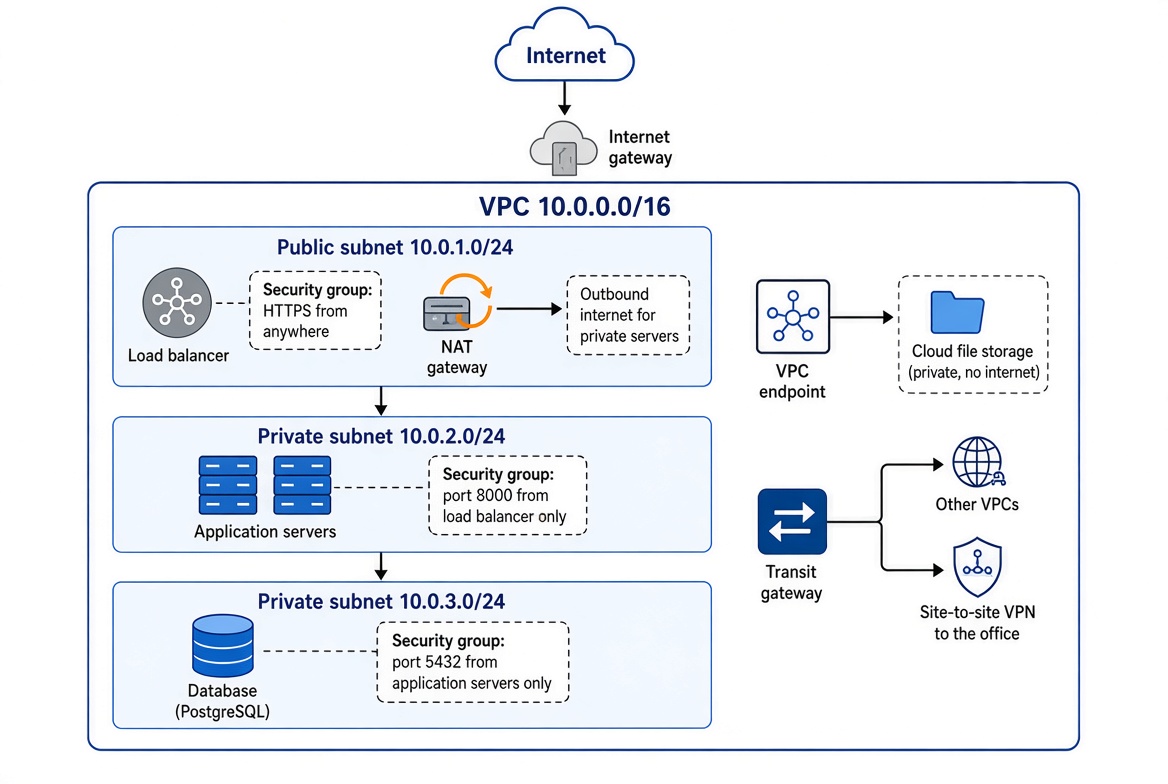
When a visitor opens the website:
- Their request arrives through the internet gateway at the load balancer in the public subnet, which its security group allows on port 443.
- The load balancer forwards the request to an application server in a private subnet. The application server’s security group accepts it, because it came from the load balancer.
- The application server queries the database in another private subnet, which accepts only connections from the application servers.
- When the application server needs to download an update, it goes out through the NAT gateway. When it stores uploaded files, it uses the VPC endpoint, so that traffic never touches the internet.
- Administrators reach the servers through the site-to-site VPN from the office, connected via the transit gateway — so no server needs SSH open to the internet.
From Physical to Cloud: A Translation Table
| Physical network | Cloud equivalent |
|---|---|
| Your office or data center network | VPC (VNet, VCN) |
| Network segments and VLANs | Subnets |
| Router and its routing table | VPC route tables |
| Connection to your internet provider | Internet gateway |
| NAT on your router | NAT gateway |
| Core router connecting many networks | Transit gateway |
| Physical firewall | Network security lists and security groups |
| Physical servers | Virtual machines (instances) |
| Network card | Virtual network interface (vNIC) |
| Dedicated hardware appliances | Virtual appliances (NFV) and managed services |
Common Cloud Networking Mistakes
- Opening SSH or remote desktop to the whole internet. A rule allowing port 22 or 3389 from
0.0.0.0/0invites constant automated attacks. Allow it only from a VPN or a specific address range. - Putting databases in public subnets. Databases almost never need to be reachable from the internet. Keep them in private subnets, reachable only from your application servers.
- Overlapping IP ranges. VPCs that use the same address range can’t be connected later. Plan your address ranges before you build.
- Forgetting a route. A NAT gateway or VPN does nothing until a route table sends traffic to it. When something can’t connect, check the route table as well as the security rules.
- Forgetting reply traffic with stateless rules. If your subnet-level rules are stateless, allow the return traffic too, or connections will fail in one direction.
- Ignoring costs. NAT gateways and data transfer are billed by the hour and by the gigabyte. VPC endpoints can reduce both.
What’s Next in This Series
Cloud networks use every concept from this series — subnets, routing, NAT, firewalls, VPNs, and more — just in virtual form. Upcoming posts in the Computer Networking for Beginners series will continue building on these foundations. If you’d like hands-on practice in the meantime, most cloud providers offer a free tier: create a small VPC with one public and one private subnet, launch a virtual server, and experiment with route tables and security rules. To learn how to set up and secure a single cloud server, see Learn VPS: From Server Basics to Your First Deployment.
Conclusion
Cloud networking takes the physical concepts you already know and makes them virtual. Clouds can be public, private, or hybrid, and services come as IaaS, PaaS, or SaaS, with the responsibility matrix deciding what you manage and what the provider manages. Virtualization and NFV turn servers, routers, switches, and firewalls into software that can be created in minutes and scaled elastically, while multi-tenancy lets many customers share the same hardware safely. A VPC gives you your own isolated network, divided into public and private subnets with route tables deciding where traffic goes. Internet gateways connect public subnets to the internet, NAT gateways let private servers reach out without being reachable, transit gateways connect many VPCs, VPNs connect your offices and users, and VPC endpoints reach cloud services privately. Finally, security lists protect entire subnets while security groups protect individual servers — and using both, with least privilege, gives you defense in depth.
Once you can map each cloud feature back to its physical counterpart, cloud networking stops looking like a new world — it’s the same network, built in software.
Next in the Computer Networking for Beginners series: Internet Protocol Explained: How Data Travels Across Networks, how TCP, UDP, ports, and sockets deliver data to the right application.
Computer Networking for Beginners series: Part 1: A Complete Guide to How Networks Work · Part 2: What Is the OSI Model? · Part 3: Networking Devices Explained · Part 4: CDNs, VPNs, QoS, and TTL · Part 5: Cloud Networking Explained · Part 6: Internet Protocol Explained · Part 7: Well-Known Port Numbers · Part 8: Protocols for Troubleshooting, Tunneling, and Security