
A Python web framework is a library that handles the repetitive parts of building a website or API (routing, requests, templates, databases, security) so you can focus on your own features.
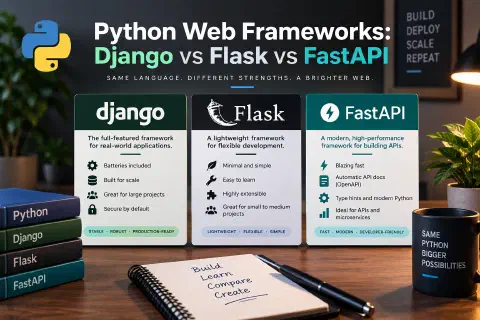
Are you looking for the best Python web framework? Here are three of the most popular are Django (full-featured), Flask (small and flexible), and FastAPI (modern and built for APIs). This guide compares them with working code, so you can pick the right one for your next project.
If you already know the Python basics, a web framework is the natural next step: it turns your scripts into something people can use in a browser.
What Does a Web Framework Do?
Without a framework, you would have to read raw HTTP requests, decide which function handles each URL, build the response, talk to a database, protect against attacks, and handle forms and logins yourself. A framework gives you tested building blocks for the common jobs:
- Routing: match a URL such as
/helloto the Python function that handles it. - Requests and responses: read query strings, form data, and JSON, and send back HTML or JSON.
- Templates: generate HTML pages from data.
- Database access: save and load data, often through an ORM. See the SQLAlchemy guide.
- Security: protections against common web attacks such as CSRF, XSS, and SQL injection.
- Extras: authentication, admin panels, validation, testing tools, and deployment support.
Frameworks differ mainly in how many of these pieces they include and how much they decide for you.
The Big Three at a Glance
| Django | Flask | FastAPI | |
|---|---|---|---|
| Style | “Batteries included” | Micro-framework | Modern API framework |
| Best for | Full websites, content sites, apps with logins and an admin | Small apps, prototypes, custom setups | JSON APIs, microservices, async work |
| Database layer | Built-in ORM and migrations | Choose your own (e.g. SQLAlchemy) | Choose your own (e.g. SQLAlchemy) |
| Admin panel | Built in | Via extensions | Not included |
| Input validation | Forms and serializers | Manual or extensions | Automatic, from Python type hints |
| Auto API docs | No (add-ons) | No (add-ons) | Yes, built in (/docs) |
| Async support | Yes (ASGI) | Limited (WSGI) | Native (ASGI) |
| Learning curve | Steeper, more to learn | Gentle | Gentle if you know type hints |
None of them is “the best”. They are built for different jobs.
The Same Endpoint in All Three
To see the difference in style, here is the same small endpoint in each framework. It answers GET /hello?name=Ana with a JSON message. I ran all three examples before putting them here.
Flask
from flask import Flask, jsonify, request

app = Flask(__name__)


@app.get("/hello")
def hello():
    name = request.args.get("name", "world")
    return jsonify(message=f"Hello, {name}!")
Save it as flask_app.py and run it:
flask --app flask_app run
Open http://127.0.0.1:5000/hello?name=Ana and you get:
{"message": "Hello, Ana!"}
Flask gives you routing and request handling, and nothing more. You add what you need. For a full walkthrough, read Python Flask: Build and Deploy Web Applications.
FastAPI
from fastapi import FastAPI

app = FastAPI()


@app.get("/hello")
def hello(name: str = "world"):
    return {"message": f"Hello, {name}!"}


@app.get("/items/{item_id}")
def read_item(item_id: int):
    return {"item_id": item_id}
Run it with the development server (install it with pip install "fastapi[standard]"):
fastapi dev fastapi_app.py
The /hello?name=Ana request returns the same JSON. FastAPI also does two things for you:
- Validation from type hints. Because
item_id: intis declared as an integer,/items/5works, while/items/abcreturns a422error that explains the input should be a valid integer. You wrote no validation code. - Automatic documentation. Open
http://127.0.0.1:8000/docsfor an interactive API page generated from your code.
Django
Django is normally used as a multi-file project, but it can run from a single file, which makes the comparison fair:
import sys

from django.conf import settings
from django.core.management import execute_from_command_line
from django.http import JsonResponse
from django.urls import path

settings.configure(
    DEBUG=True,
    SECRET_KEY="dev-only-change-me",
    ROOT_URLCONF=__name__,
    ALLOWED_HOSTS=["*"],
)


def hello(request):
    name = request.GET.get("name", "world")
    return JsonResponse({"message": f"Hello, {name}!"})


urlpatterns = [path("hello/", hello)]

if __name__ == "__main__":
    execute_from_command_line(sys.argv)
Save it as django_app.py and run:
python django_app.py runserver
Then open http://127.0.0.1:8000/hello/?name=Ana. That single file is only for learning. The SECRET_KEY and ALLOWED_HOSTS values are placeholders, and a real project should read its secrets from the environment instead of hardcoding them. See the .env file in Python projects.
A real Django project starts with two commands:
django-admin startproject mysite
python manage.py startapp blog
That creates a structure with settings.py, urls.py, wsgi.py, asgi.py, and an app folder with models.py, views.py, admin.py, and a migrations folder. The structure is more to learn up front, but it gives every Django project the same shape.
Django: The Full-Featured Choice
Django follows a “batteries included” idea. Out of the box you get:
- An ORM to work with the database using Python classes, plus migrations to change the schema safely.
- An admin panel generated from your models, so you can manage content without writing a back-office.
- User authentication, sessions, and permissions.
- Forms and validation.
- A template language for HTML pages.
- Security protections enabled by default, including CSRF protection and automatic HTML escaping in templates.
Choose Django when you are building a full website or web app with accounts, a database, and an admin, such as a blog, membership site, store, or internal tool, and you want a proven structure instead of designing your own.
The trade-off: more concepts to learn at the start, and a project layout that can feel heavy for a very small app.
Flask: Small and Flexible
Flask is a micro-framework. It gives you the core (routing, requests, templates via Jinja) and lets you choose the rest: the database library, the login system, the form tool. A large ecosystem of extensions fills the gaps when you need them.
Choose Flask when you want to learn how web apps work, build a small tool or prototype, or need full control over which pieces you use. It is also a good fit for small websites that don’t need an admin panel.
The trade-off: you make more decisions yourself, and you are responsible for adding things like authentication and form protection. Flask’s flexibility is great in the hands of someone who knows what to add, and risky if you skip the security parts.
FastAPI: Modern and Built for APIs
FastAPI is designed for building APIs. It uses Python type hints to validate input, converts data automatically, and generates interactive documentation from the same code. It runs on ASGI, so it supports async code natively, which helps with apps that wait on many network calls at once.
Choose FastAPI when you are building a JSON API for a mobile app or a JavaScript front end, a microservice, or a service that connects to machine learning models or other async work.
The trade-off: it is focused on APIs. It does not include an admin panel, a database layer, or a login system, so you assemble those yourself. It can serve HTML pages, but that isn’t what it is best at.
WSGI vs ASGI in One Minute
You will see these two terms when you deploy.
- WSGI is the older standard for connecting Python web apps to servers. It handles one request per worker at a time. Flask is a WSGI framework, and Django supports it too.
- ASGI is the newer standard that adds async support. FastAPI is built on it, and Django also supports it.
In production you run your app behind an application server: Gunicorn is common for WSGI apps and Uvicorn for ASGI apps, usually behind a web server like Nginx. That is also where Docker and a VPS come in. Putting Cloudflare in front adds caching and basic protection.
Other Python Web Frameworks Worth Knowing
The big three cover most projects, but there are others you may run into:
- Pyramid: flexible and scalable, between Flask and Django in size.
- Tornado: an older async framework and server, often used for long-lived connections.
- Sanic: an async framework focused on speed.
- Litestar: a newer async framework with a feature set similar to FastAPI.
- Bottle: a tiny single-file micro-framework.
Learn one of the big three first. The concepts (routes, requests, templates, databases) transfer to all the others.
How to Choose
| Your situation | A good starting point |
|---|---|
| New to web development and want to learn the fundamentals | Flask |
| Building a full site with users, content, and an admin | Django |
| Building an API for a mobile app or JavaScript front end | FastAPI |
| Making a quick prototype or internal tool | Flask or FastAPI |
| Handling many concurrent network requests | FastAPI |
| Want the most built-in features and conventions | Django |
| Need to follow a data science or ML workflow with an API | FastAPI |
Two honest notes about the decision:
- Speed rarely decides it. FastAPI is often faster for many simultaneous I/O-bound requests, but for most sites the database and the way you query it matter much more than the framework. If a page is slow, look at your SQL queries first.
- You can switch later. Business logic written in plain Python moves between frameworks far more easily than you might expect. Pick one, ship something, and learn from it.
Security Is Part of the Choice
All three can be used to build secure applications, but they start from different places. Django ships with many protections turned on. With Flask and FastAPI you add them: password hashing, CSRF protection for forms, input validation, and careful handling of secrets. Whatever you use:
- Use the ORM or parameterized queries so user input never gets pasted into SQL. See SQL injection.
- Keep secrets such as the Django
SECRET_KEY, API keys, and database passwords out of your code, in a .env file that is not committed to Git. - Offer two-factor authentication or passkeys for accounts that matter.
- Never run with
DEBUG=Truein production. - Keep the framework and your packages updated.
Your First Steps
- Set up a clean environment. Create a virtual environment, or use the faster uv package manager.
- Install one framework with
pip install flask,pip install django, orpip install "fastapi[standard]". - Build the hello endpoint from this guide and run it.
- Add a database. Try SQLAlchemy with Flask or FastAPI, or Django’s ORM. If you want a real database, run MySQL in Docker.
- Build one small project end to end, such as a to-do list or a notes app, and deploy it.
For ideas about what else Python can do, see Python for Everything: 10 Libraries Every Beginner Should Know.
Frequently Asked Questions
Which Python web framework should a beginner learn first?
Flask is the easiest place to start because it is small and shows you how web apps work. If your goal is a full website with users and an admin panel, Django is also a good first framework, with more to learn up front.
Is Django or Flask better?
Neither is better in general. Django is better when you want built-in features like an ORM, admin panel, and authentication. Flask is better when you want a small, flexible app and prefer to choose your own tools.
Is FastAPI better than Flask?
For building APIs, many developers prefer FastAPI because of its automatic validation, documentation, and async support. Flask is still a great choice for small web apps and for learning. They solve overlapping but different problems.
Can I build a full website with FastAPI?
You can serve HTML pages with it, but FastAPI is designed around APIs. For a content-heavy site with logins and an admin, Django usually saves more time.
Is Python good for web development?
Yes. Python is widely used for websites and APIs, has mature frameworks, and is easy to read. It also connects well to data analysis and machine learning work.
Do I need to learn JavaScript too?
For interactive pages in the browser, yes. A Python framework runs on the server, and JavaScript runs in the browser. You can build useful server-rendered sites with Python alone and add JavaScript when you need interactivity.
How do I deploy a Python web app?
Run it with a production application server (Gunicorn for WSGI, Uvicorn for ASGI), put it behind Nginx or a similar web server, and host it on a VPS, a container platform, or a managed hosting service. Start with the VPS guide.
Conclusion
Django, Flask, and FastAPI are all excellent, and the right one depends on what you are building. Choose Django for full websites with accounts and an admin, Flask for small apps and learning the fundamentals, and FastAPI for modern APIs with automatic validation and documentation.
Don’t spend weeks comparing. Install one, build the small endpoint from this guide, and then build something real. The skills you gain (routing, requests, databases, security, deployment) carry over to every other framework you learn later.