
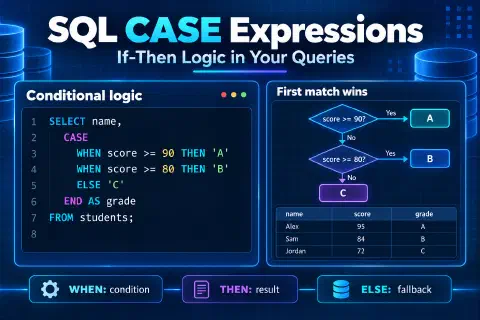
A CASE expression adds if-then-else logic to SQL. It checks conditions in order and returns the value for the first one that’s true, or the ELSE value if none are. You can use it anywhere a value is allowed: to label rows, sort in a custom order, count by condition, or update different rows differently.
Real questions rarely fit the data exactly as it’s stored. You want “Premium” instead of a price, “In progress” instead of a status code, or a count of shipped orders next to pending ones. CASE is how SQL does that translation, and it’s one of the most useful tools in this Learn SQL series.
The examples use the series’ sample database: download shop.sql and load it as shown in Part 1. Everything was tested on PostgreSQL, MySQL, SQL Server, and SQLite.
The Two Forms of CASE
Searched CASE (the Flexible One)
Each WHEN has its own condition, so you can use any comparison:
SELECT name, price,
       CASE
           WHEN price >= 500 THEN 'Premium'
           WHEN price >= 100 THEN 'Mid-range'
           ELSE 'Budget'
       END AS price_tier
FROM products
ORDER BY price DESC;
     name     | price  | price_tier
--------------+--------+------------
 Laptop       | 899.00 | Premium
 Desk         | 320.00 | Mid-range
 Monitor      | 249.00 | Mid-range
 Office Chair | 180.00 | Mid-range
 Keyboard     |  45.00 | Budget
 Mouse        |  25.00 | Budget
Every CASE ends with END, and AS price_tier names the new column.
Simple CASE (the Shorthand)
When you’re comparing one column with several exact values, list the column once:
SELECT order_id, status,
       CASE status
           WHEN 'shipped'  THEN 'Done'
           WHEN 'pending'  THEN 'In progress'
           WHEN 'returned' THEN 'Refund'
           ELSE 'Other'
       END AS status_group
FROM orders
WHERE order_id BETWEEN 104 AND 112
ORDER BY order_id;
 order_id |  status   | status_group
----------+-----------+--------------
      104 | shipped   | Done
      105 | shipped   | Done
      106 | returned  | Refund
      107 | shipped   | Done
      108 | pending   | In progress
      109 | shipped   | Done
      110 | shipped   | Done
      111 | cancelled | Other
      112 | pending   | In progress
The simple form only checks equality. For ranges, IS NULL, or conditions on several columns, use the searched form.
How CASE Decides: Order Matters
CASE checks the WHEN conditions from top to bottom and stops at the first true one. That makes the order of conditions important. Swap the two tiers from the first example:
SELECT name, price,
       CASE
           WHEN price >= 100 THEN 'Mid-range'
           WHEN price >= 500 THEN 'Premium'
           ELSE 'Budget'
       END AS wrong_tier
FROM products
WHERE product_id = 1;
  name  | price  | wrong_tier
--------+--------+------------
 Laptop | 899.00 | Mid-range
The laptop is “Mid-range” because 899 is already >= 100, so the second condition is never reached. Put the most specific (or highest) conditions first.
Without ELSE, You Get NULL
If no condition matches and there’s no ELSE, CASE returns NULL:
SELECT order_id, status,
       CASE WHEN status = 'shipped' THEN 'Done' END AS no_else
FROM orders
WHERE order_id IN (101, 108);
 order_id | status  | no_else
----------+---------+---------
      101 | shipped | Done
      108 | pending |
Add an ELSE whenever a blank result would be confusing.
Every Result Should Be the Same Type
All THEN and ELSE values should be the same kind of data. Mixing text and numbers fails in some databases:
SELECT name, CASE WHEN price >= 500 THEN 'Premium' ELSE 0 END FROM products;
PostgreSQL stops with invalid input syntax for type integer: "Premium", and SQL Server with Conversion failed when converting the varchar value 'Premium' to data type int. MySQL and SQLite quietly return a mix of 'Premium' and 0, which is worse, because the mistake goes unnoticed. Use ELSE 'Standard' (text) instead.
CASE with NULL Values
Check for missing values with WHEN column IS NULL in the searched form:
SELECT first_name,
       CASE WHEN email IS NULL THEN 'Missing' ELSE 'On file' END AS email_status,
       COALESCE(city, 'Unknown') AS city
FROM customers
WHERE customer_id IN (4, 7)
ORDER BY customer_id;
 first_name | email_status |  city
------------+--------------+---------
 Daniel     | Missing      | Yuma
 Laura      | On file      | Unknown
Don’t write the simple form CASE email WHEN NULL THEN ...; it compares with =, which never matches NULL. For a plain “use this value if it’s missing,” COALESCE is shorter. NULL in SQL explains why.
Custom Sort Orders
ORDER BY sorts alphabetically or numerically, but business order is often different. Show orders that need attention first: pending, then returned, then cancelled, then everything else:
SELECT order_id, status, order_date
FROM orders
ORDER BY CASE status
             WHEN 'pending'   THEN 1
             WHEN 'returned'  THEN 2
             WHEN 'cancelled' THEN 3
             ELSE 4
         END,
         order_date
LIMIT 6;
 order_id |  status   | order_date
----------+-----------+------------
      108 | pending   | 2025-09-22
      112 | pending   | 2025-11-02
      106 | returned  | 2025-09-07
      111 | cancelled | 2025-10-21
      101 | shipped   | 2025-08-02
      102 | shipped   | 2025-08-05
The CASE turns each status into a priority number, and the date breaks ties. (In SQL Server, use SELECT TOP 6 instead of LIMIT 6.)
Conditional Counts and Totals
Putting CASE inside SUM or COUNT lets one query produce several totals side by side, like a small pivot table. Orders by state, broken down by status:
SELECT c.state,
       COUNT(*) AS orders,
       SUM(CASE WHEN o.status = 'shipped' THEN 1 ELSE 0 END) AS shipped,
       SUM(CASE WHEN o.status = 'pending' THEN 1 ELSE 0 END) AS pending,
       SUM(CASE WHEN o.status IN ('returned', 'cancelled') THEN 1 ELSE 0 END) AS problems
FROM orders o
JOIN customers c ON c.customer_id = o.customer_id
GROUP BY c.state
ORDER BY c.state;
 state | orders | shipped | pending | problems
-------+--------+---------+---------+----------
 AZ    |      3 |       2 |       1 |        0
 CA    |      8 |       5 |       1 |        2
 NV    |      1 |       1 |       0 |        0
Each CASE returns 1 for rows that match and 0 for the rest, so SUM counts the matches. This pattern works in every database and is covered further in SQL Aggregate Functions. For more on combining tables, see SQL JOINs Explained.
Calculations That Depend on a Condition
CASE can return numbers for further math. Give a 5% discount on orders worth $1,000 or more:
SELECT o.order_id, p.name, o.quantity, p.price,
       o.quantity * p.price AS subtotal,
       CASE WHEN o.quantity * p.price >= 1000 THEN 0.05 ELSE 0 END AS discount_rate
FROM orders o
JOIN products p ON p.product_id = o.product_id
WHERE o.order_id IN (101, 102, 109)
ORDER BY o.order_id;
 order_id |  name  | quantity | price  | subtotal | discount_rate
----------+--------+----------+--------+----------+---------------
      101 | Laptop |        1 | 899.00 |   899.00 |             0
      102 | Mouse  |        3 |  25.00 |    75.00 |             0
      109 | Laptop |        2 | 899.00 |  1798.00 |          0.05
You could then multiply: subtotal * (1 - discount_rate).
CASE in UPDATE: Different Changes in One Statement
Raise electronics by 5% and accessories by 10%, and leave everything else alone, in a single UPDATE:
BEGIN;

UPDATE products
SET price = CASE category
                WHEN 'Electronics' THEN price * 1.05
                WHEN 'Accessories' THEN price * 1.10
                ELSE price
            END;

SELECT name, category, price FROM products ORDER BY product_id;
     name     |  category   | price
--------------+-------------+--------
 Laptop       | Electronics | 943.95
 Monitor      | Electronics | 261.45
 Keyboard     | Accessories |  49.50
 Mouse        | Accessories |  27.50
 Desk         | Furniture   | 320.00
 Office Chair | Furniture   | 180.00
ROLLBACK; -- undo, since this is just practice
The ELSE price is essential: without it, every furniture price would become NULL. The transaction lets you check the result before keeping it; see INSERT, UPDATE, and DELETE.
CASE in WHERE? Usually Not Needed
You can use CASE in a WHERE clause, but plain AND and OR are almost always clearer and let the database use indexes:
-- Instead of a CASE in WHERE...
SELECT customer_id, first_name
FROM customers
WHERE (state = 'CA' AND city = 'San Diego') OR state = 'AZ'
ORDER BY customer_id;
Save CASE for when you need to produce a value, not just filter.
Shortcuts in Some Databases
| Database | Two-way shortcut | Example |
|---|---|---|
| SQL Server, SQLite (3.32+) | IIF(condition, if_true, if_false) | IIF(price >= 500, 'Premium', 'Standard') |
| MySQL | IF(condition, if_true, if_false) | IF(price >= 500, 'Premium', 'Standard') |
| All | CASE WHEN ... THEN ... ELSE ... END | Works everywhere |
CASE is standard SQL and portable; prefer it unless you’re sure the query will only ever run on one database.
Common Mistakes to Avoid
- Putting broad conditions before narrow ones, so later
WHENs never run. - Forgetting
ELSE, and getting unexpected NULLs. - Forgetting
ELSE columnin anUPDATE, which wipes the values of rows that didn’t match. - Mixing data types across
THENandELSE. - Using
CASE column WHEN NULL, which never matches. - Forgetting
END, the most common syntax error. - Repeating the same long
CASEin several places. Calculate it once in a subquery or CTE and reuse it.
Frequently Asked Questions
What is a CASE statement in SQL?
It’s an expression that returns different values depending on conditions, like if-then-else in other languages. Strictly speaking it’s a CASE expression, because it produces a value rather than controlling program flow.
Can I use CASE in a WHERE clause?
Yes, but AND/OR conditions are usually simpler and faster. Use CASE in SELECT, ORDER BY, GROUP BY, aggregate functions, and UPDATE ... SET.
Can CASE have multiple conditions?
Yes. Each WHEN can combine conditions with AND and OR, as in WHEN state = 'CA' AND quantity > 3 THEN ..., and you can have as many WHEN branches as you need.
Can I nest CASE expressions?
Yes, a THEN or ELSE can contain another CASE. If nesting gets deep, a lookup table joined to your data is often easier to maintain.
What’s the difference between CASE and IF in SQL?
CASE is standard SQL and works in every database. IF() (MySQL) and IIF() (SQL Server, SQLite) are shorter two-way versions that only work in those databases.
Conclusion
CASE brings if-then-else logic into SQL. Use the searched form for any condition and the simple form for exact matches, order your WHENs from most to least specific, include an ELSE, and keep every result the same type. With it, you can label data, sort by business priority, build conditional counts, and update different rows in different ways, all in a single query.
Next in the Learn SQL series, you’ll learn to nest queries inside queries with Mastering SQL Subqueries.