
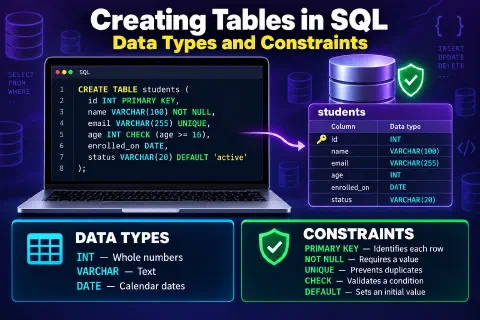
CREATE TABLE defines a new table: its name, each column’s name and data type, and the constraints that keep the data valid, such as PRIMARY KEY, FOREIGN KEY, NOT NULL, UNIQUE, CHECK, and DEFAULT. Choosing the right types and constraints up front stops bad data before it gets in.
So far in the Learn SQL series, you’ve queried tables that already existed. This part shows how to build your own. You’ll add a reviews table to the series’ sample database, choose sensible data types, use constraints to enforce your business rules, and change the table later with ALTER TABLE.
If you haven’t set up the sample database, download shop.sql and load it as shown in Part 1. Reloading the file also removes the reviews table, so you can always start over. Every example was tested on PostgreSQL, MySQL, SQL Server, and SQLite.
The CREATE TABLE Statement
The basic shape:
CREATE TABLE table_name (
    column_name  DATA_TYPE  constraints,
    column_name  DATA_TYPE  constraints,
    ...
    table_constraints
);
Each column needs a name and a data type. Constraints can go next to a column or, for rules involving several columns, at the end.
Planning comes first: which tables you need, which columns belong where, and how they relate. Database Design: A Beginner’s Guide covers that thinking; this guide covers the SQL to build it.
Choosing Data Types
A column’s data type decides what it can store, how much space it uses, and how it sorts and compares. The names vary a little between databases:
| What you’re storing | PostgreSQL | MySQL | SQL Server | SQLite |
|---|---|---|---|---|
| Whole numbers | INT, BIGINT | INT, BIGINT | INT, BIGINT | INTEGER |
| Exact decimals (money) | NUMERIC(10,2) / DECIMAL(10,2) | DECIMAL(10,2) | DECIMAL(10,2) | NUMERIC |
| Approximate decimals | REAL, DOUBLE PRECISION | FLOAT, DOUBLE | REAL, FLOAT | REAL |
| Short text with a limit | VARCHAR(100) | VARCHAR(100) | VARCHAR(100) / NVARCHAR(100) | TEXT |
| Long text | TEXT | TEXT | VARCHAR(MAX) | TEXT |
| Fixed-length codes | CHAR(2) | CHAR(2) | CHAR(2) | TEXT |
| Date | DATE | DATE | DATE | TEXT (ISO format) |
| Date and time | TIMESTAMP / TIMESTAMPTZ | DATETIME / TIMESTAMP | DATETIME2 | TEXT (ISO format) |
| True / false | BOOLEAN | BOOLEAN (stored as 0/1) | BIT | INTEGER (0/1) |
A few rules of thumb:
Use
DECIMALfor money, neverFLOATorREAL. Floating-point types store approximations:SELECT 0.1::float + 0.2::float AS float_sum, 0.1::numeric + 0.2::numeric AS decimal_sum;float_sum | decimal_sum ---------------------+------------- 0.30000000000000004 | 0.3MySQL gives the same result. A tiny error like this, repeated over thousands of invoices, adds up.
DECIMAL(10,2)means up to 10 digits in total, 2 of them after the decimal point, so values up to 99,999,999.99.Pick the smallest type that safely fits.
INThandles values up to about 2.1 billion; useBIGINTfor IDs that could grow past that.Store dates as dates, not text, so they sort, compare, and calculate correctly. See SQL Date Functions.
SQL Server: use
NVARCHARfor text that may include accents or other non-English characters.SQLite is flexible about types and, by default, doesn’t enforce them. See What Is SQLite? for its
STRICTtables.
Constraints: Rules the Database Enforces
Constraints are the database’s quality control. Every insert and update has to pass them, no matter which application or person runs it.
| Constraint | What it guarantees |
|---|---|
NOT NULL | The column always has a value |
DEFAULT | A value is filled in when none is given |
PRIMARY KEY | Each row has a unique, non-NULL identifier |
UNIQUE | No two rows share the same value (or combination of values) |
CHECK | Values pass a condition you define |
FOREIGN KEY | Values match a row in another table |
Example: A Product Reviews Table
Let’s add a table for customer reviews. The business rules:
- Each review gets an ID automatically.
- It must belong to a real product and a real customer.
- The rating must be between 1 and 5.
- A customer can review each product only once.
- The comment is optional.
- New reviews are unverified by default, and the creation time is recorded automatically.
- If a customer is deleted, their reviews go too.
Here it is in PostgreSQL:
CREATE TABLE reviews (
    review_id   INT GENERATED ALWAYS AS IDENTITY PRIMARY KEY,
    product_id  INT NOT NULL,
    customer_id INT NOT NULL,
    rating      INT NOT NULL CHECK (rating BETWEEN 1 AND 5),
    comment     VARCHAR(500),
    is_verified BOOLEAN NOT NULL DEFAULT FALSE,
    created_at  TIMESTAMP NOT NULL DEFAULT CURRENT_TIMESTAMP,
    UNIQUE (product_id, customer_id),
    FOREIGN KEY (product_id)  REFERENCES products (product_id),
    FOREIGN KEY (customer_id) REFERENCES customers (customer_id) ON DELETE CASCADE
);
Every business rule became a line of SQL. Now add some reviews, leaving out the ID and the creation time so the database fills them in:
INSERT INTO reviews (product_id, customer_id, rating, comment, is_verified) VALUES
    (1, 1, 5, 'Fast and reliable.', TRUE),
    (4, 2, 4, 'Good value.', TRUE),
    (6, 7, 3, NULL, FALSE);

SELECT review_id, product_id, customer_id, rating, comment, is_verified FROM reviews;
 review_id | product_id | customer_id | rating |      comment       | is_verified
-----------+------------+-------------+--------+--------------------+-------------
         1 |          1 |           1 |      5 | Fast and reliable. | t
         2 |          4 |           2 |      4 | Good value.        | t
         3 |          6 |           7 |      3 |                    | f
PostgreSQL shows booleans as t and f; MySQL, SQL Server, and SQLite show 1 and 0.
The Same Table in Other Databases
Only the auto-generated ID, the boolean, and the timestamp types change:
| Part | PostgreSQL | MySQL | SQL Server | SQLite |
|---|---|---|---|---|
| Auto ID | INT GENERATED ALWAYS AS IDENTITY PRIMARY KEY | INT AUTO_INCREMENT PRIMARY KEY | INT IDENTITY(1,1) PRIMARY KEY | INTEGER PRIMARY KEY |
| Boolean | BOOLEAN ... DEFAULT FALSE | BOOLEAN ... DEFAULT FALSE | BIT ... DEFAULT 0 | BOOLEAN ... DEFAULT FALSE |
| Timestamp | TIMESTAMP | TIMESTAMP | DATETIME2 | TIMESTAMP |
The constraints are written the same way in all four. In SQLite, remember to run PRAGMA foreign_keys = ON first, or the foreign keys won’t be enforced.
Constraints in Action
Each constraint blocks a specific mistake. These are PostgreSQL’s messages; the other databases block the same inserts with different wording.
CHECK: a rating of 6.
INSERT INTO reviews (product_id, customer_id, rating) VALUES (2, 5, 6);
ERROR: new row for relation "reviews" violates check constraint "reviews_rating_check"
UNIQUE: a second review of the same product by the same customer.
INSERT INTO reviews (product_id, customer_id, rating) VALUES (1, 1, 4);
ERROR:  duplicate key value violates unique constraint "reviews_product_id_customer_id_key"
DETAIL:  Key (product_id, customer_id)=(1, 1) already exists.
FOREIGN KEY: a product that doesn’t exist.
INSERT INTO reviews (product_id, customer_id, rating) VALUES (42, 5, 4);
ERROR:  insert or update on table "reviews" violates foreign key constraint "reviews_product_id_fkey"
DETAIL:  Key (product_id)=(42) is not present in table "products".
Identity: a hand-typed ID. With GENERATED ALWAYS, PostgreSQL refuses IDs you supply yourself, so the sequence can’t get out of sync:
ERROR: cannot insert a non-DEFAULT value into column "review_id"
ON DELETE: What Happens to Related Rows
ON DELETE CASCADE on the customer foreign key means deleting a customer also deletes their reviews. Laura (customer 7) has a review but no orders, so she can be deleted:
DELETE FROM customers WHERE customer_id = 7;

SELECT review_id, customer_id FROM reviews;
 review_id | customer_id
-----------+-------------
         1 |           1
         2 |           2
Her review is gone automatically. The options:
| Option | When the parent row is deleted |
|---|---|
(none) / NO ACTION / RESTRICT | The delete is blocked while related rows exist (the default) |
CASCADE | Related rows are deleted too |
SET NULL | The foreign key column in related rows is set to NULL |
Use CASCADE only for data that has no meaning without its parent, like reviews or order line items. For orders and invoices, the default, which blocks the delete, is safer.
Changing a Table with ALTER TABLE
Tables evolve. ALTER TABLE changes their structure without losing data.
Add a column. Existing rows get the default value:
ALTER TABLE reviews ADD COLUMN helpful_votes INT NOT NULL DEFAULT 0;
 review_id | helpful_votes
-----------+---------------
         1 |             0
         2 |             0
Rename a column:
ALTER TABLE reviews RENAME COLUMN comment TO review_text;
Add a constraint to an existing table, for example making customer emails unique:
ALTER TABLE customers ADD CONSTRAINT customers_email_unique UNIQUE (email);
This fails if the table already contains duplicates, so clean the data first.
Remove a column:
ALTER TABLE reviews DROP COLUMN helpful_votes;
The syntax differs in a few places:
| Task | PostgreSQL, MySQL, SQLite | SQL Server |
|---|---|---|
| Add a column | ALTER TABLE t ADD COLUMN c INT | ALTER TABLE t ADD c INT |
| Rename a column | ALTER TABLE t RENAME COLUMN a TO b | EXEC sp_rename 't.a', 'b', 'COLUMN' |
| Drop a column | ALTER TABLE t DROP COLUMN c (SQLite 3.35+) | ALTER TABLE t DROP COLUMN c |
Renaming or dropping a column breaks any query, report, or application that uses the old name. Search for uses before changing a live table.
Removing and Copying Tables
Delete a table and all its data:
DROP TABLE IF EXISTS reviews;
IF EXISTS avoids an error when the table isn’t there. A table that other tables reference with foreign keys can’t be dropped until those references are removed.
Create a table from a query:
CREATE TABLE ca_customers AS
SELECT customer_id, first_name, last_name, city
FROM customers
WHERE state = 'CA';
This copies the columns and rows (four California customers here) but not the constraints, so it’s best for quick analysis copies, not permanent tables. In SQL Server, write SELECT ... INTO ca_customers FROM customers WHERE state = 'CA';.
Viewing a Table’s Structure
| Tool | Command |
|---|---|
PostgreSQL (psql) | \d reviews |
| MySQL | DESCRIBE reviews; or SHOW CREATE TABLE reviews; |
| SQL Server | EXEC sp_help 'reviews'; |
| SQLite | .schema reviews |
| Any (standard) | SELECT * FROM information_schema.columns WHERE table_name = 'reviews'; (not SQLite) |
Naming and Design Tips
- Be consistent. Pick lowercase
snake_case(likeorder_date) and plural or singular table names, and stick to it. - Avoid spaces and reserved words such as
order,user, ordateas names; they need quoting everywhere. - Name keys clearly:
customer_idin both thecustomerstable and the tables that reference it makes joins obvious. - Make columns
NOT NULLunless there’s a real reason a value can be missing. Optional data is fine, but it should be a decision. - Put rules in the database, not just the application. A
CHECKorUNIQUEconstraint protects the data no matter how it’s inserted. - Name your constraints (
CONSTRAINT customers_email_unique UNIQUE (email)) so error messages and later changes are easier to work with.
Common Mistakes to Avoid
- Storing money in
FLOAT. - Storing dates or numbers as text, which sorts wrongly (
'10' < '9') and allows invalid values. - Skipping the primary key. Every table should have one.
- Forgetting foreign keys, which lets orphaned rows creep in.
- Using
ON DELETE CASCADEeverywhere, which can delete far more than you expected. - Making a
VARCHARtoo short for real data, such as long names or email addresses. - Writing inline
REFERENCESin MySQL. MySQL ignores aREFERENCESclause written next to a column; use a separateFOREIGN KEY (...) REFERENCES ...line, as in the examples above.
Frequently Asked Questions
What’s the difference between a primary key and a unique constraint?
Both prevent duplicates. A table has only one primary key, and it can never be NULL; it’s the row’s main identifier. A table can have many unique constraints, and most databases allow NULLs in them.
Should I use VARCHAR or TEXT?
Use VARCHAR(n) when there’s a sensible maximum length, like a name or email, so the database enforces it. Use TEXT for long or unpredictable content, like comments. In PostgreSQL, they perform the same.
What’s the difference between CHAR and VARCHAR?
CHAR(n) always stores exactly n characters, padding with spaces, which suits fixed codes like state abbreviations. VARCHAR(n) stores up to n characters without padding.
How do I create an auto-increment ID?
Use GENERATED ALWAYS AS IDENTITY in PostgreSQL, AUTO_INCREMENT in MySQL, IDENTITY(1,1) in SQL Server, or INTEGER PRIMARY KEY in SQLite.
Can I change a column’s data type later?
Yes, with ALTER TABLE ... ALTER COLUMN (PostgreSQL and SQL Server) or MODIFY COLUMN (MySQL), as long as the existing data can be converted. SQLite requires rebuilding the table. On large tables, test first; the change can take time and lock the table.
Conclusion
CREATE TABLE turns your data plan into a structure the database enforces. Choose data types that match the data, especially DECIMAL for money and DATE for dates, and use constraints to encode your rules: primary keys for identity, foreign keys for relationships, NOT NULL, UNIQUE, and CHECK for validity, and DEFAULT for sensible starting values.
Build the reviews table in your sample database and try to break each rule. Next in the series, you’ll fill tables with data and change it safely with INSERT, UPDATE, and DELETE.