
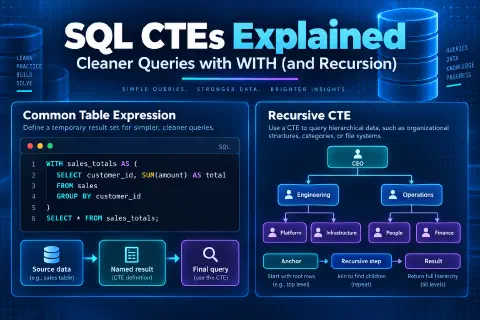
A common table expression (CTE) is a named, temporary result set that you define with WITH at the start of a query and then use like a table. CTEs break complicated queries into readable steps, and recursive CTEs can generate sequences, like a list of months, or walk through hierarchies, like categories and subcategories.
As queries grow, subqueries nested inside subqueries become hard to read and harder to fix. A CTE lets you write the same logic top to bottom: first calculate this, then that, then show the result. Most analysts who learn CTEs use them every day.
This part of the Learn SQL series builds on subqueries. The examples use the series’ sample database: download shop.sql and load it as shown in Part 1. Everything was tested on PostgreSQL, MySQL 8, SQL Server, and SQLite.
CTE Syntax
WITH cte_name AS (
    SELECT ...          -- any query
)
SELECT ...
FROM cte_name;          -- use it like a table
The CTE exists only while this one statement runs. It isn’t saved in the database.
Your First CTE
Which customers have spent more than $500 on shipped orders? First calculate each customer’s total, then filter and add their names:
WITH customer_totals AS (
    SELECT o.customer_id,
           COUNT(*)                  AS orders,
           SUM(o.quantity * p.price) AS total_spent
    FROM orders o
    JOIN products p ON p.product_id = o.product_id
    WHERE o.status = 'shipped'
    GROUP BY o.customer_id
)
SELECT c.first_name, c.last_name, t.orders, t.total_spent
FROM customer_totals t
JOIN customers c ON c.customer_id = t.customer_id
WHERE t.total_spent > 500
ORDER BY t.total_spent DESC;
 first_name | last_name | orders | total_spent
------------+-----------+--------+-------------
 Omar       | Haddad    |      1 |     1798.00
 Maria      | Lopez     |      2 |      989.00
 Kevin      | Patel     |      1 |      720.00
 Sofia      | Nguyen    |      2 |      569.00
The same result is possible with a subquery in FROM, but the CTE version reads in order: the totals are defined first, with a name that says what they are, and the final SELECT stays short.
Chaining Several CTEs
You can define several CTEs, separated by commas, and each can use the ones before it. Which customers spent more than the average customer?
WITH order_values AS (
    SELECT o.order_id, o.customer_id, o.quantity * p.price AS order_value
    FROM orders o
    JOIN products p ON p.product_id = o.product_id
    WHERE o.status = 'shipped'
),
customer_totals AS (
    SELECT customer_id, SUM(order_value) AS total_spent
    FROM order_values
    GROUP BY customer_id
),
average AS (
    SELECT AVG(total_spent) AS avg_spent FROM customer_totals
)
SELECT c.first_name, t.total_spent, ROUND(a.avg_spent, 2) AS avg_spent
FROM customer_totals t
JOIN customers c ON c.customer_id = t.customer_id
CROSS JOIN average a
WHERE t.total_spent > a.avg_spent
ORDER BY t.total_spent DESC;
 first_name | total_spent | avg_spent
------------+-------------+-----------
 Omar       |     1798.00 |    774.83
 Maria      |      989.00 |    774.83
Each step does one job: calculate order values, total them per customer, find the average, then compare. To debug, you can run the query up to any step by replacing the final SELECT with SELECT * FROM order_values, for example. That’s much harder with nested subqueries.
Note that there’s only one WITH; the following CTEs are just separated by commas.
CTE vs. Subquery vs. View vs. Temporary Table
| Option | Lifetime | Reusable in other queries? | Best for |
|---|---|---|---|
| Subquery | One spot in one query | No | Small, simple steps |
| CTE | One statement | No | Breaking a query into readable steps; recursion |
| View | Permanent (until dropped) | Yes | Logic that many queries or users need |
| Temporary table | The session | Yes, within the session | Large intermediate results reused several times |
In most databases, a CTE performs about the same as the equivalent subquery; choose it for readability. If the same CTE logic shows up in many queries, it’s a good candidate for a view.
Recursive CTEs
A recursive CTE refers to itself. It has two parts joined by UNION ALL:
- An anchor query that produces the starting rows.
- A recursive query that builds new rows from the previous ones, until it produces none.
The simplest example counts from 1 to 5:
WITH RECURSIVE numbers AS (
    SELECT 1 AS n                              -- anchor: start at 1
    UNION ALL
    SELECT n + 1 FROM numbers WHERE n < 5      -- recursive step: add 1 until 5
)
SELECT n FROM numbers;
 n
---
 1
 2
 3
 4
 5
The WHERE n < 5 is the stop condition. Without it, the query would try to run forever.
| Database | Keyword |
|---|---|
| PostgreSQL, MySQL 8+, SQLite | WITH RECURSIVE |
| SQL Server | WITH (the word RECURSIVE isn’t allowed) |
Practical Example: Fill In Missing Months
A plain GROUP BY month only shows months that have orders. A report usually needs every month, including the empty ones. Generate the months with a recursive CTE, then LEFT JOIN the orders:
WITH RECURSIVE months AS (
    SELECT DATE '2025-08-01' AS month_start
    UNION ALL
    SELECT CAST(month_start + INTERVAL '1 month' AS DATE)
    FROM months
    WHERE month_start < DATE '2025-12-01'
)
SELECT m.month_start, COUNT(o.order_id) AS orders
FROM months m
LEFT JOIN orders o
       ON o.order_date >= m.month_start
      AND o.order_date <  CAST(m.month_start + INTERVAL '1 month' AS DATE)
GROUP BY m.month_start
ORDER BY m.month_start;
 month_start | orders
-------------+--------
 2025-08-01  |      4
 2025-09-01  |      4
 2025-10-01  |      3
 2025-11-01  |      1
 2025-12-01  |      0
December appears with 0 orders instead of disappearing. Only the “add one month” part changes between databases:
| Database | Next month |
|---|---|
| PostgreSQL | CAST(month_start + INTERVAL '1 month' AS DATE) |
| MySQL | month_start + INTERVAL 1 MONTH |
| SQL Server | DATEADD(MONTH, 1, month_start) |
| SQLite | date(month_start, '+1 month') |
All four return the same five rows. SQL Date Functions covers date math in more detail.
Practical Example: Walk a Category Tree
Hierarchies, such as categories with subcategories, employees and managers, or folders inside folders, are stored with a column that points to the parent row. A recursive CTE can follow those links to any depth. Create a small categories table to try it:
CREATE TABLE categories (
    category_id INT PRIMARY KEY,
    name        VARCHAR(50) NOT NULL,
    parent_id   INT,
    FOREIGN KEY (parent_id) REFERENCES categories (category_id)
);

INSERT INTO categories VALUES
    (1, 'All Products',  NULL),
    (2, 'Electronics',   1),
    (3, 'Computers',     2),
    (4, 'Laptops',       3),
    (5, 'Monitors',      2),
    (6, 'Furniture',     1),
    (7, 'Office Chairs', 6);
Start at the top category (no parent), then repeatedly join each category’s children:
WITH RECURSIVE tree AS (
    SELECT category_id, name, parent_id, 0 AS depth,
           CAST(name AS VARCHAR(200)) AS path
    FROM categories
    WHERE parent_id IS NULL
    UNION ALL
    SELECT c.category_id, c.name, c.parent_id, t.depth + 1,
           CAST(t.path || ' > ' || c.name AS VARCHAR(200))
    FROM categories c
    JOIN tree t ON c.parent_id = t.category_id
)
SELECT depth, path FROM tree ORDER BY path;
 depth |                       path
-------+--------------------------------------------------
     0 | All Products
     1 | All Products > Electronics
     2 | All Products > Electronics > Computers
     3 | All Products > Electronics > Computers > Laptops
     2 | All Products > Electronics > Monitors
     1 | All Products > Furniture
     2 | All Products > Furniture > Office Chairs
The CAST keeps the path column’s type the same in both parts of the UNION ALL, which some databases require. To join text, MySQL uses CONCAT(t.path, ' > ', c.name) and SQL Server uses t.path + ' > ' + c.name; the rest is the same. Drop the practice table afterward with DROP TABLE categories;.
Recursion Limits
A recursive CTE with a missing or wrong stop condition can loop forever, so most databases set a limit:
| Database | Default limit | How to change it |
|---|---|---|
| SQL Server | 100 levels | OPTION (MAXRECURSION 1000) at the end of the query (0 means no limit) |
| MySQL | 1,000 levels | SET SESSION cte_max_recursion_depth = 5000; |
| PostgreSQL, SQLite | No limit | Make sure your stop condition is correct |
Hitting the limit gives an error such as SQL Server’s The maximum recursion 100 has been exhausted before statement completion. Raise the limit only when you know the data really goes deeper, such as a two-year daily calendar (730 rows) in SQL Server.
Common Mistakes to Avoid
- Writing
WITHbefore each CTE. Use oneWITH, then separate CTEs with commas. - Adding a semicolon before the final
SELECT, which ends the statement and loses the CTE. - Forgetting
RECURSIVEin PostgreSQL, MySQL, or SQLite, or adding it in SQL Server. - Missing a stop condition in a recursive CTE.
- Using
UNIONinstead ofUNION ALLin a recursive CTE.UNIONremoves duplicates on every step, which is slower and rarely what you want. - Expecting a CTE to persist. It disappears when the statement ends; create a view for something permanent.
- Using a CTE in SQL Server after another statement without a semicolon. If the previous statement doesn’t end with
;, SQL Server can’t parseWITH; that’s why you often see;WITHin SQL Server code.
Frequently Asked Questions
What does CTE stand for in SQL?
Common table expression. It’s a named result set defined with WITH that exists only for one statement.
Is a CTE faster than a subquery?
Usually neither is faster; most databases treat them the same way. Use CTEs because they’re easier to read, test, and change.
Can I use a CTE in an UPDATE or DELETE?
Yes, in PostgreSQL, SQL Server, MySQL 8, and SQLite. For example, a CTE can find the rows to change, and the UPDATE or DELETE can then reference it.
Can I reference a CTE more than once?
Yes. Within the same statement, you can join to a CTE or use it in several places, which is one advantage over repeating a subquery.
Which databases support CTEs?
All modern versions of PostgreSQL, SQL Server, Oracle, SQLite, and MySQL from version 8.0. MySQL 5.7 and older don’t support them.
Conclusion
CTEs make long queries readable by turning them into named steps that you can test one at a time. Chain several CTEs to build up a calculation, and use recursive CTEs to generate date series or walk hierarchies of any depth, with a clear stop condition.
Next in the Learn SQL series, you’ll combine whole result sets with UNION, INTERSECT, and EXCEPT.