
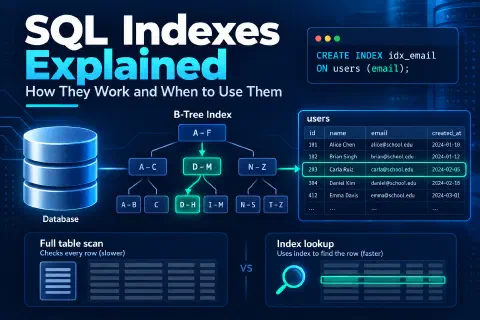
An index is a separate, sorted structure that lets the database find rows without reading the whole table, much like the index at the back of a book. The right index can turn a query that scans millions of rows into one that reads a handful, but every index also takes space and slows down inserts and updates, so you add them where queries need them.
On small tables, indexes hardly matter: reading a few thousand rows is instant. As tables grow, a missing index is the most common reason a query goes from milliseconds to seconds. This part of the Learn SQL series explains how indexes work, how to check whether a query uses one, and how to choose the right ones.
Why Your SQL Query Is Slow covers the most common performance problems; this guide goes deeper into indexes themselves. The examples use PostgreSQL 17, with notes for MySQL, SQL Server, and SQLite.
How an Index Works
Without an index, finding all orders for customer 42 means checking every row, one by one. This is called a full table scan (or sequential scan).
An index stores the values of one or more columns in sorted order, each with a pointer to its row. Most databases use a B-tree, a balanced tree that narrows the search at each level, like looking up a word in a dictionary: you jump to the right section instead of reading every page. Finding one value among millions takes only a few steps.
You already have indexes: every primary key and UNIQUE constraint creates one automatically. That’s why looking up an order by order_id is always fast.
A Table Big Enough to Matter
The series’ sample database is too small to show a difference, so create a practice table with 500,000 orders. In PostgreSQL, generate_series produces the rows:
CREATE TABLE order_history AS
SELECT g                                    AS order_id,
       (g % 5000) + 1                       AS customer_id,
       (g % 6) + 1                          AS product_id,
       (g % 5) + 1                          AS quantity,
       DATE '2023-01-01' + (g % 1000)       AS order_date,
       CASE WHEN g % 10 = 0 THEN 'returned' ELSE 'shipped' END AS status
FROM generate_series(1, 500000) AS g;

ALTER TABLE order_history ADD PRIMARY KEY (order_id);
ANALYZE order_history;
That’s 5,000 customers with 100 orders each. ANALYZE updates the statistics the database uses to plan queries. (In other databases, you can generate rows with a recursive CTE, as shown in SQL CTEs Explained.)
Reading a Query Plan with EXPLAIN
EXPLAIN shows how the database plans to run a query; EXPLAIN ANALYZE actually runs it and adds real timings. Find customer 42’s orders:
EXPLAIN ANALYZE SELECT * FROM order_history WHERE customer_id = 42;
 Gather  (cost=1000.00..7326.17 rows=100 width=28) (actual time=0.168..14.607 rows=100 loops=1)
   Workers Planned: 2
   Workers Launched: 2
   ->  Parallel Seq Scan on order_history  (cost=0.00..6316.17 rows=42 width=28) (actual time=0.474..10.725 rows=33 loops=3)
         Filter: (customer_id = 42)
         Rows Removed by Filter: 166633
 Planning Time: 0.098 ms
 Execution Time: 14.624 ms
The key words are Seq Scan (it read the whole table, in parallel) and Rows Removed by Filter: it looked at all 500,000 rows to return 100. Now add an index on customer_id and run the same query:
CREATE INDEX idx_order_history_customer ON order_history (customer_id);

EXPLAIN ANALYZE SELECT * FROM order_history WHERE customer_id = 42;
 Bitmap Heap Scan on order_history  (cost=5.20..353.94 rows=100 width=28) (actual time=0.039..0.140 rows=100 loops=1)
   Recheck Cond: (customer_id = 42)
   Heap Blocks: exact=100
   ->  Bitmap Index Scan on idx_order_history_customer  (cost=0.00..5.17 rows=100 width=0) (actual time=0.027..0.027 rows=100 loops=1)
         Index Cond: (customer_id = 42)
 Planning Time: 0.123 ms
 Execution Time: 0.153 ms
The plan now says Index Scan (here, a bitmap index scan), and execution time dropped from about 14.6 ms to 0.15 ms, close to 100 times faster. Your timings will differ, but the gap grows as the table grows.
EXPLAIN in Other Databases
| Database | Command | What to look for |
|---|---|---|
| PostgreSQL | EXPLAIN / EXPLAIN ANALYZE | Seq Scan (bad on big tables) vs. Index Scan |
| MySQL | EXPLAIN / EXPLAIN ANALYZE | type: ALL (full scan) vs. ref/range, and the key column |
| SQL Server | “Display Estimated Execution Plan” in SSMS, or SET SHOWPLAN_TEXT ON | Table Scan / Clustered Index Scan vs. Index Seek |
| SQLite | EXPLAIN QUERY PLAN | SCAN table vs. SEARCH table USING INDEX |
Creating and Removing Indexes
CREATE INDEX idx_orders_status_date ON orders (status, order_date);
Name indexes consistently, such as idx_<table>_<columns>, so you can tell what each one is for. Removing one differs slightly:
| Database | Drop an index |
|---|---|
| PostgreSQL, SQLite | DROP INDEX idx_orders_status_date; |
| MySQL, SQL Server | DROP INDEX idx_orders_status_date ON orders; |
To list a table’s indexes: \di in psql, SHOW INDEX FROM orders; in MySQL, EXEC sp_helpindex 'orders'; in SQL Server, and .indexes orders in the SQLite shell.
Composite Indexes: Column Order Matters
An index on several columns, a composite index, is sorted by the first column, then by the second within each first value, like a phone book sorted by last name, then first name.
CREATE INDEX idx_order_history_customer_date ON order_history (customer_id, order_date);
This one index serves several queries:
WHERE customer_id = 42✔ (uses the first column)WHERE customer_id = 42 AND order_date >= '2025-01-01'✔ (uses both)WHERE order_date = '2025-03-01'✘ (skips the first column)
For that last query, the database can’t jump to the right place, just as a phone book sorted by last name can’t help you find everyone named “Maria.” PostgreSQL may still read the whole index, but look at the plan’s estimated cost:
 Bitmap Index Scan on idx_order_history_customer_date  (cost=0.00..5434.42 rows=497 width=0)
   Index Cond: (order_date = '2025-03-01'::date)
Compare that with the cost when the first column is used:
 Bitmap Index Scan on idx_order_history_customer_date  (cost=0.00..4.69 rows=27 width=0)
   Index Cond: ((customer_id = 42) AND (order_date >= '2025-01-01'::date))
More than a thousand times more work. SQLite simply falls back to SCAN orders in the same situation. The rule: put the column you filter on most (usually with =) first, and range conditions like dates after it. A composite index on (a, b) also makes a separate index on (a) alone unnecessary.
When an Index Doesn’t Help
Low-Selectivity Columns
An index is useful when it narrows the results to a small fraction of the table. In order_history, 90% of orders are “shipped” and 10% “returned.” With an index on status:
EXPLAIN SELECT * FROM order_history WHERE status = 'shipped';
 Seq Scan on order_history  (cost=0.00..9962.00 rows=449533 width=28)
   Filter: (status = 'shipped'::text)
PostgreSQL ignores the index, because jumping back and forth between the index and the table for 450,000 rows is slower than just reading the table. For the rarer “returned” value, it does use the index. The query planner decides based on statistics; that’s why ANALYZE matters.
Functions on the Indexed Column
Wrapping the column in a function or calculation hides it from a normal index:
EXPLAIN SELECT * FROM order_history WHERE customer_id + 0 = 42;
 Gather  (cost=1000.00..8087.00 rows=2500 width=28)
   Workers Planned: 2
   ->  Parallel Seq Scan on order_history  (cost=0.00..6837.00 rows=1042 width=28)
         Filter: ((customer_id + 0) = 42)
The same happens with WHERE LOWER(email) = ..., WHERE YEAR(order_date) = 2025, or WHERE name LIKE '%chair'. Rewrite the condition so the column stands alone (for dates, order_date >= '2025-01-01' AND order_date < '2026-01-01'), or create an expression index on the exact expression, as shown in SQL String Functions.
Small Tables
For a table with a few hundred rows, a full scan is so fast that the planner skips indexes anyway. Don’t index tables that will stay tiny.
Covering Indexes
When an index contains every column a query needs, the database can answer from the index alone, without visiting the table:
EXPLAIN ANALYZE SELECT customer_id, order_date FROM order_history WHERE customer_id = 42;
 Index Only Scan using idx_order_history_customer_date on order_history  (cost=0.42..10.17 rows=100 width=8) (actual time=0.029..0.035 rows=100 loops=1)
   Index Cond: (customer_id = 42)
   Heap Fetches: 0
Index Only Scan with Heap Fetches: 0 means the table wasn’t touched. (PostgreSQL may need a VACUUM first so it knows the table’s pages are up to date.) That’s another reason to select only the columns you need instead of SELECT *.
PostgreSQL and SQL Server can also add extra columns to an index just for covering, without sorting by them:
CREATE INDEX idx_oh_customer_cover ON order_history (customer_id) INCLUDE (order_date);
Unique and Partial Indexes
Unique indexes enforce that no two rows share a value, exactly like a UNIQUE constraint:
CREATE UNIQUE INDEX idx_customers_email ON customers (email);
Partial indexes (called filtered indexes in SQL Server) cover only the rows that match a condition, so they’re smaller and faster when you always query the same subset:
CREATE INDEX idx_order_history_returned ON order_history (order_date)
WHERE status = 'returned';
This index is only about 376 kB, because it covers just the 10% of rows that are returns. PostgreSQL, SQLite, and SQL Server support them; MySQL doesn’t. In SQL Server, a filtered unique index (... WHERE email IS NOT NULL) is the standard way to allow several NULLs in a “unique” column; see NULL in SQL.
Foreign Keys Usually Need an Index
Joins and deletes check foreign key columns constantly, so they usually deserve an index. Not every database creates one for you:
| Database | Indexes foreign key columns automatically? |
|---|---|
| MySQL (InnoDB) | Yes |
| PostgreSQL, SQL Server, SQLite | No; create them yourself |
In the sample database, SHOW INDEX FROM orders in MySQL lists indexes on customer_id and product_id, but PostgreSQL’s orders table only has its primary key. If you query orders by customer often, add CREATE INDEX idx_orders_customer ON orders (customer_id);.
The Cost of Indexes
Indexes aren’t free:
- Storage. The primary key index on
order_historyis 11 MB, next to a 29 MB table. Several indexes can rival the table’s size. - Slower writes. Every
INSERT,UPDATE, andDELETEmust update every affected index too. - Maintenance. Unused indexes still cost space and write time.
So index for the queries you actually run: the columns in your most common WHERE, JOIN, and ORDER BY clauses. Most databases can show which indexes go unused, such as PostgreSQL’s pg_stat_user_indexes view.
Practical Checklist
- Find the slow query and run
EXPLAIN(orEXPLAIN ANALYZE). - Look for full scans of large tables.
- Index the filtered and joined columns, with equality columns first in composite indexes.
- Check that the query can use it: no functions on the column, no leading
%inLIKE. - Run
EXPLAINagain and compare. - Review periodically and drop indexes nothing uses.
Common Mistakes to Avoid
- Indexing every column “just in case,” which slows writes and wastes space.
- Getting composite index order wrong, so the most common filter can’t use it.
- Creating duplicate indexes, such as
(a)next to(a, b). - Wrapping indexed columns in functions in
WHERE. - Forgetting foreign key indexes in PostgreSQL and SQL Server.
- Judging an index on a tiny test table, where the planner ignores it anyway.
- Not updating statistics after loading lots of data (
ANALYZEin PostgreSQL,ANALYZE TABLEin MySQL).
Frequently Asked Questions
What is an index in SQL?
A separate data structure, usually a B-tree, that stores column values in sorted order with pointers to their rows, so the database can find matching rows without scanning the whole table.
Does a primary key create an index?
Yes. Every primary key and unique constraint automatically gets an index.
How many indexes should a table have?
As many as your important queries need and no more. Read-heavy tables, like reporting tables, can have several; write-heavy tables, like logs, should have few.
What’s the difference between a clustered and a non-clustered index?
A clustered index determines the physical order of the table’s rows, so a table can have only one; in SQL Server and MySQL’s InnoDB, it’s normally the primary key. A non-clustered index is a separate structure that points back to the rows. PostgreSQL tables don’t keep a clustered order automatically.
Why isn’t my index being used?
Common reasons: the query wraps the column in a function, the filter matches a large share of the rows, the table is small, the composite index’s first column isn’t in the filter, or the statistics are out of date.
Conclusion
Indexes are the biggest single lever for query speed. They let the database jump to the rows it needs instead of reading everything, and EXPLAIN shows you whether that’s happening. Index the columns you filter and join on, put the most selective equality columns first in composite indexes, keep columns “bare” in WHERE, and remember that every index costs storage and write speed.
Next in the Learn SQL series, put this into practice with Why Your SQL Query Is Slow (And How to Fix It). When you’re done experimenting, remove the practice table with DROP TABLE order_history;.