
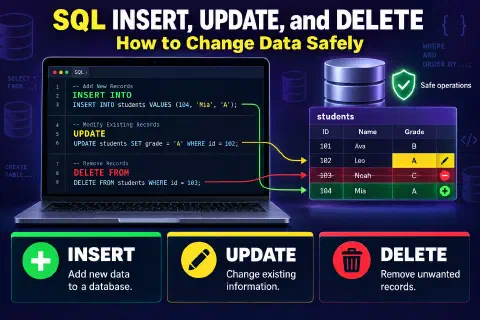
INSERT adds new rows to a table, UPDATE changes values in existing rows, and DELETE removes rows. UPDATE and DELETE affect every row that matches their WHERE clause, or every row in the table if you leave it out, so always test the condition with a SELECT first and use transactions for anything important.
So far in the Learn SQL series, you’ve queried data and created tables. This part covers the commands that change the rows inside them. They’re simple to write, but mistakes are permanent: there’s no undo button in a database. You’ll learn the syntax, how the database protects you with constraints, how to undo changes with transactions, and the habits professionals use to avoid accidents.
The examples use the series’ sample database. Download shop.sql and load it as shown in Part 1. Since these examples change the data, reload the file whenever you want a fresh start. They were tested on PostgreSQL, MySQL, SQL Server, and SQLite.
INSERT: Adding Rows
Insert One Row
List the columns, then the values in the same order:
INSERT INTO customers (customer_id, first_name, last_name, email, city, state, signup_date)
VALUES (9, 'Grace', 'Kim', '[email protected]', 'Tucson', 'AZ', '2025-11-10');
Check that it worked:
SELECT customer_id, first_name, last_name, city FROM customers WHERE customer_id = 9;
 customer_id | first_name | last_name |  city
-------------+------------+-----------+--------
           9 | Grace      | Kim       | Tucson
You can leave out the column list and give values for every column in table order (INSERT INTO customers VALUES (...)), but always naming the columns is safer: the statement keeps working if columns are added or reordered, and it’s clear which value goes where.
Insert Several Rows at Once
Separate each row’s values with a comma. This is faster than running one INSERT per row:
INSERT INTO products (product_id, name, category, price) VALUES
    (7, 'Webcam',    'Electronics', 79.00),
    (8, 'Desk Lamp', 'Furniture',   39.00),
    (9, 'USB-C Hub', 'Accessories', 35.00);

SELECT * FROM products WHERE product_id >= 7;
 product_id |   name    |  category   | price
------------+-----------+-------------+-------
          7 | Webcam    | Electronics | 79.00
          8 | Desk Lamp | Furniture   | 39.00
          9 | USB-C Hub | Accessories | 35.00
Leave Out Optional Columns
Columns you don’t list get their default value, which is NULL unless the table defines another default:
INSERT INTO customers (customer_id, first_name, last_name, signup_date)
VALUES (10, 'Luis', 'Reyes', '2025-11-15');

SELECT customer_id, first_name, email, city, state FROM customers WHERE customer_id = 10;
 customer_id | first_name | email | city | state
-------------+------------+-------+------+-------
          10 | Luis       |       |      |
In real tables, IDs are usually generated automatically (with SERIAL or IDENTITY in PostgreSQL, AUTO_INCREMENT in MySQL, IDENTITY in SQL Server, and INTEGER PRIMARY KEY in SQLite), so you leave the ID column out too. The sample database uses fixed IDs to keep the examples predictable.
Copy Rows from a Query: INSERT … SELECT
You can insert the results of a SELECT, for example to archive old orders. First create an empty table with the same columns as orders (the WHERE 1 = 0 condition copies the structure but no rows), then copy the old orders into it:
CREATE TABLE orders_archive AS SELECT * FROM orders WHERE 1 = 0;

INSERT INTO orders_archive
SELECT * FROM orders WHERE order_date < '2025-09-01';
This copies the four August orders in one statement. In SQL Server, create the empty table with SELECT * INTO orders_archive FROM orders WHERE 1 = 0; instead.
How Constraints Protect Your Data
The table’s rules, called constraints, reject data that doesn’t make sense. The sample database has three kinds, and each one stops a different mistake.
NOT NULL: a required value is missing.
INSERT INTO customers (customer_id, first_name, last_name, signup_date)
VALUES (11, 'Ana', NULL, '2025-11-16');
ERROR: null value in column "last_name" of relation "customers" violates not-null constraint
PRIMARY KEY: the ID already exists.
INSERT INTO customers (customer_id, first_name, last_name, signup_date)
VALUES (1, 'Dup', 'Row', '2025-11-16');
ERROR:  duplicate key value violates unique constraint "customers_pkey"
DETAIL:  Key (customer_id)=(1) already exists.
FOREIGN KEY: the related row doesn’t exist. There’s no customer 99, so this order is rejected:
INSERT INTO orders (order_id, customer_id, product_id, quantity, order_date, status)
VALUES (113, 99, 1, 1, '2025-11-20', 'pending');
ERROR:  insert or update on table "orders" violates foreign key constraint "orders_customer_id_fkey"
DETAIL:  Key (customer_id)=(99) is not present in table "customers".
The messages above are from PostgreSQL; MySQL, SQL Server, and SQLite word them differently but block the same things. One exception: SQLite doesn’t enforce foreign keys unless you run PRAGMA foreign_keys = ON on each connection. See What Is SQLite?
UPDATE: Changing Existing Rows
UPDATE sets new values for the rows that match WHERE.
Change one row. Put the laptop on sale at 10% off:
UPDATE products
SET price = price * 0.90
WHERE product_id = 1;

SELECT name, price FROM products WHERE product_id = 1;
  name  | price
--------+--------
 Laptop | 809.10
Change several rows. Raise every accessory’s price by 5%:
UPDATE products
SET price = price * 1.05
WHERE category = 'Accessories';

SELECT name, price FROM products WHERE category = 'Accessories' ORDER BY name;
   name    | price
-----------+-------
 Keyboard  | 47.25
 Mouse     | 26.25
 USB-C Hub | 36.75
Change several columns at once by separating them with commas:
UPDATE orders
SET status = 'shipped', quantity = 2
WHERE order_id = 108;

SELECT order_id, status, quantity FROM orders WHERE order_id = 108;
 order_id | status  | quantity
----------+---------+----------
      108 | shipped |        2
The Most Dangerous Mistake in SQL
UPDATE products SET price = 0; -- no WHERE clause
Without WHERE, UPDATE changes every row in the table. The same goes for DELETE. There’s no confirmation prompt; the database simply does it. The safety habits later in this guide exist mainly to prevent this.
DELETE: Removing Rows
DELETE removes the rows that match WHERE. First, look at what you’re about to delete:
SELECT order_id, status FROM orders WHERE status = 'cancelled';
 order_id |  status
----------+-----------
      111 | cancelled
Then delete with the same condition:
DELETE FROM orders WHERE status = 'cancelled';

SELECT COUNT(*) AS orders_left FROM orders;
 orders_left
-------------
          11
Foreign Keys Block Unsafe Deletes
Maria (customer 1) has orders, so deleting her would leave orders pointing at a customer who no longer exists. The database refuses:
DELETE FROM customers WHERE customer_id = 1;
ERROR:  update or delete on table "customers" violates foreign key constraint "orders_customer_id_fkey" on table "orders"
DETAIL:  Key (customer_id)=(1) is still referenced from table "orders".
To remove a customer, you’d first decide what happens to their orders: delete them, reassign them, or keep the customer and mark them inactive instead.
Soft Deletes
Many applications never truly delete important records. Instead, they add a column such as is_active or deleted_at and update it, so the history stays available for reports and audits:
UPDATE customers SET deleted_at = CURRENT_TIMESTAMP WHERE customer_id = 6;
(The sample tables don’t include a deleted_at column; this shows the pattern.)
DELETE vs. TRUNCATE vs. DROP
| Command | What it does | Can use WHERE? |
|---|---|---|
DELETE FROM t WHERE ... | Removes matching rows | Yes |
DELETE FROM t | Removes all rows, one by one | No |
TRUNCATE TABLE t | Removes all rows quickly, usually resetting auto-numbering | No |
DROP TABLE t | Deletes the whole table, including its structure | No |
Transactions: Your Undo Button
A transaction groups statements so they either all succeed or are all undone (SQL Transactions and ACID goes deeper). Until you COMMIT, you can ROLLBACK and everything goes back to how it was:
BEGIN;

UPDATE products SET price = 0;   -- oops, forgot the WHERE

SELECT name, price FROM products WHERE product_id IN (1, 2);
  name   | price
---------+-------
 Laptop  |  0.00
 Monitor |  0.00
Every price is now 0. Because you’re inside a transaction, undo it:
ROLLBACK;

SELECT name, price FROM products WHERE product_id IN (1, 2);
  name   | price
---------+--------
 Laptop  | 809.10
 Monitor | 249.00
The prices are back. If the change had been correct, COMMIT would have saved it permanently.
| Database | Start a transaction |
|---|---|
| PostgreSQL, SQLite | BEGIN; |
| MySQL | START TRANSACTION; (or BEGIN;) |
| SQL Server | BEGIN TRANSACTION; |
Transactions also keep related changes consistent. Moving money between accounts takes two updates, one subtraction and one addition; in a transaction, a failure halfway through can’t leave money missing.
Most tools run in autocommit mode by default, which means each statement is committed immediately unless you start a transaction yourself.
See What Changed: RETURNING and OUTPUT
Some databases can return the rows you just inserted, updated, or deleted, which saves a separate SELECT:
UPDATE customers
SET city = 'Calexico'
WHERE customer_id = 7
RETURNING customer_id, first_name, city;
 customer_id | first_name |   city
-------------+------------+----------
           7 | Laura      | Calexico
RETURNING works in PostgreSQL and SQLite (3.35 and later). SQL Server uses OUTPUT instead: UPDATE customers SET city = 'Calexico' OUTPUT inserted.customer_id, inserted.first_name, inserted.city WHERE customer_id = 7;. MySQL doesn’t have either, so run a SELECT afterward.
Insert or Update: Upserts
Sometimes you want to insert a row if it’s new, or update it if it already exists. This is called an upsert, and each database writes it differently. Here, product 2 already exists, so its price is updated:
PostgreSQL and SQLite:
INSERT INTO products (product_id, name, category, price)
VALUES (2, 'Monitor', 'Electronics', 229.00)
ON CONFLICT (product_id) DO UPDATE SET price = EXCLUDED.price;
EXCLUDED refers to the row you tried to insert. If the ID doesn’t exist yet, the row is simply inserted.
MySQL (8.0.19 and later):
INSERT INTO products (product_id, name, category, price)
VALUES (2, 'Monitor', 'Electronics', 229.00) AS new
ON DUPLICATE KEY UPDATE price = new.price;
SQL Server:
MERGE products AS target
USING (VALUES (2, 'Monitor', 'Electronics', 229.00)) AS source (product_id, name, category, price)
ON target.product_id = source.product_id
WHEN MATCHED THEN UPDATE SET price = source.price
WHEN NOT MATCHED THEN INSERT (product_id, name, category, price)
    VALUES (source.product_id, source.name, source.category, source.price);
All three leave the Monitor priced at 229.00.
Safety Habits for Changing Data
- Run the
WHEREas aSELECTfirst. Check the rows and the count, then turn it into theUPDATEorDELETEwithout changing the condition. - Use a transaction for anything that matters, and check the results before you
COMMIT. - Target rows by primary key when changing a specific record (
WHERE order_id = 108), not by a name that might not be unique. - Back up before big changes. See PostgreSQL Backup and Restore.
- Practice on a copy, never on production data.
- Use the least access you need. Accounts that only read data shouldn’t be able to update or delete it.
- Never build statements by gluing user input into SQL text. Use parameters, or you open the door to SQL injection.
Some tools add guard rails too. MySQL Workbench, for example, has a “safe updates” setting that blocks UPDATE and DELETE statements without a key in the WHERE clause.
Common Mistakes to Avoid
- Forgetting
WHEREon anUPDATEorDELETE. - Putting values in the wrong order because the column list was left out.
- Forgetting quotes around text and dates, or putting them around numbers.
- Leaving a transaction open without
COMMITorROLLBACK, which can lock rows for other users. - Assuming SQLite checks foreign keys without
PRAGMA foreign_keys = ON. - Deleting records that reports still need, when a soft delete would keep the history.
Frequently Asked Questions
What’s the difference between UPDATE and INSERT?
INSERT adds new rows. UPDATE changes values in rows that already exist. An upsert does one or the other depending on whether the row exists.
Can I undo a DELETE in SQL?
Only if you ran it inside a transaction that you haven’t committed yet; then ROLLBACK undoes it. Once committed, the data can only come back from a backup.
What happens if I run UPDATE without WHERE?
Every row in the table is changed. That’s why you should test the condition with SELECT first and use transactions for important changes.
What’s the difference between DELETE and TRUNCATE?
DELETE removes rows one at a time and can use WHERE. TRUNCATE quickly removes all rows and can’t be filtered. Both keep the table itself; DROP TABLE deletes the table too.
How do I insert multiple rows in one statement?
List several sets of values separated by commas: INSERT INTO t (a, b) VALUES (1, 'x'), (2, 'y'), (3, 'z');.
Conclusion
INSERT, UPDATE, and DELETE are how data changes in a database. Name your columns when inserting, let constraints catch bad data, always check your WHERE condition with a SELECT before updating or deleting, and wrap important changes in a transaction so you can roll back mistakes.
Reload shop.sql to reset the sample database, and practice each command until the safety habits feel automatic. You’ve now covered the full cycle of reading and writing data, the foundation for everything else in the Learn SQL series.