
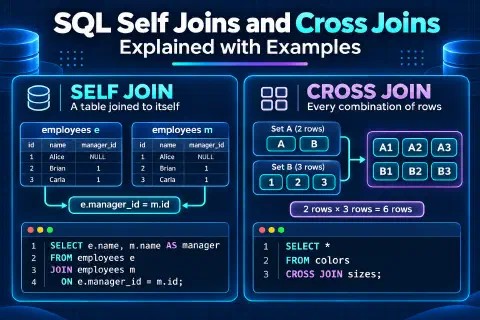
A self join joins a table to itself, so you can compare rows in the same table, like an employee and their manager or two customers in the same city. A cross join pairs every row of one table with every row of another, which is how you build complete grids, like every category with every order status, before filling in the numbers.
The SQL JOINs guide covered the four everyday joins: INNER, LEFT, RIGHT, and FULL. They all connect two different tables. This lesson covers the two joins that confuse beginners most, because they look strange at first: joining a table to itself, and joining without any matching condition at all.
The examples use the Learn SQL series’ sample database: download shop.sql and load it as shown in Part 1. Everything was tested on PostgreSQL, MySQL 8, SQL Server, and SQLite.
Self Joins
A self join isn’t a special keyword. It’s a regular JOIN (or LEFT JOIN) where both sides are the same table. The trick is to give each copy its own alias, so SQL, and you, can tell them apart.
Your First Self Join: Customers in the Same City
Which customers live in the same city as another customer?
SELECT c1.first_name AS customer_1,
       c2.first_name AS customer_2,
       c1.city
FROM customers c1
JOIN customers c2
  ON c1.city = c2.city
 AND c1.customer_id < c2.customer_id
ORDER BY c1.city, customer_1;
 customer_1 | customer_2 |   city
------------+------------+-----------
 Maria      | Ana        | El Centro
 James      | Omar       | San Diego
Think of c1 and c2 as two copies of the same list. For every customer in c1, SQL looks for customers in c2 who live in the same city.
The condition c1.customer_id < c2.customer_id matters. Without it, every customer would match themselves (Maria and Maria), and each real pair would show up twice. Here’s what happens with <> (not equal) instead:
SELECT c1.first_name AS customer_1, c2.first_name AS customer_2, c1.city
FROM customers c1
JOIN customers c2
  ON c1.city = c2.city
 AND c1.customer_id <> c2.customer_id
ORDER BY c1.city, customer_1;
 customer_1 | customer_2 |   city
------------+------------+-----------
 Ana        | Maria      | El Centro
 Maria      | Ana        | El Centro
 James      | Omar       | San Diego
 Omar       | James      | San Diego
<> removes the “matched with yourself” rows, but keeps both directions of each pair. < keeps only one direction, which is almost always what you want when you’re looking for pairs.
Notice that Laura, whose city is NULL, never appears. NULL = NULL isn’t true, as you saw in the NULL values lesson, so she can’t match anyone.
Hierarchies: Employees and Their Managers
Self joins really shine with hierarchies, where a table points to itself. Create a small employees table, where manager_id holds the employee_id of each person’s manager:
CREATE TABLE employees (
    employee_id INT PRIMARY KEY,
    name        VARCHAR(50) NOT NULL,
    title       VARCHAR(50) NOT NULL,
    manager_id  INT,
    FOREIGN KEY (manager_id) REFERENCES employees (employee_id)
);

INSERT INTO employees VALUES
    (1, 'Elena Ruiz',   'Store Owner',         NULL),
    (2, 'Marcus Lee',   'Operations Manager',  1),
    (3, 'Priya Shah',   'Marketing Manager',   1),
    (4, 'Tom Baker',    'Warehouse Lead',      2),
    (5, 'Grace Kim',    'Support Agent',       2),
    (6, 'Luis Ortega',  'Content Writer',      3);
Follow along: download
self-join-employees.sqlfrom the data repository on GitHub instead of copying the data from this page.
The foreign key points back at the same table, which is perfectly allowed. Elena owns the store, so she has no manager (NULL).
To show each employee next to their manager’s name, join the table to itself: e is the employee, m is the manager.
SELECT e.name  AS employee,
       e.title,
       m.name  AS manager
FROM employees e
JOIN employees m ON m.employee_id = e.manager_id
ORDER BY e.employee_id;
  employee   |       title        |  manager
-------------+--------------------+------------
 Marcus Lee  | Operations Manager | Elena Ruiz
 Priya Shah  | Marketing Manager  | Elena Ruiz
 Tom Baker   | Warehouse Lead     | Marcus Lee
 Grace Kim   | Support Agent      | Marcus Lee
 Luis Ortega | Content Writer     | Priya Shah
Read the ON clause out loud: “match each employee’s manager_id to a manager’s employee_id.” Getting this direction backwards is the most common self join mistake; you’d get each manager’s employees instead.
Elena is missing, because an inner join drops rows without a match, and her manager_id is NULL. Use a LEFT JOIN to keep everyone:
SELECT e.name AS employee,
       COALESCE(m.name, '(no manager)') AS manager
FROM employees e
LEFT JOIN employees m ON m.employee_id = e.manager_id
ORDER BY e.employee_id;
  employee   |   manager
-------------+--------------
 Elena Ruiz  | (no manager)
 Marcus Lee  | Elena Ruiz
 Priya Shah  | Elena Ruiz
 Tom Baker   | Marcus Lee
 Grace Kim   | Marcus Lee
 Luis Ortega | Priya Shah
Counting Direct Reports
Flip the direction to look down the hierarchy. How many people report directly to each employee?
SELECT m.name AS manager,
       COUNT(e.employee_id) AS direct_reports
FROM employees m
LEFT JOIN employees e ON e.manager_id = m.employee_id
GROUP BY m.employee_id, m.name
ORDER BY direct_reports DESC, manager;
   manager   | direct_reports
-------------+----------------
 Elena Ruiz  |              2
 Marcus Lee  |              2
 Priya Shah  |              1
 Grace Kim   |              0
 Luis Ortega |              0
 Tom Baker   |              0
COUNT(e.employee_id) counts only real matches, so people with no reports get 0 instead of 1. That’s the same COUNT(column) versus COUNT(*) rule from the aggregate functions lesson.
Going Up More Than One Level
You can join the same table three or more times. Here’s each employee with their manager and their manager’s manager:
SELECT e.name AS employee,
       m.name AS manager,
       mm.name AS managers_manager
FROM employees e
JOIN employees m  ON m.employee_id  = e.manager_id
JOIN employees mm ON mm.employee_id = m.manager_id
ORDER BY e.employee_id;
  employee   |  manager   | managers_manager
-------------+------------+------------------
 Tom Baker   | Marcus Lee | Elena Ruiz
 Grace Kim   | Marcus Lee | Elena Ruiz
 Luis Ortega | Priya Shah | Elena Ruiz
Each extra level needs another join, so this only works when you know how deep the tree goes. For hierarchies of any depth, use a recursive CTE, as shown in the CTE lesson.
Comparing Rows: Products Bought by the Same Customer
Self joins also work on transaction tables. Which pairs of products were bought by the same customer? Join orders to itself on the customer, keeping each pair once with <:
SELECT p1.name AS product_1,
       p2.name AS product_2,
       COUNT(DISTINCT o1.customer_id) AS customers
FROM orders o1
JOIN orders o2
  ON o2.customer_id = o1.customer_id
 AND o1.product_id  < o2.product_id
JOIN products p1 ON p1.product_id = o1.product_id
JOIN products p2 ON p2.product_id = o2.product_id
GROUP BY p1.name, p2.name
ORDER BY customers DESC, product_1, product_2;
 product_1 |  product_2   | customers
-----------+--------------+-----------
 Keyboard  | Desk         |         1
 Laptop    | Desk         |         1
 Laptop    | Keyboard     |         1
 Laptop    | Mouse        |         1
 Monitor   | Desk         |         1
 Monitor   | Office Chair |         1
With only 12 orders, each pair appears once. On a real store’s data, this is the starting point for “frequently bought together” recommendations: the pairs at the top are the products to suggest together.
Comparing Against Other Rows: Ranking Without Window Functions
A self join with an inequality can compare each row with all the others. How many products in the same category are cheaper than each product?
SELECT p.name, p.category, p.price,
       COUNT(cheaper.product_id) AS cheaper_in_category
FROM products p
LEFT JOIN products cheaper
  ON cheaper.category = p.category
 AND cheaper.price < p.price
GROUP BY p.product_id, p.name, p.category, p.price
ORDER BY p.category, p.price DESC;
     name     |  category   | price  | cheaper_in_category
--------------+-------------+--------+---------------------
 Keyboard     | Accessories |  45.00 |                   1
 Mouse        | Accessories |  25.00 |                   0
 Laptop       | Electronics | 899.00 |                   1
 Monitor      | Electronics | 249.00 |                   0
 Desk         | Furniture   | 320.00 |                   1
 Office Chair | Furniture   | 180.00 |                   0
This is how people ranked rows before window functions existed. Today, RANK() OVER (PARTITION BY category ORDER BY price) from the window functions lesson is shorter and much faster on big tables, but you’ll still see this pattern in older code.
Cross Joins
A cross join returns every possible combination of rows from two tables, also called the Cartesian product. It has no ON clause, because nothing needs to match.
Your First Cross Join
Imagine the store sells a T-shirt in three sizes and two colors. Every combination is a product variant:
SELECT s.size, c.color
FROM (SELECT 'Small' AS size UNION ALL SELECT 'Medium' UNION ALL SELECT 'Large') s
CROSS JOIN (SELECT 'Black' AS color UNION ALL SELECT 'White') c
ORDER BY c.color, s.size;
  size  | color
--------+-------
 Large  | Black
 Medium | Black
 Small  | Black
 Large  | White
 Medium | White
 Small  | White
Three sizes times two colors gives six rows. The two small lists are built with UNION ALL, from the set operations lesson, so the example works in every database without creating tables.
Watch the Row Count
A cross join multiplies. 8 customers times 6 products is 48 rows:
SELECT COUNT(*) AS combinations
FROM customers
CROSS JOIN products;
 combinations
--------------
           48
That’s harmless here, but 100,000 customers times 10,000 products is a billion rows. Before you cross join two real tables, multiply their row counts and make sure you mean it.
A cross join can also be filtered like any other query. Every Nevada customer paired with every furniture product, for example a list of people to send a furniture promotion:
SELECT c.first_name, p.name AS product
FROM customers c
CROSS JOIN products p
WHERE c.state = 'NV' AND p.category = 'Furniture'
ORDER BY c.first_name, product;
 first_name |   product
------------+--------------
 Kevin      | Desk
 Kevin      | Office Chair
 Laura      | Desk
 Laura      | Office Chair
The Most Useful Cross Join: Filling In the Gaps
Here’s the problem a cross join solves best. Count orders by category and status:
SELECT p.category, o.status, COUNT(*) AS orders
FROM orders o
JOIN products p ON p.product_id = o.product_id
GROUP BY p.category, o.status
ORDER BY p.category, o.status;
  category   |  status   | orders
-------------+-----------+--------
 Accessories | pending   |      1
 Accessories | shipped   |      2
 Electronics | returned  |      1
 Electronics | shipped   |      4
 Furniture   | cancelled |      1
 Furniture   | pending   |      1
 Furniture   | shipped   |      2
Combinations with no orders simply don’t exist in the result. In a report or a chart, those missing zeros are a problem: nobody can tell whether Accessories had zero returns or whether the row was forgotten.
The fix is to build the complete grid first with a cross join, then LEFT JOIN the real data onto it:
SELECT cat.category,
       st.status,
       COUNT(o.order_id) AS orders
FROM (SELECT DISTINCT category FROM products) cat
CROSS JOIN (SELECT DISTINCT status FROM orders) st
LEFT JOIN products p ON p.category = cat.category
LEFT JOIN orders o   ON o.product_id = p.product_id
                    AND o.status = st.status
GROUP BY cat.category, st.status
ORDER BY cat.category, st.status;
  category   |  status   | orders
-------------+-----------+--------
 Accessories | cancelled |      0
 Accessories | pending   |      1
 Accessories | returned  |      0
 Accessories | shipped   |      2
 Electronics | cancelled |      0
 Electronics | pending   |      0
 Electronics | returned  |      1
 Electronics | shipped   |      4
 Furniture   | cancelled |      1
 Furniture   | pending   |      1
 Furniture   | returned  |      0
 Furniture   | shipped   |      2
Now every category has a row for every status: 3 categories times 4 statuses gives 12 rows. Two details make it work:
- The status condition goes in the
ONclause of theLEFT JOIN, not inWHERE. InWHERE, it would throw away the zero rows again. COUNT(o.order_id)counts real orders only, so empty combinations show 0.
The same pattern fills in missing dates: cross join a list of months (from a calendar table or a recursive CTE) with your categories, then LEFT JOIN the sales. It’s also the first step of a pivot table in SQL.
The Accidental Cross Join
You can write a cross join without the words CROSS JOIN. Listing tables with commas, the old join style, creates one:
SELECT COUNT(*) AS row_count
FROM customers, orders;
 row_count
-----------
        96
8 customers times 12 orders: 96 rows, almost all of them nonsense. With the comma style, the join condition has to go in WHERE, and forgetting it is an easy mistake:
SELECT COUNT(*) AS row_count
FROM customers c, orders o
WHERE o.customer_id = c.customer_id;
 row_count
-----------
        12
This is one of the best reasons to always write explicit JOIN ... ON: a missing ON is much easier to spot. If a query suddenly returns far more rows than you expected, or totals that are several times too large, look for an accidental cross join first.
Databases also differ on a JOIN with no ON: MySQL and SQLite quietly treat it as a cross join, while PostgreSQL and SQL Server reject it with a syntax error. Write CROSS JOIN when you mean it, so the intent is clear in every database.
Common Mistakes to Avoid
- Forgetting the aliases. In a self join, both copies have the same column names. Without aliases like
eandm, the database can’t tell whichnameyou mean. - Matching rows with themselves. When you look for pairs, add
a.id < b.id(one copy of each pair) ora.id <> b.id(both directions). - Joining in the wrong direction. In a hierarchy,
m.employee_id = e.manager_idfinds each person’s manager;e.employee_id = m.manager_idfinds their reports. Say the condition out loud before you run it. - Losing the top of the tree. An inner self join drops rows whose parent is NULL, like the owner. Use
LEFT JOINwhen everyone must appear. - Cross joining large tables by accident. Check row counts, and always use explicit
JOIN ... ONinstead of commas. - Filtering the grid away. When you fill gaps with a cross join plus
LEFT JOIN, put conditions on the right-hand table inON, notWHERE.
Frequently Asked Questions
Is SELF JOIN a SQL keyword?
No. A self join is a normal JOIN or LEFT JOIN where the same table appears twice with different aliases. There’s no SELF JOIN syntax.
When should I use a self join?
When the rows you want to compare live in the same table: employees and managers, categories and parent categories, pairs of customers or products, or each row compared with the others in its group.
Is a self join slow?
It’s as fast as any other join, as long as the join columns are indexed, like manager_id here. Self joins that compare every row with every other row in a group can grow quickly on big tables; window functions are usually faster for rankings and running totals.
What is the difference between a cross join and an inner join?
An inner join keeps only the row combinations that match the ON condition. A cross join keeps every combination. An inner join with a condition that’s always true, like ON 1 = 1, gives the same result as a cross join.
What is a Cartesian product?
It’s the math name for every combination of two sets, and the result of a cross join. Its row count is the first table’s rows multiplied by the second’s.
Conclusion
A self join is just a join where both sides are the same table, told apart with aliases. Use it to compare rows: pairs of customers, employees and their managers, products bought together, or each row against the others in its group. Remember < to avoid duplicate pairs and LEFT JOIN to keep rows without a match.
A cross join returns every combination of two tables. It’s rarely what you want on its own, but combined with a LEFT JOIN it builds complete reports with no missing zeros. And whenever row counts look several times too large, suspect an accidental cross join.
Next in the Learn SQL series, you’ll clean and reshape text with SQL string functions.