
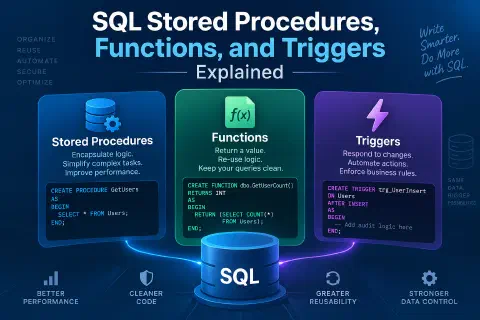
Stored procedures, functions, and triggers are code that lives inside the database. A function calculates and returns a value you can use in a query, a stored procedure runs a series of steps when you call it, and a trigger runs automatically when rows are inserted, updated, or deleted. They let the database enforce rules and automate tasks no matter which application changes the data.
So far in the Learn SQL series, every piece of SQL has been sent to the database one statement at a time. Sometimes it’s better to store logic in the database itself: a calculation everyone should do the same way, a multi-step process that should always validate its input, or an audit log that must be written every time a price changes.
This is the part of SQL where databases differ the most. The examples show PostgreSQL first, then MySQL and SQL Server; SQLite supports triggers but not stored procedures or functions. They use the series’ sample database (shop.sql), and every example was tested.
Functions vs. Procedures vs. Triggers
| Function | Stored procedure | Trigger | |
|---|---|---|---|
| How it runs | Called inside a query | Called with CALL / EXEC | Automatically, on INSERT/UPDATE/DELETE |
| Returns | A value (or a table) | Nothing, or output parameters / result sets | Nothing |
| Typical use | Reusable calculations | Multi-step processes, validation | Auditing, automatic updates, enforcing rules |
| Example | order_total(101) | CALL place_order(3, 4, 2) | Log every price change |
User-Defined Functions
A function packages a calculation so every query does it the same way. This one returns an order’s total:
PostgreSQL:
CREATE FUNCTION order_total(p_order_id INT)
RETURNS DECIMAL(10,2)
LANGUAGE sql
AS $$
    SELECT o.quantity * p.price
    FROM orders o
    JOIN products p ON p.product_id = o.product_id
    WHERE o.order_id = p_order_id;
$$;
The $$ marks surround the function’s body. Use it like a built-in function:
SELECT order_id, quantity, order_total(order_id) AS total
FROM orders
WHERE customer_id = 1
ORDER BY order_id;
 order_id | quantity | total
----------+----------+--------
      101 |        1 | 899.00
      103 |        2 |  90.00
      112 |        1 | 320.00
MySQL (the DELIMITER lines are needed in the mysql command-line client so the semicolons inside the function don’t end the statement early):
DELIMITER //
CREATE FUNCTION order_total(p_order_id INT)
RETURNS DECIMAL(10,2)
READS SQL DATA
BEGIN
    DECLARE v_total DECIMAL(10,2);
    SELECT o.quantity * p.price INTO v_total
    FROM orders o
    JOIN products p ON p.product_id = o.product_id
    WHERE o.order_id = p_order_id;
    RETURN v_total;
END //
DELIMITER ;
SQL Server (functions must be called with their schema name, as in dbo.order_total(order_id)):
CREATE FUNCTION dbo.order_total (@order_id INT)
RETURNS DECIMAL(10,2)
AS
BEGIN
    RETURN (
        SELECT o.quantity * p.price
        FROM orders o
        JOIN products p ON p.product_id = o.product_id
        WHERE o.order_id = @order_id
    );
END;
All three return the same totals. One caution: a function that runs its own query is called once per row, so on large tables a plain JOIN or a view is usually faster. Functions shine for logic you reuse in many places, such as tax or shipping rules.
Stored Procedures
A procedure runs a series of statements. This one places an order, but first checks that the quantity makes sense:
PostgreSQL:
CREATE PROCEDURE place_order(p_customer_id INT, p_product_id INT, p_quantity INT)
LANGUAGE plpgsql
AS $$
BEGIN
    IF p_quantity <= 0 THEN
        RAISE EXCEPTION 'Quantity must be positive, got %', p_quantity;
    END IF;

    INSERT INTO orders (order_id, customer_id, product_id, quantity, order_date, status)
    SELECT COALESCE(MAX(order_id), 100) + 1, p_customer_id, p_product_id, p_quantity,
           CURRENT_DATE, 'pending'
    FROM orders;
END;
$$;
plpgsql is PostgreSQL’s procedural language, which adds variables, IF, loops, and error handling to SQL. Call the procedure:
CALL place_order(3, 4, 2);

SELECT order_id, customer_id, product_id, quantity, status FROM orders WHERE order_id = 113;
 order_id | customer_id | product_id | quantity | status
----------+-------------+------------+----------+---------
      113 |           3 |          4 |        2 | pending
An invalid call is rejected before anything is inserted:
CALL place_order(3, 4, 0);
ERROR: Quantity must be positive, got 0
(Generating the next ID with MAX(order_id) + 1 keeps the example simple, but two users calling it at the same moment could get the same ID. Real tables use auto-generated IDs, as shown in Creating Tables in SQL.)
MySQL:
DELIMITER //
CREATE PROCEDURE place_order(IN p_customer_id INT, IN p_product_id INT, IN p_quantity INT)
BEGIN
    IF p_quantity <= 0 THEN
        SIGNAL SQLSTATE '45000' SET MESSAGE_TEXT = 'Quantity must be positive';
    END IF;
    INSERT INTO orders (order_id, customer_id, product_id, quantity, order_date, status)
    SELECT COALESCE(MAX(order_id), 100) + 1, p_customer_id, p_product_id, p_quantity,
           CURRENT_DATE, 'pending'
    FROM orders;
END //
DELIMITER ;

CALL place_order(3, 4, 2);
SQL Server:
CREATE PROCEDURE place_order @customer_id INT, @product_id INT, @quantity INT
AS
BEGIN
    IF @quantity <= 0
        THROW 50001, 'Quantity must be positive', 1;

    INSERT INTO orders (order_id, customer_id, product_id, quantity, order_date, status)
    SELECT COALESCE(MAX(order_id), 100) + 1, @customer_id, @product_id, @quantity,
           CAST(GETDATE() AS DATE), 'pending'
    FROM orders;
END;

EXEC place_order @customer_id = 3, @product_id = 4, @quantity = 2;
Each database raises errors its own way: RAISE EXCEPTION (PostgreSQL), SIGNAL SQLSTATE (MySQL), and THROW (SQL Server). Procedures that change several tables should also use a transaction with proper error handling; see SQL Transactions and ACID.
Triggers
A trigger runs automatically when data changes, so it can’t be forgotten or skipped. A common use is an audit log. Record every price change in a price_history table:
CREATE TABLE price_history (
    change_id  INT GENERATED ALWAYS AS IDENTITY PRIMARY KEY,
    product_id INT NOT NULL,
    old_price  DECIMAL(8,2) NOT NULL,
    new_price  DECIMAL(8,2) NOT NULL,
    changed_at TIMESTAMP NOT NULL DEFAULT CURRENT_TIMESTAMP
);
(Use AUTO_INCREMENT in MySQL, IDENTITY(1,1) in SQL Server, and INTEGER PRIMARY KEY in SQLite for the ID.)
PostgreSQL splits a trigger into a function that does the work and the trigger that calls it:
CREATE FUNCTION log_price_change()
RETURNS TRIGGER
LANGUAGE plpgsql
AS $$
BEGIN
    INSERT INTO price_history (product_id, old_price, new_price)
    VALUES (OLD.product_id, OLD.price, NEW.price);
    RETURN NEW;
END;
$$;

CREATE TRIGGER trg_products_price_change
AFTER UPDATE OF price ON products
FOR EACH ROW
WHEN (OLD.price IS DISTINCT FROM NEW.price)
EXECUTE FUNCTION log_price_change();
Inside a row trigger, OLD holds the row before the change and NEW holds it after. The WHEN condition skips updates that don’t actually change the price. Now discount electronics by 10%, and rename a product:
UPDATE products SET price = price * 0.90 WHERE category = 'Electronics';
UPDATE products SET name = 'Office Chair Pro' WHERE product_id = 6;

SELECT product_id, old_price, new_price FROM price_history ORDER BY change_id;
 product_id | old_price | new_price
------------+-----------+-----------
          1 |    899.00 |    809.10
          2 |    249.00 |    224.10
Both price changes were logged automatically, and the rename wasn’t, because the price didn’t change. No application had to remember to write the log.
MySQL:
DELIMITER //
CREATE TRIGGER trg_products_price_change
AFTER UPDATE ON products
FOR EACH ROW
BEGIN
    IF OLD.price <> NEW.price THEN
        INSERT INTO price_history (product_id, old_price, new_price)
        VALUES (OLD.product_id, OLD.price, NEW.price);
    END IF;
END //
DELIMITER ;
SQLite:
CREATE TRIGGER trg_products_price_change
AFTER UPDATE OF price ON products
FOR EACH ROW
WHEN OLD.price <> NEW.price
BEGIN
    INSERT INTO price_history (product_id, old_price, new_price)
    VALUES (OLD.product_id, OLD.price, NEW.price);
END;
SQL Server triggers run once per statement, not per row. The changed rows are available in two special tables, deleted (before) and inserted (after), so the trigger works with sets:
CREATE TRIGGER trg_products_price_change
ON products
AFTER UPDATE
AS
BEGIN
    SET NOCOUNT ON;
    INSERT INTO price_history (product_id, old_price, new_price)
    SELECT d.product_id, d.price, i.price
    FROM deleted d
    JOIN inserted i ON i.product_id = d.product_id
    WHERE d.price <> i.price;
END;
A common SQL Server mistake is writing a trigger as if it handles one row, which silently mishandles multi-row updates like the 10% discount above.
Other Trigger Uses
- Keep a “last updated” timestamp current on every change.
- Enforce complex rules that a
CHECKconstraint can’t express, such as limits that depend on other tables. - Maintain summary values, such as a running total on a parent row (use with care).
BEFOREtriggers (PostgreSQL, MySQL, SQLite) can modify or reject a row before it’s saved; SQL Server usesINSTEAD OFtriggers for similar cases.
Managing Routines
| Task | PostgreSQL | MySQL | SQL Server |
|---|---|---|---|
| Replace a function | CREATE OR REPLACE FUNCTION | DROP FUNCTION + CREATE | CREATE OR ALTER FUNCTION |
| Remove a procedure | DROP PROCEDURE place_order; | DROP PROCEDURE place_order; | DROP PROCEDURE place_order; |
| Remove a trigger | DROP TRIGGER trg ON products; | DROP TRIGGER trg; | DROP TRIGGER trg; |
| List them | \df in psql | SHOW PROCEDURE STATUS; | sys.procedures, sys.triggers |
Triggers are removed automatically when their table is dropped. Store the code for all routines in version control, like application code, so changes are tracked and can be deployed again.
When to Use Database Logic (and When Not To)
Good uses:
- Rules that must always apply, whichever application, script, or person changes the data, like audit logs.
- Logic shared by several applications written in different languages.
- Heavy data processing that’s faster next to the data than after sending it over the network.
Reasons for caution:
- Hidden behavior. Triggers run invisibly; a simple
UPDATEcan do much more than it appears. Document them well. - Harder testing and debugging than application code, and less familiar to many developers.
- Lock-in. Procedure code rarely moves between databases without a rewrite, as the examples above show.
- Performance traps, such as functions called once per row or triggers that cascade into more triggers.
A practical balance: use constraints first, triggers for auditing and unbreakable rules, functions for shared calculations, procedures for well-defined database tasks, and keep most business logic in the application.
Common Mistakes to Avoid
- Forgetting
DELIMITERin the MySQL command-line client. - Writing SQL Server triggers for one row instead of the
insertedanddeletedsets. - Triggers that update the same table they fire on, which can loop.
- Putting all business logic in triggers, so no one can follow what an update really does.
- Calling per-row functions in big queries when a join would do.
- Generating IDs with
MAX() + 1in real systems instead of auto-generated keys.
Frequently Asked Questions
What’s the difference between a stored procedure and a function?
A function returns a value and is used inside queries, like SELECT order_total(101). A procedure is called on its own with CALL or EXEC, can run many statements, and in most databases can manage transactions.
Does SQLite support stored procedures?
No. SQLite has triggers and views, but not stored procedures or user-defined SQL functions. Applications can register custom functions through SQLite’s programming interface instead.
When should I use a trigger?
For actions that must happen every time data changes, regardless of who changes it, such as audit logs or “last updated” timestamps. Avoid them for logic that would be clearer in the application.
Are stored procedures faster?
Sometimes. They avoid sending data back and forth between the application and the database, which helps with multi-step processing. A single query isn’t faster just because it’s inside a procedure.
Can stored procedures prevent SQL injection?
They help when parameters are used properly, because values are passed separately from the SQL. A procedure that builds SQL text from its inputs is still vulnerable. See SQL Injection.
Conclusion
Functions, stored procedures, and triggers move logic into the database: functions for reusable calculations, procedures for validated multi-step tasks, and triggers for actions that must happen on every change. They’re powerful and reliable, but each database writes them differently, and hidden logic can be hard to follow, so use them where the database is genuinely the right place.
Next in the Learn SQL series, see how attackers abuse badly built queries, and how to stop them, in SQL Injection: How It Works and How to Prevent It. Reload shop.sql to reset the sample data and remove price_history (and its trigger) afterward.