
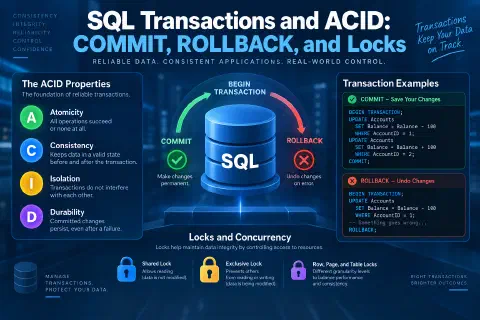
A transaction groups several SQL statements into one unit of work: either all of them succeed and are saved together with COMMIT, or none of them are, with ROLLBACK. Transactions are how databases keep related changes consistent, even when something fails halfway through or many users change the same data at once.
Processing a return means two changes: mark the order as returned, and record the refund. If the first succeeds and the second fails, the data says a customer returned an item but never got their money back. Transactions prevent that kind of half-finished state.
INSERT, UPDATE, and DELETE introduced BEGIN and ROLLBACK as an undo button. This part of the Learn SQL series explains how transactions really work, including a surprising difference in how databases handle errors. The examples use the series’ sample database (shop.sql) and were tested on PostgreSQL, MySQL, SQL Server, and SQLite.
ACID: The Four Guarantees
Transactions in relational databases follow four properties, known as ACID:
| Property | Meaning | Example |
|---|---|---|
| Atomicity | All or nothing | The status update and the refund are saved together, or neither is |
| Consistency | Constraints always hold | A refund can’t point to an order that doesn’t exist |
| Isolation | Concurrent transactions don’t see each other’s unfinished work | Another user doesn’t see the return until it’s committed |
| Durability | Committed data survives crashes | After COMMIT, a power failure doesn’t lose the refund |
The Basic Pattern
Create a refunds table to work with:
CREATE TABLE refunds (
    refund_id INT PRIMARY KEY,
    order_id  INT NOT NULL,
    amount    DECIMAL(8,2) NOT NULL CHECK (amount > 0),
    FOREIGN KEY (order_id) REFERENCES orders (order_id)
);
Now process the return of order 104, a $320 desk, as one transaction:
BEGIN;

UPDATE orders SET status = 'returned' WHERE order_id = 104;
INSERT INTO refunds (refund_id, order_id, amount) VALUES (1, 104, 320.00);

COMMIT;
 order_id |  status  | amount
----------+----------+--------
      104 | returned | 320.00
Until COMMIT, other users still see order 104 as “shipped” and no refund. After COMMIT, both changes appear at once.
| Database | Start | Save | Undo |
|---|---|---|---|
| PostgreSQL, SQLite | BEGIN; | COMMIT; | ROLLBACK; |
| MySQL | START TRANSACTION; (or BEGIN;) | COMMIT; | ROLLBACK; |
| SQL Server | BEGIN TRANSACTION; | COMMIT; | ROLLBACK; |
Autocommit
Without an explicit BEGIN, most tools run in autocommit mode: each statement is its own transaction and is saved immediately. That’s fine for single statements, but any change that involves more than one statement should be wrapped in a transaction.
What Happens When a Statement Fails?
Here’s where databases differ in an important way. Try to process a return for order 110 with an invalid refund amount of 0, which breaks the CHECK constraint:
BEGIN;

UPDATE orders SET status = 'returned' WHERE order_id = 110;
INSERT INTO refunds (refund_id, order_id, amount) VALUES (2, 110, 0);   -- fails

COMMIT;
PostgreSQL treats the whole transaction as failed. Every statement after the error is refused, and the final COMMIT actually performs a ROLLBACK:
ERROR:  new row for relation "refunds" violates check constraint "refunds_amount_check"
ERROR:  current transaction is aborted, commands ignored until end of transaction block
ROLLBACK
Order 110 is still “shipped,” and there’s no refund. The data stays consistent.
MySQL, SQL Server (by default), and SQLite only cancel the statement that failed. The transaction stays open, so the COMMIT saves the UPDATE that worked:
 order_id |  status
----------+----------
      110 | returned
Order 110 is now marked returned with no refund recorded, exactly the half-finished state transactions are supposed to prevent. A transaction doesn’t protect you by itself; something has to decide to roll back when an error happens.
How to Roll Back Reliably
In application code (Python, PHP, and so on), catch the error and call
ROLLBACK. Database libraries usually make this easy; Python’ssqlite3, for example, rolls back automatically when you usewith conn:, as shown in What Is SQLite?In SQL Server, either turn on
XACT_ABORT, which makes any error roll back the whole transaction:SET XACT_ABORT ON; BEGIN TRANSACTION; UPDATE orders SET status = 'returned' WHERE order_id = 110; INSERT INTO refunds (refund_id, order_id, amount) VALUES (2, 110, 0); COMMIT;or use
TRY...CATCH:BEGIN TRY BEGIN TRANSACTION; UPDATE orders SET status = 'returned' WHERE order_id = 110; INSERT INTO refunds (refund_id, order_id, amount) VALUES (2, 110, 0); COMMIT; END TRY BEGIN CATCH IF @@TRANCOUNT > 0 ROLLBACK; PRINT 'Rolled back: ' + ERROR_MESSAGE(); END CATCH;Both leave order 110 as “shipped.”
In MySQL stored procedures, declare an error handler that runs
ROLLBACK. Stored Procedures, Functions, and Triggers covers procedures.In scripts, stop at the first error. The SQLite shell has a
-bailoption, andpsqlhas-v ON_ERROR_STOP=1; in both cases the unfinished transaction is rolled back when the session ends.
Savepoints: Partial Undo
A savepoint marks a point inside a transaction that you can roll back to without undoing everything:
BEGIN;

UPDATE products SET price = price * 1.10 WHERE category = 'Electronics';

SAVEPOINT before_accessories;
UPDATE products SET price = price * 2 WHERE category = 'Accessories';   -- too much

ROLLBACK TO SAVEPOINT before_accessories;

COMMIT;
   name   | price
----------+--------
 Laptop   | 988.90
 Keyboard |  45.00
The electronics increase is kept; the accidental doubling of accessories is undone. In SQL Server, write SAVE TRANSACTION before_accessories; and ROLLBACK TRANSACTION before_accessories;.
Concurrency: When Two Users Change the Same Data
Databases let many users work at once, and transactions keep them from stepping on each other. Two mechanisms do most of the work: locks and isolation levels.
Locks
When a transaction updates a row, it locks that row until it commits or rolls back. Another transaction that tries to update the same row has to wait. You can see this with two connections in PostgreSQL:
- Session 1:
BEGIN; UPDATE products SET price = 999 WHERE product_id = 2;(and doesn’t commit yet) - Session 2:
UPDATE products SET price = 250 WHERE product_id = 2;
Session 2 waits for session 1. With a timeout set, it gives up:
SET lock_timeout = '1s';
UPDATE products SET price = 250 WHERE product_id = 2;
ERROR: canceling statement due to lock timeout
Reading is usually not blocked: in PostgreSQL, MySQL, and Oracle, readers see the last committed version of the row instead of waiting. That’s why long-running transactions are a problem: they hold locks and make other users wait. Keep transactions short, and never leave one open while waiting for a person to click something.
Deadlocks
A deadlock happens when two transactions each hold a lock the other needs: A locks row 1 and wants row 2, while B locks row 2 and wants row 1. Neither can continue, so the database detects it and cancels one of them with an error. The fix is in the application: retry the cancelled transaction, and update rows in a consistent order (for example, always by ID) so the cycle can’t form.
Isolation Levels
Isolation levels control how much one transaction can see of others’ changes while it runs:
| Level | Prevents | Default in |
|---|---|---|
| Read uncommitted | Almost nothing; can see uncommitted data | (rarely used) |
| Read committed | Reading uncommitted changes | PostgreSQL, SQL Server, Oracle |
| Repeatable read | Rows you’ve read changing under you | MySQL (InnoDB) |
| Serializable | All anomalies; behaves as if transactions ran one at a time | SQLite |
Higher levels are safer but cause more waiting and more transactions that have to be retried. The defaults are a good balance for most applications. Change the level for one transaction with SET TRANSACTION ISOLATION LEVEL SERIALIZABLE; (in PostgreSQL, right after BEGIN; in MySQL and SQL Server, just before starting the transaction).
You can check the current level with SHOW transaction_isolation; in PostgreSQL and SELECT @@transaction_isolation; in MySQL.
Preventing Lost Updates
A classic bug: two users read the same stock count of 5, each sells one item, and both write back 4. One sale is lost. Two common fixes:
- Update relative to the current value, in one statement:
UPDATE products SET stock = stock - 1 WHERE product_id = 2; - Lock the row when you read it with
SELECT ... FOR UPDATE(PostgreSQL, MySQL) inside a transaction, so the other user waits until you’re done. SQL Server usesWITH (UPDLOCK)instead.
Best Practices
- Wrap related changes in one transaction, such as an order and its line items, or a status change and its refund.
- Keep transactions short. Do the slow work (calculations, API calls, user input) before
BEGIN. - Always handle errors with a rollback, especially in MySQL and SQL Server.
- Change rows in a consistent order to avoid deadlocks.
- Don’t mix in schema changes casually. PostgreSQL can roll back
CREATE TABLEandALTER TABLE, but MySQL commits them immediately, even inside a transaction. - Back up anyway. Transactions protect against failed changes, not against correct-looking changes that were simply wrong. See PostgreSQL Backup and Restore.
Common Mistakes to Avoid
- Assuming an error rolls everything back. Only PostgreSQL does that automatically.
- Forgetting to
COMMIT, so changes disappear when the session ends, or leaving transactions open, which blocks other users. - Running multi-step changes in autocommit mode.
- Holding a transaction open during slow work.
- Expecting MySQL to roll back
DROPorALTER.
Frequently Asked Questions
What is a transaction in SQL?
A group of SQL statements treated as one unit: either all of them are saved with COMMIT, or all are undone with ROLLBACK.
What does ACID stand for?
Atomicity, consistency, isolation, and durability: the four guarantees that make database transactions reliable.
What’s the difference between COMMIT and ROLLBACK?
COMMIT permanently saves the transaction’s changes. ROLLBACK discards them and returns the data to how it was before the transaction started.
Does every SQL statement run in a transaction?
Yes. In autocommit mode, each statement is its own transaction and is committed immediately. BEGIN starts a transaction that lasts until you commit or roll back.
What is a deadlock?
Two transactions waiting on each other’s locks. The database cancels one of them with an error; the application should retry it.
Conclusion
Transactions make multi-step changes safe: all or nothing, with constraints enforced and other users protected from half-finished work. Wrap related statements between BEGIN and COMMIT, use savepoints for partial undo, keep transactions short, and, most importantly, make sure errors lead to a ROLLBACK, because only PostgreSQL does that on its own.
Next in the Learn SQL series, you’ll save queries as reusable virtual tables with SQL Views. To reset the sample data, reload shop.sql, which also removes the refunds table.