
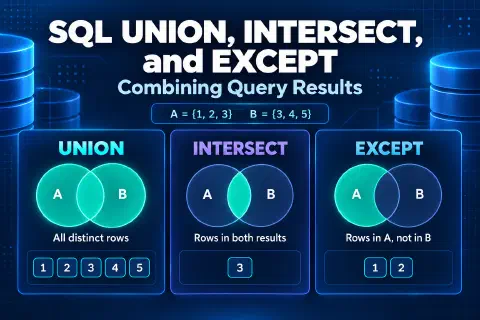
SQL set operations combine the results of two queries into one. UNION stacks the rows and removes duplicates, UNION ALL stacks them and keeps duplicates, INTERSECT returns only rows that appear in both results, and EXCEPT returns rows from the first result that aren’t in the second.
A JOIN combines tables side by side, adding columns. Set operations combine results top to bottom, adding or comparing rows. They answer questions like “list all events, whatever their type,” “which customers bought from both categories,” and “which customers never ordered.”
The examples use the Learn SQL series’ sample database: download shop.sql and load it as shown in Part 1. Everything was tested on PostgreSQL, MySQL 8.4, SQL Server, and SQLite.
The Rules
Every set operation follows the same rules:
- Both queries must return the same number of columns.
- Matching columns must have compatible data types, such as text with text and numbers with numbers.
- Column names come from the first query.
ORDER BYgoes at the very end and sorts the combined result.
Breaking the first rule fails everywhere:
SELECT first_name, last_name FROM customers
UNION
SELECT name FROM products;
ERROR: each UNION query must have the same number of columns
The second rule is enforced by PostgreSQL and SQL Server, which reject a text column stacked on a number column. MySQL and SQLite quietly convert the values instead, which can hide a mistake.
UNION: Stack Results and Remove Duplicates
Cities with customers in California or Arizona:
SELECT city, state FROM customers WHERE state = 'CA'
UNION
SELECT city, state FROM customers WHERE state = 'AZ'
ORDER BY state, city;
   city    | state
-----------+-------
 Phoenix   | AZ
 Yuma      | AZ
 El Centro | CA
 San Diego | CA
California has four customers but only two distinct cities; UNION removed the duplicate rows. For a single table, WHERE state IN ('CA', 'AZ') would be simpler; UNION shines when the rows come from different queries or tables.
UNION vs. UNION ALL
UNION removes duplicates; UNION ALL keeps every row. Stack the states of the first four customers and the last four:
SELECT state FROM customers WHERE customer_id <= 4
UNION
SELECT state FROM customers WHERE customer_id >= 5
ORDER BY state;
 state
-------
 AZ
 CA
 NV
With UNION ALL, all eight values come back, including repeats:
SELECT state FROM customers WHERE customer_id <= 4
UNION ALL
SELECT state FROM customers WHERE customer_id >= 5;
 state
-------
 CA
 CA
 AZ
 AZ
 CA
 NV
 NV
 CA
Use UNION ALL unless you need duplicates removed. Removing duplicates means the database has to sort or compare every row, which is slower on large results. And if the two queries can’t overlap anyway, UNION does that extra work for nothing.
Example: An Activity Feed
UNION ALL is great for combining different kinds of events into one timeline. Add a text column to label where each row came from:
SELECT 'signup' AS event, first_name AS who, signup_date AS event_date
FROM customers
WHERE signup_date >= '2025-06-01'
UNION ALL
SELECT 'order', c.first_name, o.order_date
FROM orders o
JOIN customers c ON c.customer_id = o.customer_id
WHERE o.order_date < '2025-08-20'
ORDER BY event_date;
 event  |  who  | event_date
--------+-------+------------
 signup | Laura | 2025-06-18
 signup | Omar  | 2025-07-04
 order  | Maria | 2025-08-02
 order  | James | 2025-08-05
 order  | Maria | 2025-08-11
 order  | Sofia | 2025-08-19
The column names event, who, and event_date come from the first query, so the second query doesn’t need aliases.
INTERSECT: Rows in Both Results
Which customers have bought both electronics and furniture?
SELECT o.customer_id
FROM orders o
JOIN products p ON p.product_id = o.product_id
WHERE p.category = 'Electronics'
INTERSECT
SELECT o.customer_id
FROM orders o
JOIN products p ON p.product_id = o.product_id
WHERE p.category = 'Furniture'
ORDER BY customer_id;
 customer_id
-------------
           1
           3
           5
A single query with WHERE category = 'Electronics' AND category = 'Furniture' would return nothing, because one row can’t have two categories. INTERSECT compares the two lists of customers instead.
To show names, use the INTERSECT as a subquery:
SELECT first_name, last_name
FROM customers
WHERE customer_id IN (
    SELECT o.customer_id FROM orders o JOIN products p ON p.product_id = o.product_id
    WHERE p.category = 'Electronics'
    INTERSECT
    SELECT o.customer_id FROM orders o JOIN products p ON p.product_id = o.product_id
    WHERE p.category = 'Furniture'
)
ORDER BY first_name;
 first_name | last_name
------------+-----------
 Ana        | Martinez
 Maria      | Lopez
 Sofia      | Nguyen
EXCEPT: Rows Only in the First Result
Which customers have never placed an order? Take every customer ID, minus the ones that appear in orders:
SELECT customer_id FROM customers
EXCEPT
SELECT customer_id FROM orders
ORDER BY customer_id;
 customer_id
-------------
           7
Customer 7, Laura, has no orders. Order matters with EXCEPT: A EXCEPT B is not the same as B EXCEPT A.
Which customers bought electronics but never accessories? Good candidates for an accessories promotion:
SELECT o.customer_id
FROM orders o
JOIN products p ON p.product_id = o.product_id
WHERE p.category = 'Electronics'
EXCEPT
SELECT o.customer_id
FROM orders o
JOIN products p ON p.product_id = o.product_id
WHERE p.category = 'Accessories'
ORDER BY customer_id;
 customer_id
-------------
           3
           5
           8
Maria (1) and James (2) also bought electronics, but they’ve bought accessories too, so they’re excluded. Oracle calls this operation MINUS instead of EXCEPT.
Support Across Databases
| Operation | PostgreSQL | MySQL | SQL Server | SQLite |
|---|---|---|---|---|
UNION, UNION ALL | Yes | Yes | Yes | Yes |
INTERSECT | Yes | 8.0.31 and later | Yes | Yes |
EXCEPT | Yes | 8.0.31 and later | Yes | Yes |
On older MySQL versions, write INTERSECT as WHERE customer_id IN (...) and EXCEPT as WHERE NOT EXISTS (...) or a LEFT JOIN ... IS NULL.
Set Operations vs. Joins and Subqueries
Several of these questions can also be answered with other tools:
| Question | Set operation | Alternative |
|---|---|---|
| Customers with no orders | EXCEPT | LEFT JOIN ... WHERE o.order_id IS NULL or NOT EXISTS |
| Customers in both groups | INTERSECT | IN / EXISTS, or GROUP BY ... HAVING COUNT(DISTINCT category) = 2 |
| Stack rows from two sources | UNION ALL | (No simple alternative) |
Set operations are often the clearest when you’re comparing whole lists of the same kind of thing. Joins are better when you need columns from both sides. One difference to know: INTERSECT and EXCEPT treat two NULLs as equal, while IN and NOT IN don’t; see NULL in SQL for the NOT IN trap.
You can also name each side with a CTE to keep long set operations readable.
Common Mistakes to Avoid
- Different numbers of columns in the two queries.
- Columns in a different order, which silently stacks, say, cities under states. Set operations match columns by position, not by name.
- Using
UNIONwhenUNION ALLis enough, which wastes time removing duplicates. - Putting
ORDER BYin the first query. It belongs only at the end. - Mixing types that MySQL and SQLite quietly convert.
- Forgetting that
EXCEPTis one-directional.
Frequently Asked Questions
What’s the difference between UNION and UNION ALL?
UNION removes duplicate rows from the combined result; UNION ALL keeps every row. UNION ALL is faster and should be your default unless you need duplicates removed.
What’s the difference between UNION and JOIN?
UNION stacks rows from two queries on top of each other (more rows, same columns). JOIN combines tables side by side (same rows matched, more columns).
Does MySQL support INTERSECT and EXCEPT?
Yes, from version 8.0.31. On older versions, use IN, EXISTS, or LEFT JOIN instead.
Can I combine more than two queries?
Yes. Chain them: query1 UNION query2 UNION query3. When you mix different operations, databases don’t all apply them in the same order (some run INTERSECT first, SQLite simply goes left to right), so use parentheses or CTEs to make the order explicit.
Why does my UNION return fewer rows than expected?
Because UNION removes duplicates. If two rows are identical across every selected column, only one is kept. Use UNION ALL to keep them all.
Conclusion
Set operations combine whole query results. Use UNION ALL to stack rows, UNION when you need duplicates removed, INTERSECT to find what two lists share, and EXCEPT to find what one list has that the other doesn’t. Keep the columns the same in number, order, and type, and put ORDER BY at the end.
Next in the Learn SQL series, you’ll calculate running totals and rankings without collapsing rows, with SQL Window Functions.