
Zero-day vulnerabilities are a particular type of flaw in software applications — one that’s unknown to the vendor and unpatched at the time it’s discovered or exploited. That makes them especially dangerous: attackers can exploit a serious security weakness on a website before anyone responsible for fixing it even knows it exists.
In the eCommerce era, these vulnerabilities have become increasingly costly for both companies and customers. While zero-days are often exploited by criminals looking for a quick payout, government security agencies have also used these same vulnerabilities for surveillance or offensive operations (Frankenfield, 2019).
Writing perfectly secure code isn’t realistic at scale, which is why companies have to continuously test and review their software to minimize vulnerabilities. This is part of why open-source software has become such a strong alternative to proprietary software — a large community reviewing shared code tends to catch more problems than a single vendor working alone. Over the past decade, WordPress has become the leading open-source platform for building websites of every kind, from blogs to business sites to full eCommerce stores.
Every year, volunteer programmers donate significant time reviewing open-source software to make it safer. Even so, zero-day vulnerabilities sometimes slip into public use before anyone catches them — creating real risk for site owners and, more importantly, for every visitor who trusts that site with their data.
This guide explains what zero-day vulnerabilities actually are, walks through real WordPress and WooCommerce exploits from recent years, and covers how to assess and reduce your own eCommerce site’s exposure to this kind of risk.
Technical Description of eCommerce Threats
Zero-day vulnerabilities have affected some of the most popular web platforms, including WordPress and Drupal. In 2019, a vulnerability discovered in the WooCommerce checkout — a widely used WordPress eCommerce plugin — threatened more than 60,000 websites running the vulnerable version, allowing attackers to execute arbitrary file uploads (Hashim, 2019).
Arbitrary file upload vulnerabilities occur in a web application’s file upload system. An attacker who gains access to this kind of flaw can upload a malicious script capable of executing arbitrary commands, potentially leading to a full compromise of the server.
This category of vulnerability can also expose a website’s database directly, typically because input fields on the eCommerce store fail to properly filter and sanitize user input. That failure can let an unauthenticated attacker modify database records through a specially crafted, malicious request.
Real-World Examples: Recent History and Impact on eCommerce Sites
Cybersecurity firms that specialize in investigating WordPress plugins and themes have documented a steady stream of attacks against WordPress-powered sites. Two examples from 2019–2020 illustrate the pattern well:
- Duplicator plugin (February 2020): Wordfence reported that attackers were actively exploiting a zero-day vulnerability in Duplicator, a plugin that lets administrators export a website and its database to another server. Exploiting this flaw could let attackers steal customer data directly from the database — or even sell a duplicated copy of the site to a competitor (Cimpanu, 2020).
- Flexible Checkout Fields plugin: Installed on more than 20,000 WooCommerce websites at the time, this plugin had an unpatched vulnerability that let attackers inject XSS (cross-site scripting) payloads triggered inside a logged-in administrator’s dashboard — payloads that could then be used to create new, unauthorized administrator accounts on the compromised site.
Both cases share a common thread: the underlying flaw wasn’t in WordPress core itself, but in a third-party plugin — a reminder that a site’s overall security is only as strong as its least-maintained plugin.
eCommerce Threat Risk Assessment
A risk assessment is essential when an organization is building a new online business, or evaluating the security of an existing one. Choosing the right platform and tools for the job is one of the best ways to minimize the risk to your investment.
A proper risk assessment identifies and analyzes potential events that could negatively impact a company’s assets, giving both the business and IT teams a clear picture of where their real exposure lies. The core questions worth asking are straightforward: how do we maintain a secure platform, and what are the actual risks of using a given tool for the job?
Even a business that doesn’t sell products or services directly online still holds customer or business data worth protecting — unauthorized access to that data can seriously damage a company regardless of whether it operates an online store. In the security world, a zero-day vulnerability is treated as something that must be addressed immediately, precisely because there’s no advance warning before it’s exploited.
To reduce risk, companies should implement a consistent set of security practices:
- Keep every plugin, theme, and core platform update current — the single most effective defense against known vulnerabilities.
- Limit the number of plugins installed to reduce the overall attack surface.
- Use a web application firewall (WAF) to catch malicious requests before they reach the application.
- Maintain regular, tested backups, so a compromise can be recovered from quickly rather than becoming a prolonged outage.
- Monitor security advisories from your CMS and plugin vendors, so you learn about a new vulnerability as early as possible.
Closing the Zero-Day Window of Vulnerability
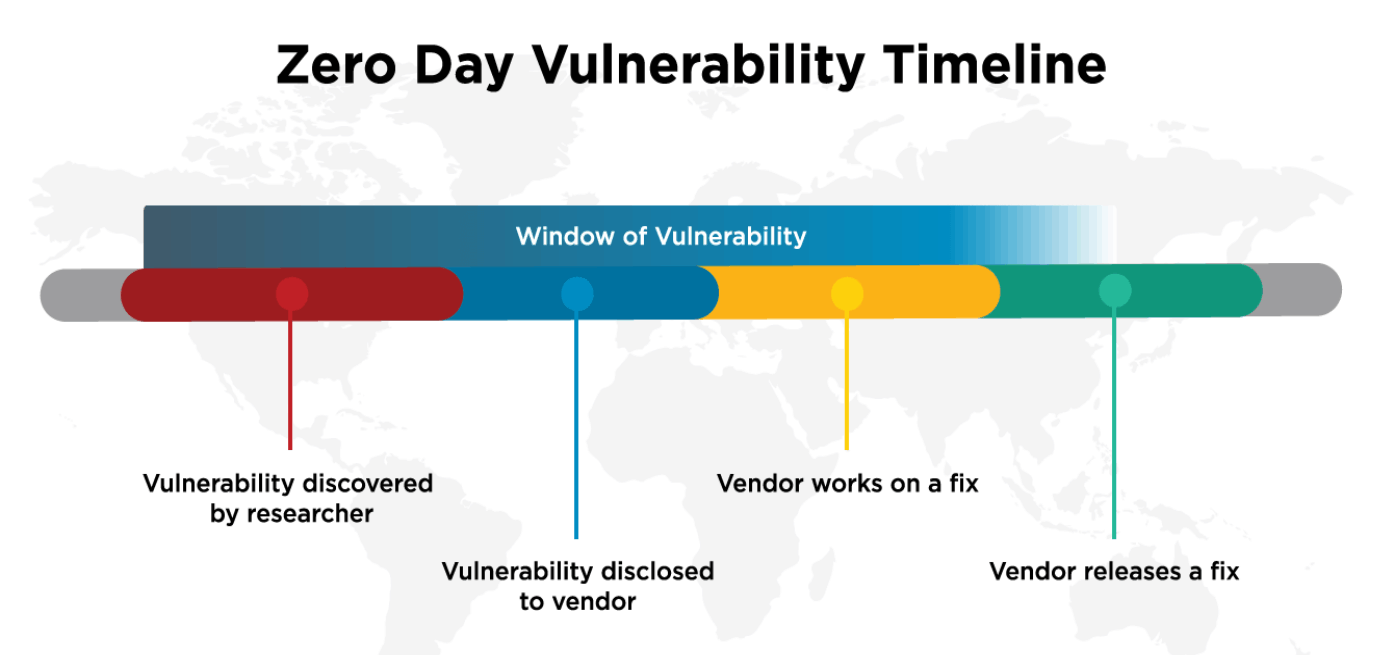
The “window of vulnerability” for a zero-day exploit is the time between when a vulnerability becomes known and when a fix is actually released by the vendor. How a vulnerability is discovered varies by platform and community, but it generally follows this pattern (WordFence, 2018):
- A vulnerability is discovered, either by a security researcher or a malicious actor.
- Once it becomes publicly known, it stops being a true “zero-day,” and the vendor is now aware it needs a fix.
- The vendor may or may not publicly acknowledge the issue right away.
- The vendor’s development team works on a fix.
- The fix ships either in a regularly scheduled update or as an emergency out-of-cycle release, depending on severity.
The shorter that window stays open, the less time an attacker has to exploit the flaw — which is exactly why applying updates promptly, rather than waiting for a convenient moment, matters so much.
Conclusion
Zero-day vulnerabilities are unintended flaws in software or operating systems, often the result of programming errors or improper security configuration. Left unaddressed, they create security holes that cybercriminals can and do exploit — as the real WordPress and WooCommerce plugin incidents covered in this guide demonstrate.
Stopping zero-day attacks entirely isn’t realistic for any platform, open-source or proprietary. What is realistic is minimizing your exposure: keep every plugin and theme updated, limit unnecessary plugins, back up your data regularly, and monitor security advisories for the platforms your eCommerce site depends on. That combination won’t make you invulnerable, but it dramatically shrinks the window an attacker has to work with — which, in practice, is what actually keeps most eCommerce sites safe.
Sources
- Frankenfield, J. (2019). Zero-Day Attack. Investopedia.
- Hashim, A. (2019). WordPress WooCommerce Plugin Vulnerability Permits Arbitrary File Add.
- Cimpanu, C. (2020). Hackers Are Actively Exploiting Zero-Days in Several WordPress Plugins. ZDNet.
- WordFence. (2018). Understanding Zero-Day Exploits & Disclosures.