
If you’ve ever typed a color code like #FF5733 into a CSS file, you’ve already used the hexadecimal number system — whether you realized it or not. Binary and hexadecimal number systems aren’t just abstract computer science trivia; they show up in places a beginner web designer runs into constantly, from IP addresses to the exact color codes used in every stylesheet.
A binary number is part of a numeral system expressed using only 0s and 1s — the foundation of the binary code that computer hardware uses to communicate. Hexadecimal, or “hex,” is a base-16 system that compresses long binary values into something far more compact and human-readable.
This guide covers how binary numbers work, how to convert decimal numbers into binary, how binary applies to IP addresses, how hexadecimal is used to build and compress IPv6 addresses, and how that same hexadecimal system shows up in the CSS color codes you already use every day.
What Are Binary Numbers?
Computers, networking devices, and machines use the binary system because of its simplicity — using only two states makes it easy for hardware built on electrical signals, where 1 means “on” and 0 means “off.” Every calculation inside a computer ultimately comes down to millions of transistors switching between these two states.
Those 0s and 1s don’t just mean “on” or “off” in a literal sense — these signals get interpreted by devices to represent everything from text to images to network addresses.
Why Learn Binary and Hexadecimal?
Understanding how to convert numbers between decimal, binary, and hexadecimal is genuinely useful for a beginner web designer, especially when learning about IP addresses and subnetting — and, as you’ll see later in this guide, hexadecimal shows up directly in CSS color codes too.
How to Convert Decimal Numbers to Binary
Most numbers are represented using the decimal system, which is base 10:
- Decimal: from “deci,” meaning 10
- Binary: from “bi,” meaning 2
The decimal system uses ten unique digits, 0 through 9. The binary system uses only two: 0 and 1. Each binary digit is called a bit.
If you’re studying for a CCNA or Network+ exam, you’ll need to convert an IP address into binary. Use the table below to convert between decimal and binary.
Basic Decimal to Binary Conversion Table
| Exponent | 2⁷ | 2⁶ | 2⁵ | 2⁴ | 2³ | 2² | 2¹ | 2⁰ |
|---|---|---|---|---|---|---|---|---|
| Decimal | 128 | 64 | 32 | 16 | 8 | 4 | 2 | 1 |
| Binary | 1 | 0 | 1 | 0 | 0 | 1 | 1 | 0 |
Example: converting the binary number 10100110 into decimal.
Read the table from right to left. Each column represents 2 raised to an increasing exponent. Add up the decimal values wherever the binary digit is a 1, and skip the columns with a 0 — those bits are “turned off”:
128 + 32 + 4 + 2 = 166
In practice, most people use a calculator for this conversion rather than doing it by hand.
How to Convert an IPv4 Address into Binary
An IPv4 address is a 32-bit number that uniquely identifies a network interface on a device. It’s typically written as four decimal numbers (called octets), separated by periods, with each octet holding a value between 0 and 255.
Using the conversion table above, here’s how a few real IPv4 addresses convert into binary:
Ex.1
192.168.0.12
11000000.10101000.00000000.00001100
Ex.2
172.16.0.5
10101100.00010000.00000000.00000101
Ex.3
10.0.1.11
00001010.00000000.00000001.00001011
What Is the Hexadecimal Number System?
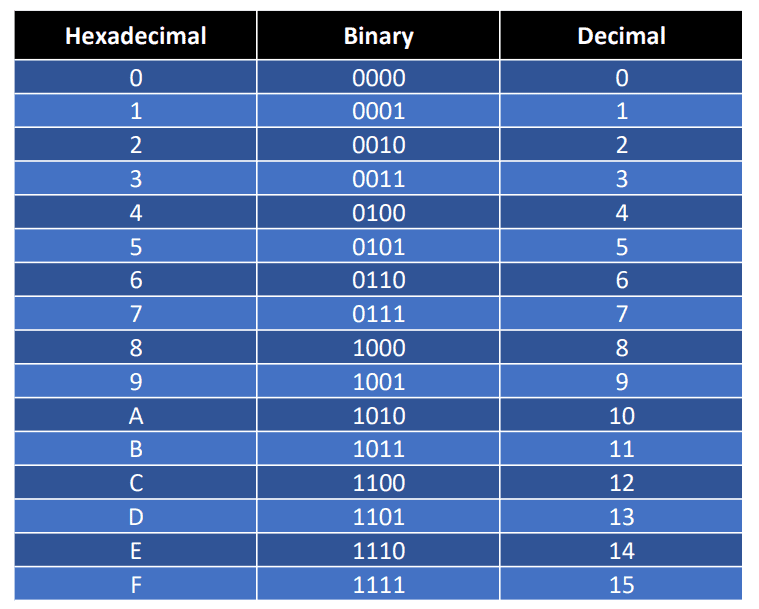
Hexadecimal, or “hex,” is a base-16 number system. It uses 16 alphanumeric characters — the digits 0 through 9, plus the letters A through F — to represent values.
How IPv6 Uses Hexadecimal
As the number of network-connected devices exploded, the industry needed a much larger supply of unique addresses than IPv4 could offer. That need led to IPv6, which uses hexadecimal instead of decimal.
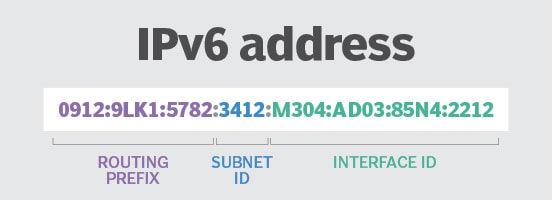
An IPv6 address consists of eight groups of hexadecimal values separated by colons. The first 64 bits handle routing (the routing prefix and subnet ID), while the last 64 bits identify the specific device interface — typically derived from its MAC address using the IEEE’s Extended Unique Identifier (EUI-64) format.
Converting an IPv6 Address to Hexadecimal
Just like IPv4, an IPv6 address can be converted to and from binary. Here’s a 128-bit IPv6 address in binary, split into eight 16-bit blocks:
0010000000000001 0000000000000000 0011001000111000 1101111111100001 0000000001100011 0000000000000000 0000000000000000 1111111011111011
Each 16-bit block converts into a 4-character hexadecimal group, separated by colons:
2001:0000:3238:DFE1:0063:0000:0000:FEFB
Even in hexadecimal, that’s still a long address to read or remember — which is exactly why IPv6 includes rules for shortening it.
How to Compress an IPv6 Address
IPv6 compression makes long addresses easier for humans to read and remember, using two simple rules applied in order:
| Step | Rule | Result |
|---|---|---|
| 1 | Drop leading zeros in every group | 2001:0000:3238:DFE1:0063:0000:0000:FEFB → 2001:0:3238:DFE1:63:0:0:FEFB |
| 2 | Replace one run of consecutive all-zero groups with :: (only once per address) | 2001:0:3238:DFE1:63:0:0:FEFB → 2001:0:3238:DFE1:63::FEFB |
The double colon (::) can only appear once in an address, since using it more than once would make the address ambiguous to expand back out.
Hexadecimal in Web Design: CSS Color Codes
Here’s where this connects directly to everyday web design work: every 6-character CSS hex color code, like #FF5733, is hexadecimal.
- The code breaks into three pairs:
FF,57, and33. - Each pair represents the intensity of one color channel — red, green, and blue — on a scale from
00toFF. - In decimal, that range is 0 to 255, since
FFin hexadecimal equals 255 in decimal.
So #FF5733 means: red at 255 (maximum), green at 87, and blue at 51 — the same underlying math used to convert IP addresses, just applied to color instead of networking.
Conclusion
Binary and hexadecimal number systems are the backbone of how computers represent and move information — from the 1s and 0s inside a transistor, to the IP addresses that route traffic across a network, to the hex color codes styling every website you build. Converting between binary, decimal, and hexadecimal is also a core skill tested in IT certifications like CompTIA Network+ and CCNA.
You don’t need to become a math expert to benefit from this guide. Just understanding the basic logic — binary as base-2, hexadecimal as base-16, and decimal as the base-10 system you already use every day — makes IP addresses, IPv6 compression, and even CSS color codes noticeably easier to reason about. The next time you pick a hex color for a design, you’ll know exactly what those six characters are really doing.