
If you’re a beginner web designer setting up hosting for the first time, you’ve probably clicked past a setting labeled “subnet” without knowing what it meant. It’s easy to skip — until a server can’t reach a database, or a cloud hosting dashboard asks you to choose one before you can launch anything.
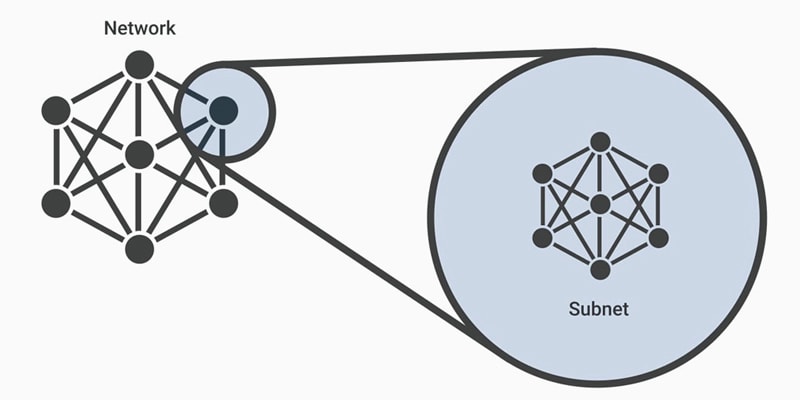
A subnet (short for subnetwork) is a logical subdivision of a larger IP network. Subnetting is simply the practice of splitting one big network into two or more smaller ones. It sounds technical, but the reason it exists is simple: smaller networks are faster, easier to manage, and more secure than one enormous one.
Subnetting reduces network traffic by keeping data traveling shorter distances and avoiding unnecessary routes, which shortens the path data takes to reach its destination. For web designers, subnets show up constantly in cloud hosting platforms (like AWS or Azure), server firewall settings, and troubleshooting guides — so understanding the basics of what a subnet is and how it works will save you real confusion down the line.
What Is a Subnet?
A subnet is a smaller network created by dividing a larger IP network into logical sections. Instead of every device on a network being lumped together, subnetting organizes them into manageable, isolated groups.
How Subnetting Works
Every IPv4 address is made up of 32 binary bits, split into two parts: a network portion and a host portion. The network portion identifies which subnet a device belongs to, while the host portion identifies the specific device within that subnet.
Each number in an IP address ranges from 0 to 255, because that represents 00000000 to 11111111 in binary. A subnet mask works alongside the IP address to tell the network exactly where the network portion ends and the host portion begins.
Why Web Designers Should Understand Subnets
You don’t need to be a network engineer to benefit from knowing this. Subnets come up in situations like:
- Cloud hosting setup. Platforms like AWS and Azure ask you to place your server inside a specific subnet when deploying a site.
- Database connectivity issues. A server that “can’t connect” to its database is often a subnet or firewall rule problem, not a code problem.
- Security groups and firewalls. Access rules are frequently scoped to a subnet, controlling which resources can talk to each other.
- Reading hosting documentation. Terms like CIDR blocks and subnet masks appear throughout most hosting providers’ setup guides.
IP Address Classes and Subnet Masks
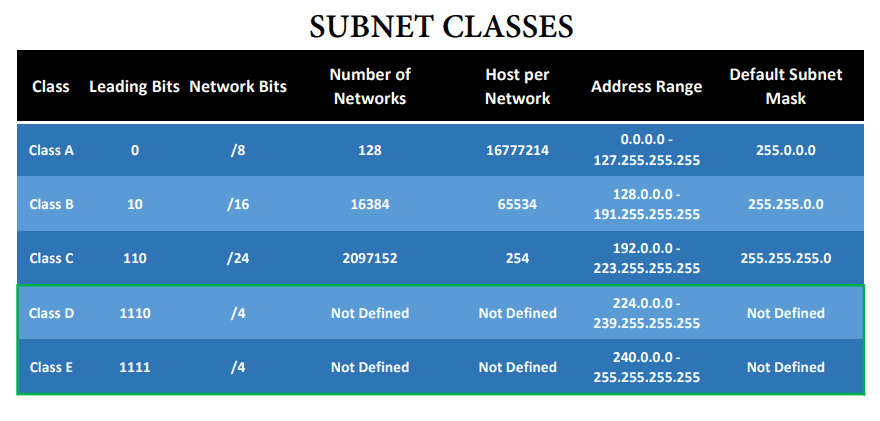
IP addresses are grouped into classes, each with a different default subnet mask and capacity.
Class A Network
- Public IP range: 1.0.0.0 to 127.0.0.0
- First octet value range: 1 to 127
- Subnet mask: 255.0.0.0 (8 bits)
- Number of networks: 128
- Hosts per network: 16,777,214
- Format: N.H.H.H
Example: 10.14.1.57 — network: 10, device ID: 14.1.57
Class B Network
- Public IP range: 128.0.0.0 to 191.255.255.255
- First octet value range: 128 to 191
- Subnet mask: 255.255.0.0 (16 bits)
- Number of networks: 16,384
- Hosts per network: 65,534
- Format: N.N.H.H
Example: 172.16.25.122 — network: 172.16, device ID: 25.122
Class C Network
- Public IP range: 192.0.0.0 to 223.255.255.255
- First octet value range: 192 to 223
- Subnet mask: 255.255.255.0 (24 bits)
- Number of networks: 2,097,152
- Hosts per network: 254
- Format: N.N.N.H
Example: 192.168.114.109 — network: 192.168.114, device ID: 109
Network Address vs. Broadcast Address
Within any subnet, two addresses are reserved and can’t be assigned to a device:
- Network address — all 0’s in the host portion of the address; it identifies the subnet itself.
- Broadcast address — all 1’s in the host portion of the address; it’s used to send data to every device on the subnet at once.
Key Benefits of Subnetting
Subnetting exists to solve real network speed and management problems. Splitting a large network into smaller ones reduces congestion and improves data flow. Additional benefits include:
- Efficient IP address allocation — fewer addresses go unused
- Logical network organization — easier administration for larger networks
- Enhanced security — access controls can be applied between subnets
- Contained threats — malware or breaches on one subnet are less likely to spread to others
A Quick Trick for Subnet Math
Subnet math (figuring out ranges and masks by hand) trips up most beginners at first, because it looks like it requires converting everything to binary. It doesn’t. Professor Messer’s “Seven Second Subnetting” method skips the binary conversion entirely by using one simple number, often called the magic number or block size.
Step 1: Find the “Interesting Octet”
A subnet mask is made up of four numbers, and most of them will be 255 or 0. The “interesting octet” is the one number that isn’t — it’s where the actual subnetting math happens.
For example, in the subnet mask 255.255.255.192, the interesting octet is 192 (the last one).
Step 2: Subtract From 256 to Get the Magic Number
Subtract the interesting octet from 256. The result is your magic number — the size of each subnet block.
256 - 192 = 64
That 64 means every subnet in this network jumps in increments of 64.
Step 3: Count Up by the Magic Number
Starting at 0, keep adding the magic number until you reach the interesting octet’s position. Each result is the starting address of the next subnet.
0, 64, 128, 192
So a /26 network (subnet mask 255.255.255.192) splits into four subnets, each starting at .0, .64, .128, and .192 in that last octet.
Step 4: Find the Range for Each Subnet
Each subnet’s usable range runs from its starting number up to one less than the next starting number:
| Subnet | Network Address | Usable Range | Broadcast Address |
|---|---|---|---|
| 1 | .0 | .1 – .62 | .63 |
| 2 | .64 | .65 – .126 | .127 |
| 3 | .128 | .129 – .190 | .191 |
| 4 | .192 | .193 – .254 | .255 |
No binary conversion required — just one subtraction and some counting. Once this pattern clicks, most subnet math genuinely takes a matter of seconds, which is exactly what the “Seven Second Subnetting” name promises. If you want to see the full method applied to trickier subnet masks, Professor Messer’s video tutorial on the technique is worth watching.
Conclusion
A subnet is simply a smaller, logical piece of a larger network — and subnetting is the process of creating those divisions using IP address classes and subnet masks. While the math can look intimidating at first, the core idea is straightforward: smaller networks are faster, easier to secure, and easier to manage than one giant network.
For a beginner web designer, understanding what a subnet is means fewer confusing moments when configuring cloud hosting, setting up firewall rules, or troubleshooting a server that can’t reach a database. You don’t need to master subnet math to benefit — just recognizing terms like subnet mask, network address, and broadcast address will make hosting documentation far less intimidating.
As you take on more hosting and deployment work, subnetting concepts will keep resurfacing. The more comfortable you get with the basics now, the less mysterious those hosting dashboards will feel later.