
If you’re a beginner web designer, you’ll eventually run into a situation where you need to test something risky — an unfamiliar plugin, a different operating system, or a server setup you don’t want to mess up your main computer. That’s exactly where a virtual machine comes in.
A virtual machine (often shortened to VM) is a computer within a computer — a fully functional, isolated environment that runs on top of your regular operating system. It has its own dedicated CPU, memory, and storage borrowed from your physical computer, all packaged inside a single file called an image. Running one requires decent computing power, since older or underpowered computers struggle to run two operating systems at once.
For web designers specifically, virtual machines are a practical tool, not just a developer novelty. They let you test how a site behaves on Windows, macOS, or Linux without owning three separate computers, safely open a suspicious file a client sent you, or experiment with a Linux-based server environment before deploying anything live. This guide explains what a virtual machine is, how virtualization works, and which VM software is worth using as a beginner.
What Is a Virtual Machine?
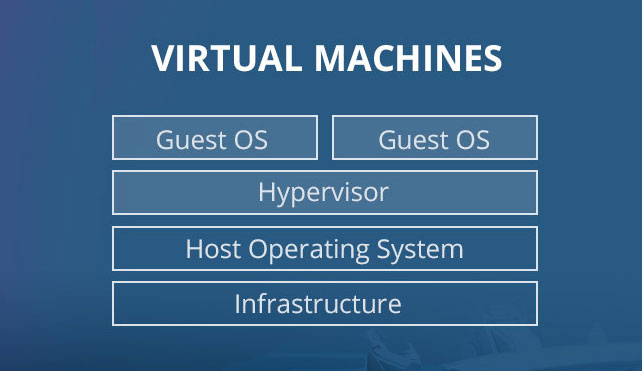
A virtual machine is software that emulates a complete computer system, including its own operating system, running inside your existing computer. The computer running the VM is called the host machine, and the virtual computer running inside it is called the guest machine.
How Do Virtual Machines Work?
Virtual machines run on a technology called virtualization, which uses software called a hypervisor to create virtual versions of hardware, storage, and network resources. The hypervisor divides your physical computer’s capabilities across one or more virtual environments, so each VM behaves as if it has its own dedicated hardware — even though it’s really sharing resources with the host.
Because a VM is fully isolated from the host system, it’s a favorite tool among security professionals. They use virtual machines to test suspicious software in a sealed-off environment, so if something goes wrong, it can’t touch the real computer.
Why Web Designers Should Care About Virtual Machines
You don’t need to be a system administrator to benefit from virtual machines. As a beginner web designer, a VM gives you a safe, disposable space to:
- Test cross-platform behavior. Check how a site or app renders on a different operating system without buying new hardware.
- Try untrusted files safely. Open a client’s downloaded theme, plugin, or attachment inside an isolated VM instead of risking your main machine.
- Practice server environments. Spin up a Linux VM to get comfortable with the command line and server setups you’ll eventually deploy to.
- Undo mistakes instantly. Most VM software supports “snapshots,” letting you roll back to a clean state in seconds if something breaks.
Common Uses for Virtual Machines
Beyond web design specifically, virtual machines are widely used to:
- Access or test a potentially infected operating system
- Run legacy applications that only work on older OS versions
- Operate software built for a different operating system than your own
- Build and deploy cloud applications
- Try out a new OS release, including beta versions, before committing to it
- Back up an entire operating system as a single portable file
How to Get Started With a Virtual Machine
Setting up your first VM is more approachable than it sounds. Here’s the basic process:
- Choose virtualization software. Pick a free or paid application (see the options below).
- Download an OS image. This is the installation file for the operating system you want to run as the guest — Ubuntu and Linux Mint are common beginner-friendly choices.
- Allocate resources. Set how much CPU, memory, and storage from your host machine the VM is allowed to use.
- Install and boot the guest OS. Follow the same installation steps you’d use on a physical computer, just inside the VM window.
- Take a snapshot. Once everything is set up, save a snapshot so you can always return to this clean starting point.
Popular Virtual Machine Software
- VirtualBox — A free, open-source option that runs on Windows, macOS, and Linux. It’s one of the most widely used virtualization tools for both home users and enterprises, and a great starting point for beginners.
- VMware — Desktop virtualization software available for Linux, Windows, and macOS, popular in professional and enterprise settings.
- Parallels — A polished, macOS-specific virtualization tool designed for Apple computers.
- Hyper-V — Microsoft’s built-in virtualization platform for Windows.
Virtual Machines vs. Containers
If you keep researching virtualization, you’ll likely run into “containers” (like Docker) as well. The key difference: a virtual machine includes an entire guest operating system, while a container shares the host’s OS and only packages the application and its dependencies. VMs offer stronger isolation, while containers are lighter and faster to start — both are useful tools, just suited to different jobs.
Conclusion
A virtual machine is essentially a computer running inside your computer — a fully isolated environment you can use to test, experiment, and troubleshoot without putting your main system at risk. Thanks to virtualization and hypervisor software, a single physical machine can safely run multiple operating systems side by side.
For beginner web designers, understanding what a virtual machine is opens up practical possibilities: testing sites across operating systems, safely inspecting unfamiliar files, and practicing server environments before anything goes live. Free tools like VirtualBox make it easy to get started without spending a dime.
As your projects grow more complex, a virtual machine becomes less of a novelty and more of a habit — a safe, disposable space to try things out before they touch your real computer or a live client site.