
If you’re a beginner web designer, you’ve probably typed a domain name into a browser a thousand times without thinking about what happens next. Behind every website, every hosting account, and every DNS record is an IP address — a numeric label that tells computers exactly where to send information.
An IP address (short for Internet Protocol address) is assigned to every device on a network so it can send and receive data. Not every device gets a public, internet-facing address; many sit behind a router using a private address instead. As more devices connect to the internet, the industry has been shifting from the older IPv4 system toward IPv6, which offers a vastly larger supply of addresses.
Understanding IP addresses matters for web designers specifically because you’ll run into them constantly: pointing a domain’s DNS records at your host’s server, testing a site locally at an address like 127.0.0.1, or whitelisting a client’s IP so they can preview a site before launch. This guide covers what IP addresses are, how IPv4 and IPv6 differ, and how public and private addresses are used. For more background, see Internet Protocol.
What Is an IP Address?
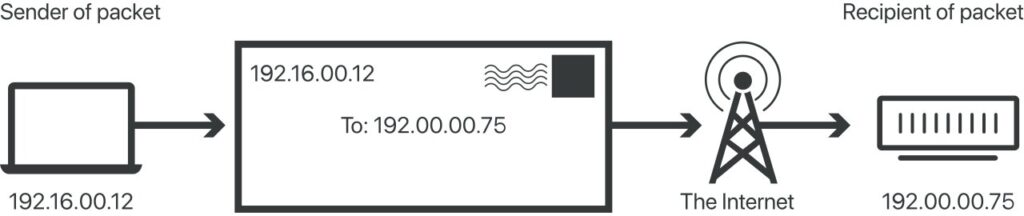
An IP address is a numeric identifier assigned to a device — a computer, phone, or server — so it can communicate on a network. Think of it like a mailing address: it tells data exactly where to go.
A typical IPv4 address consists of:
- Four numbers separated by periods (for example, 192.168.1.1)
- Each number containing one to three digits
- Every number falling between 0 and 255
Why This Matters for Web Designers
When you set up hosting or connect a domain, you’re pointing a DNS “A record” at your server’s IP address. When you troubleshoot why a client can’t reach their own site, checking the IP address is often the first step. And when you test a site on your own computer before it goes live, you’re usually connecting to 127.0.0.1 — the address every computer uses to refer to itself, also called “localhost.”
Public vs. Private IP Addresses
IP addresses fall into two main categories:
- Public IP addresses are assigned by an internet service provider (ISP) and are reachable from anywhere on the internet. Your web server needs one of these so visitors can find your site.
- Private IP addresses are assigned automatically by a router to devices on a local network, like the laptops and printers in a home or office. They aren’t reachable from outside that network.
Three IP address ranges are reserved specifically for private networks:
- 192.168.0.0 – 192.168.255.255 (65,536 addresses)
- 172.16.0.0 – 172.31.255.255 (1,048,576 addresses)
- 10.0.0.0 – 10.255.255.255 (16,777,216 addresses)
If you’ve ever logged into a router’s admin panel at an address like 192.168.1.1, you were using one of these private ranges.
How to Find an IP Address
On Windows
- Click the Wi-Fi or network icon in the system tray.
- Select “Network Settings.”
- Choose Ethernet (cable) or Wi-Fi (wireless) to view the connection details.
Using the Command Line
Mac and Linux — open a terminal and type:
ifconfig
Windows — open the command prompt and type:
ipconfig
Finding Your Public IP Address
The quickest method is searching “what is my IP” on Google, which displays your public-facing address instantly. This is useful when whitelisting an IP for a staging site or checking which address a client’s connection is actually using.
IPv4 vs. IPv6: What’s the Difference?
- IPv4 is the fourth version of the Internet Protocol and uses 32-bit addressing, supporting about 4.3 billion unique addresses. That sounded like plenty decades ago, but it isn’t enough for today’s explosion of internet-connected devices.
- IPv6 is the newer standard, offering approximately 340 undecillion possible addresses — an almost incomprehensibly larger pool. IPv6 is gradually replacing IPv4 and also brings improvements to security and routing efficiency.
Most web hosts and networks today support both, so you’ll often see IPv4 and IPv6 addresses listed side by side in your hosting dashboard.
Static vs. Dynamic IP Addresses
- Static IP addresses stay the same permanently. They’re useful for servers, network-attached storage, and printers that other devices need to find reliably.
- Dynamic IP addresses are temporary and reassigned periodically by the network. Most home internet connections and everyday devices use dynamic addresses, largely because IPv4 address scarcity made permanent addresses impractical for every device.
If you’re hosting a website, you’ll typically want (or your host will provide) a static IP address so your domain’s DNS records always point to the right place.
Do You Need to Hide Your IP Address?
An IP address is a unique identifier that tells websites who’s visiting, which is why some users choose to mask it. A Virtual Private Network (VPN) is the most common tool for this — it creates an encrypted tunnel between your device and the sites you visit, hiding your real IP address in the process. Web designers sometimes use VPNs to test how a site appears to visitors from different countries or regions.
Conclusion
An IP address is one of the most important building blocks of the internet — every device, server, and website relies on one to send and receive data. Now that you understand what an IP address is, the difference between IPv4 and IPv6, and how public and private addresses work, you’re better equipped to handle hosting setup, DNS configuration, and everyday troubleshooting as a web designer.
The internet is really just a massive network of interconnected devices, and IP addresses are what make that interconnection possible. Whether you’re pointing a domain at your host’s IP, testing locally through 127.0.0.1, or explaining to a client why their staging site needs an IP whitelisted, this foundational knowledge will keep coming up throughout your web design work — so it’s worth having down cold.