
Every time a browser loads a website, a chain of technical handoffs happens in milliseconds — and Internet Protocol (IP) is the piece responsible for making sure the right data ends up at the right place. If you’re a beginner web designer, you don’t need to master networking theory, but understanding what Internet Protocol is will make troubleshooting connectivity issues and reading hosting documentation far less confusing.
Internet Protocol is a set of rules for addressing and routing data across interconnected networks. Data sent over the internet gets broken into smaller pieces called packets, and each packet carries addressing information that routers use to forward it toward its destination — a process happening constantly, behind the scenes, every time a page loads.
This guide breaks down what Internet Protocol is, what’s actually inside an IP packet, how TCP and UDP move data differently, and how IP routing gets a packet from a server to a browser — plus why any of this matters for a beginner web designer.
What Is Internet Protocol (IP)?
Internet Protocol is the addressing and routing system that lets computers find each other across a network of networks — including the internet itself. Every device on a network gets an IP address, and IP uses that address to figure out where a packet needs to go and how to get it there.
How Does Internet Protocol Work?
Here’s a simple analogy for how IP fits into the bigger picture of how data moves across a network. Imagine you’re relocating your family to a new city:
- Data — the contents of the moving boxes represent your application’s data.
- Link layer — the roads represent the local network connection.
- Network layer — the moving truck represents IP, carrying packets between networks.
- Transport layer — the boxes represent TCP or UDP segments.
- Application layer — what’s inside the boxes represents application protocols like HTTP, FTP, or SSH.
- IP address — the destination house’s address represents the IP address.
- Port number — the rooms inside the house represent ports, which identify specific services.
What Is an IP Packet?
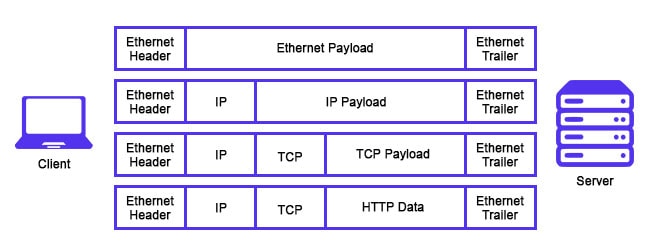
An IP packet is the container that carries data across a TCP/IP network. Packets are typically carried as the payload inside an Ethernet frame — a wrapper that includes the source and destination MAC addresses in its own header.
Inside an IP Packet’s Header
Every IP packet includes a header full of information describing it, including the sender’s and receiver’s IP addresses. Key fields include:
- IP Identification (IPID) — uniquely identifies a datagram and helps reassemble fragmented packets.
- Time-to-Live (TTL) — prevents packets from looping endlessly around a network; once TTL hits 0, the packet is dropped. TTL is also what makes the
traceroutetool work, by sending packets with increasing TTLs and recording where each one expires. - Protocol — identifies the higher-level protocol carried inside the packet.
- Source IP address — the address of the device that created the packet.
- Destination IP address — where the packet is headed.
- Header length and packet length — describe the size of the packet and its header.
- Hop count — tracks how many networks the packet has crossed.
TCP vs. UDP: Two Ways Data Travels
Once a packet is built, it typically travels using one of two transport protocols: TCP or UDP. Both ride on top of IP, but they behave very differently.
TCP (Transmission Control Protocol)
TCP is the most common protocol on the web — it’s what powers a typical web browser session. Think of TCP like sending someone a message written across several Lego blocks through the mail: each block can travel a different route and arrive out of order, but TCP reassembles them correctly on the other end and re-sends anything that got lost.
UDP (User Datagram Protocol)
UDP is a faster, lighter alternative to TCP, sometimes called UDP/IP when used over an IP network. It divides messages into datagrams and includes source and destination port numbers so applications know where to send them. Its checksum can catch corrupted data, but unlike TCP, UDP doesn’t guarantee delivery, order, or retransmission — it prioritizes speed over reliability, which makes it a common choice for things like video streaming and online gaming.
How Does IP Routing Work?
The internet is made up of many interconnected networks, each responsible for a specific block of IP addresses — these are known as autonomous systems (AS). Routers keep track of the devices on their network using a routing table, which lets them forward packets toward the correct destination network.
In practice, a packet hops from router to router, getting passed one step closer to its destination each time, until it reaches the router responsible for the targeted network — similar to how subnets organize devices into smaller, manageable groups within a larger network.
Why This Matters for Web Designers
You don’t need to configure routers to benefit from understanding Internet Protocol. As a beginner web designer, this knowledge helps you:
- Make sense of hosting dashboards that reference IP addresses, ports, and routing
- Troubleshoot “site can’t be reached” errors with more confidence
- Understand why HTTP (which rides on TCP) behaves differently from tools built on UDP
- Communicate more clearly with developers and hosting support when something breaks
Conclusion
Internet Protocol is the addressing and routing system that quietly moves every packet of data across the internet — breaking information into pieces, wrapping each one in a header full of routing details, and passing it router to router until it reaches its destination. Whether that data travels over reliable TCP or fast, lightweight UDP, it’s all built on the same underlying IP foundation.
For a beginner web designer, you don’t need to memorize every header field to get value from this guide — just understanding that Internet Protocol governs how packets, routing, and addressing work together will make hosting setups, connectivity errors, and networking documentation noticeably less intimidating. The next time a site fails to load, you’ll have a much better mental model of what’s actually happening behind the scenes.