
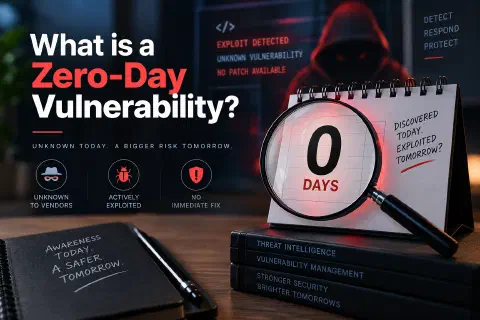
A zero-day vulnerability is a security flaw in software or hardware that the vendor doesn’t know about yet, or hasn’t fixed yet, so there is no patch available when attackers start using it. The name comes from the fact that defenders have had “zero days” to prepare.
Zero-days are among the most serious threats in cybersecurity because the usual first line of defense, installing the update, isn’t available. They’ve been used to spy on governments, deploy ransomware inside companies, and break into phones, browsers, and websites.
This guide explains what a zero-day vulnerability is in plain language, how zero-day exploits and attacks work, real examples from Stuxnet to Log4Shell, how attacks are detected, and the practical steps that reduce your risk.
What Is a Zero-Day Vulnerability?
A vulnerability is a weakness in software, firmware, or hardware that someone could use to make it do something it shouldn’t, such as reveal data, run unauthorized code, or give a regular user administrator rights.
A vulnerability becomes a zero-day vulnerability when it’s unknown to the people responsible for fixing it, or known but not yet patched, while attackers can already take advantage of it. Two things make it a zero-day:
- No fix exists. The vendor hasn’t released a patch, so users can’t protect themselves by updating.
- Defenders are behind. Attackers, or at least someone outside the vendor, know about the flaw before the people who need to defend against it.
Why Is It Called “Zero-Day”?
The term counts the days the vendor has had to fix the problem. When a flaw is being exploited the moment the vendor learns about it, the vendor has had zero days. Once a patch is released, the flaw is no longer a zero-day. It becomes a known vulnerability, sometimes called an “n-day.”
A Simple Analogy
Imagine a building whose front-door lock has a hidden design defect: a certain trick opens it without a key. The lock maker doesn’t know about the defect, so there’s no replacement lock yet. A burglar who discovers the trick can walk into every building that uses that lock, and the owners have no idea they’re exposed. That defect is a zero-day vulnerability. Once the lock maker learns about it and ships a fixed lock, it’s a known vulnerability, and buildings that don’t replace the lock stay at risk.
How Does a Zero-Day Vulnerability Work?
Every zero-day involves three pieces:
- The vulnerability: the flaw itself, usually caused by a programming mistake, such as a missing permission check, a memory-handling bug, or input that isn’t validated.
- The exploit: code or a technique that takes advantage of the flaw.
- The patch: the vendor’s fix, delivered as a software update.
From Discovery to Patch, Step by Step
- A flaw ships in a product. Nobody notices it during development or testing.
- Someone finds it. It could be a security researcher, the vendor’s own team, a criminal group, or a government agency. Attackers find flaws by studying code, comparing software versions, and using automated testing tools (called fuzzers) that feed programs unexpected input until something breaks.
- An exploit is developed. Turning a flaw into a working attack can take days or months, depending on the bug.
- The flaw is used or reported. A researcher usually reports it privately to the vendor (responsible disclosure). An attacker uses it quietly, or sells it.
- The vendor learns about it, either from a report or by investigating an attack.
- The vendor builds, tests, and releases a patch, sometimes as an emergency update outside the normal schedule.
- Users and administrators install the patch. Until they do, their systems remain vulnerable, even though the flaw is no longer technically a zero-day.
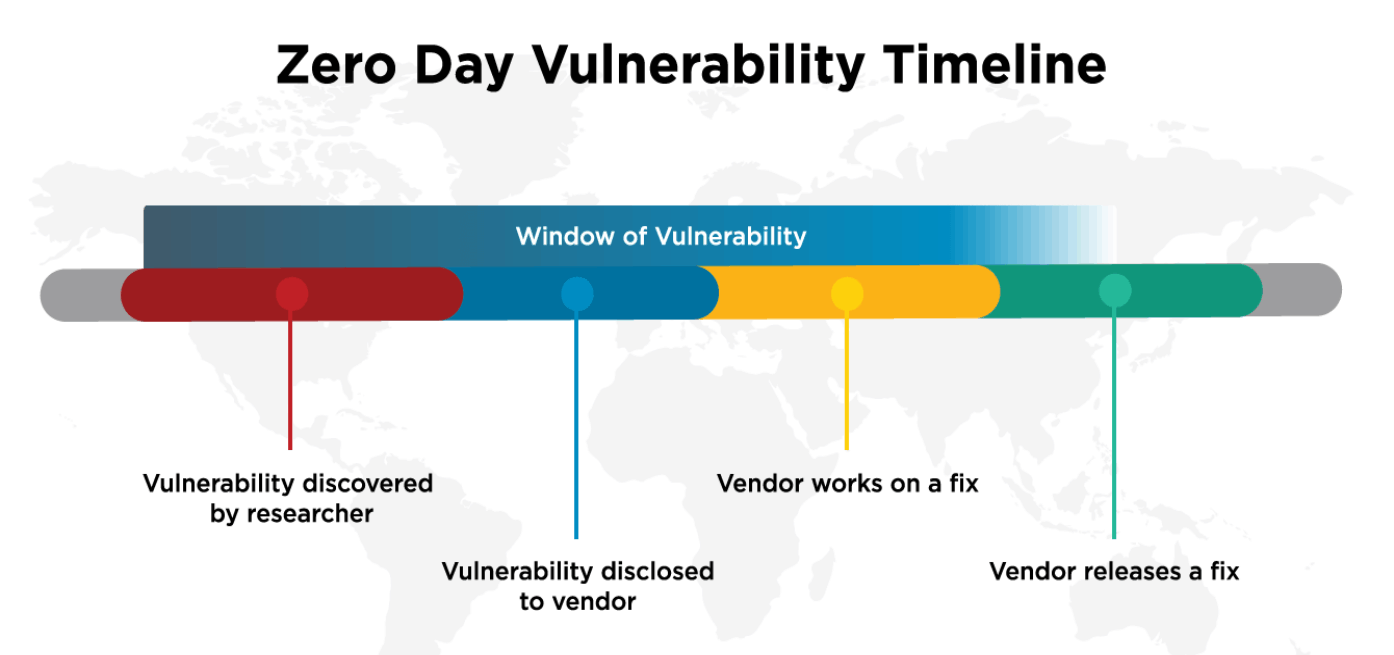
The Window of Vulnerability
The window of vulnerability is the time between when a flaw can first be exploited and when the fix is actually installed. It has two parts:
- The vendor’s part: from discovery to a released patch. You can’t control this.
- Your part: from the released patch to the moment you install it. You can control this.
Many real-world compromises happen in the second part, through unpatched software vulnerabilities that already had a fix available. Shortening your part of the window is one of the most effective security habits there is.
Zero-Day Vulnerability vs. Zero-Day Exploit vs. Zero-Day Attack
These three terms are often used interchangeably, but they mean different things:
| Term | What it is | Example |
|---|---|---|
| Zero-day vulnerability | The unknown or unpatched flaw itself | A browser bug that lets a web page write to memory it shouldn’t |
| Zero-day exploit | The code or method that takes advantage of the flaw | A crafted web page that triggers the bug and runs the attacker’s code |
| Zero-day attack | The actual use of the exploit against real targets | Sending victims links to that web page to install spyware |
A vulnerability can exist for years without anyone writing an exploit. An exploit can exist without being used in an attack, for example a researcher’s proof of concept. A zero-day attack is when all three come together against real people or systems.
Why Are Zero-Day Vulnerabilities Dangerous?
Zero-day security threats are dangerous because the normal defenses, patches and signature-based antivirus, don’t know about them yet. Successful attacks can lead to:
- Data breaches and information theft. Attackers can steal customer records, passwords, intellectual property, and confidential documents.
- Financial losses. Incident response, recovery, downtime, legal costs, and regulatory penalties add up quickly.
- Ransomware and malware infections. Zero-days are often the first step: get in, raise privileges, then deploy ransomware or other malware.
- Unauthorized system access. An exploit can give attackers remote control of a server, a laptop, or a phone, often without the user doing anything wrong.
- Business disruption. Systems may need to be shut down, rebuilt, or isolated while the attack is investigated.
- Privacy and identity theft risks. Stolen personal information can be used for fraud and targeted phishing for years afterward.
Common Targets of Zero-Day Attacks
Attackers focus on software that’s widely used, exposed to the internet, or holds valuable access:
- Operating systems. Windows, macOS, Linux, iOS, and Android control everything on a device. A flaw that raises a normal user to administrator (“privilege escalation”) is especially valuable.
- Web browsers. Chrome, Edge, Safari, and Firefox process untrusted content from every site you visit, so a browser flaw can be triggered just by loading a page.
- Business applications. File-transfer tools, email servers, collaboration platforms, and content management systems hold sensitive data and are often reachable from the internet.
- Mobile devices. Phones hold messages, location, photos, and authentication apps. Some of the most advanced zero-day exploits target iPhones and Android devices, sometimes without any click from the victim.
- Cloud environments. Flaws in cloud services, containers, or management tools can expose many customers at once.
- Network devices and IoT systems. VPN gateways, firewalls, routers, cameras, and other connected devices sit at the edge of the network, are hard to monitor, and are often patched slowly. Google’s threat intelligence team reported that security and networking products were the main enterprise targets among the zero-days it tracked in 2024.
Real-World Examples of Zero-Day Vulnerabilities
Stuxnet (Discovered 2010)
What happened: Stuxnet was a computer worm discovered in 2010 that used several previously unknown Windows vulnerabilities to spread, including a flaw in how Windows handled shortcut (.lnk) files on USB drives. It was designed to find and sabotage specific industrial control systems.
Who was affected: Its main target was uranium-enrichment centrifuges at Iran’s Natanz facility, but it also spread to computers in many other countries. It’s widely reported to have been developed by nation-state actors, although no government has officially confirmed responsibility.
Why it matters: Stuxnet showed that zero-days could cause physical damage, not just data theft, and that attackers would chain several zero-days together to reach a high-value target.
Google Chrome Zero-Days
What happened: Google regularly releases emergency Chrome updates noting that it is “aware that an exploit exists in the wild.” For example, in June 2025 Google’s Threat Analysis Group reported CVE-2025-6554, a type-confusion flaw in Chrome’s V8 JavaScript engine that could let a malicious web page read and write memory. Google mitigated it within a day with a configuration change and then shipped a full fix in a Chrome update.
Who was affected: Every Chrome user who hadn’t updated, plus users of other browsers built on Chromium, such as Edge, Brave, and Opera, until those vendors shipped their own fixes.
Why it matters: Browsers are constantly targeted because they process untrusted content. Restarting your browser when it prompts you to update is a simple, effective defense.
Microsoft Windows Zero-Days
What happened: In April 2025, Microsoft patched CVE-2025-29824, a zero-day in the Windows Common Log File System (CLFS) driver. Attackers who already had a foothold on a machine used it to gain full system privileges and then deploy ransomware (Microsoft, 2025).
Who was affected: Microsoft reported a small number of targeted organizations in sectors including IT, finance, software, real estate, and retail, in several countries.
Why it matters: Not every zero-day lets an attacker in from the outside. Privilege-escalation flaws like this one turn a limited break-in into full control, which is why defense in depth and least privilege matter. Google’s analysis counted 22 Windows zero-days exploited in 2024, up from 16 in 2023 (Google Threat Intelligence Group, 2025).
Log4Shell (2021)
What happened: Log4Shell (CVE-2021-44228) was a flaw in Apache Log4j 2, a Java logging library used inside a huge number of applications. If an application logged a specially crafted text string, such as one typed into a username field or sent in a web request, Log4j could be tricked into loading and running the attacker’s code.
Timeline: A researcher from Alibaba Cloud’s security team reported the flaw privately to Apache on November 24, 2021. Apache worked on a fix, and the issue became public on December 9, 2021, along with proof-of-concept exploit code, around the same time the first patched version (2.15.0) was released. Cloudflare and Cisco later reported seeing exploitation attempts as early as December 1–2, more than a week before public disclosure. Follow-up flaws meant organizations had to update again to versions 2.16.0 and 2.17.0 within weeks.
Who was affected: Hundreds of thousands of systems, from enterprise software and cloud services to games and network appliances. Many organizations didn’t even know they used Log4j because it was buried inside other products.
Why it matters: Log4Shell showed how one flaw in a widely used open-source component can affect almost everyone, and why knowing what software you run (a software inventory, or software bill of materials) is part of zero-day defense.
WordPress and WooCommerce Plugins
Websites face the same pattern on a smaller scale. In 2023, attackers exploited a critical flaw in the WooCommerce Payments plugin (CVE-2023-28121) that let them act as an administrator. A fix had shipped in March, but Wordfence recorded about 1.3 million attacks against 157,000 sites on a single day in July, showing how long sites stay exposed after a patch (Lakshmanan, 2023). In 2025, a critical file-upload flaw in the TI WooCommerce Wishlist plugin (CVE-2025-47577) was disclosed while no fix was available (Lakshmanan, 2025). See how PHP vulnerabilities affect WordPress for more on securing a WordPress site.
How to Detect Zero-Day Vulnerabilities and Attacks
Zero-day vulnerability detection is hard. Traditional antivirus and intrusion detection tools rely largely on signatures, patterns that match threats already known. A brand-new exploit has no signature yet, so defenders look for suspicious behavior instead:
- Unusual system behavior. Unexpected crashes, programs launching other programs they normally don’t (such as a word processor starting PowerShell), new services, or new administrator accounts.
- Suspicious network traffic. Connections to unfamiliar servers, unusual data transfers at odd hours, or a server suddenly making outbound connections it never made before.
- Endpoint Detection and Response (EDR). EDR tools record activity on laptops and servers and flag behavior that looks like an attack, such as credential dumping or privilege escalation, even when the specific exploit is unknown.
- Intrusion Detection and Prevention Systems (IDS/IPS). These watch network traffic for attack patterns. They’re most effective against known threats, but anomaly-based rules can catch unusual activity.
- Behavioral analysis. Security tools build a baseline of normal behavior for users and systems and alert on deviations.
- Threat intelligence and continuous monitoring. Vendor advisories, security news, and feeds such as CISA’s Known Exploited Vulnerabilities (KEV) catalog tell you when a flaw is being actively exploited, so you can prioritize it. Centralized log monitoring helps you spot the signs.
Deception tools can help too. A honeypot is a decoy system that has no legitimate users, so any activity on it is suspicious by definition.
How to Prevent Zero-Day Attacks
No product or practice can guarantee complete zero-day vulnerability protection. The goal is to make exploitation harder, limit the damage when it happens, and recover quickly. Layered defenses do that:
- Keep software and operating systems updated. Turn on automatic updates where possible, and apply emergency security updates quickly. This closes your part of the window of vulnerability.
- Implement endpoint protection. Use modern endpoint protection or EDR that watches behavior, not just signatures.
- Use multi-factor authentication (MFA). Stolen passwords are a common next step after an exploit. Two-factor authentication and passkeys make them far less useful.
- Apply the principle of least privilege. Give users and applications only the access they need. Daily work shouldn’t happen in an administrator account, which limits what a privilege-escalation exploit can achieve.
- Implement network segmentation. Separate critical systems so that one compromised device can’t reach everything else.
- Use application allowlisting where appropriate. On servers and fixed-purpose machines, allow only approved software to run.
- Maintain regular and tested backups. Keep at least one copy offline or immutable, and practice restoring it. See disaster recovery.
- Conduct vulnerability assessments. Scan your systems regularly, keep an inventory of the software and libraries you run, and remove what you don’t use. A smaller attack surface leaves fewer places for zero-days to hide.
- Monitor systems continuously. Collect logs centrally, watch for alerts, and know who responds and how.
- Train employees about cybersecurity threats. Many zero-day attacks still start with a phishing email or a malicious link. Staff who recognize and report suspicious messages give you an early warning. Unmanaged personal devices add risk too; see employee device security.
For websites, a web application firewall (WAF), such as the one Cloudflare offers, can block common exploit patterns and sometimes add protection for new flaws before you’ve updated.
What Should You Do If a Zero-Day Vulnerability Is Discovered?
When a zero-day affecting software you use is announced, act quickly:
For individuals:
- Install the update as soon as it’s released, and restart the app or device if asked.
- If no update exists yet, follow the vendor’s temporary advice (for example, disabling a feature).
- Watch for unusual account activity and change passwords if the vendor recommends it.
- Be extra cautious with links and attachments, since attackers often take advantage of the news.
For organizations:
- Confirm whether you’re affected: check your software inventory for the product and version.
- Read the vendor’s advisory and check whether the flaw is in CISA’s KEV catalog.
- Apply the patch, or the vendor’s mitigation if no patch exists, starting with internet-facing systems.
- If neither is possible, isolate or temporarily shut down the affected system.
- Search logs and EDR data for signs of exploitation from before the patch, not just after.
- If you find signs of compromise, follow your incident response plan, preserve evidence, and bring in specialists if needed.
- Notify affected customers, partners, or regulators as required.
- Afterward, review what slowed you down and improve the process.
Are Zero-Day Vulnerabilities Always Exploited by Hackers?
No. It helps to separate three stages:
- Discovering a vulnerability. Many zero-days are found by researchers, bug bounty hunters, or the vendor’s own team and reported privately. They get fixed before anyone malicious knows they exist.
- Developing an exploit. Turning a flaw into a reliable attack takes skill and time, and some flaws are very hard or impossible to exploit in practice.
- Actively exploiting it. Only some vulnerabilities are ever used in real attacks. Google’s Threat Intelligence Group tracked 75 zero-days exploited in the wild in 2024, a small number compared with the tens of thousands of vulnerabilities published each year.
That’s why security teams prioritize flaws that are known to be exploited, and why vendors’ advisories often say whether exploitation has been seen “in the wild.” Still, you shouldn’t wait for proof of exploitation before patching a critical flaw.
Frequently Asked Questions About Zero-Day Vulnerabilities
What is a zero-day vulnerability in simple terms?
It’s a security hole that the software maker doesn’t know about or hasn’t fixed yet, so there’s no update to protect you when attackers start using it.
Why is it called a zero-day vulnerability?
Because the vendor has had zero days to fix the problem by the time it can be exploited.
What is the difference between a zero-day vulnerability and a zero-day exploit?
The vulnerability is the flaw. The exploit is the code or technique that takes advantage of it. A zero-day attack is when that exploit is used against real targets.
How do hackers find zero-day vulnerabilities?
By reviewing code, reverse engineering software, comparing updates to see what changed, and fuzzing, which means sending programs huge amounts of unexpected input to find crashes. Some groups also buy zero-days from brokers.
Can antivirus software detect zero-day attacks?
Sometimes, but not reliably. Signature-based antivirus can’t recognize a brand-new threat. Modern endpoint protection and EDR that analyze behavior have a better chance of catching the attacker’s actions after the exploit runs.
Are zero-day vulnerabilities dangerous?
Yes. They can lead to data breaches, ransomware, and full system takeover, and the usual defense, installing a patch, isn’t available at first. The risk depends on how widely the software is used and how easy the flaw is to exploit.
How can businesses protect themselves against zero-day attacks?
Use layered defenses: fast patching, EDR, MFA, least privilege, network segmentation, tested backups, continuous monitoring, and employee training. Together they make attacks harder and limit the damage.
What is an example of a zero-day attack?
Stuxnet used several Windows zero-days to sabotage Iranian nuclear centrifuges. More recently, attackers used a Windows CLFS zero-day (CVE-2025-29824) to gain full control of systems before deploying ransomware.
How long does it take to fix a zero-day vulnerability?
It varies from hours to months. Browser vendors often ship fixes within days of learning about active exploitation. Complex flaws, or those in hardware and embedded devices, can take much longer. Then users still have to install the fix.
Can zero-day vulnerabilities affect smartphones?
Yes. iPhones and Android devices are frequent targets, especially for spyware. Keep your phone updated, install apps only from official stores, and turn on features like Apple’s Lockdown Mode if you’re at higher risk.
Conclusion
A zero-day vulnerability is a flaw that attackers can exploit before a fix exists. Because there’s no patch at first, and because security tools may not recognize the threat, zero-days are among the most serious cybersecurity risks for individuals and organizations alike.
You can’t prevent every zero-day, but you can make yourself a much harder target. Install updates quickly, protect accounts with MFA, limit privileges, segment your network, keep tested backups, and monitor your systems so you notice when something is wrong. Start today: check that automatic updates are on, review your software inventory, and make vulnerability management a regular habit rather than an emergency response.
Sources and Further Reading
- CISA. Known Exploited Vulnerabilities Catalog.
- NIST. National Vulnerability Database.
- MITRE. CVE Program.
- Google Threat Intelligence Group. (2025). Hello 0-Days, My Old Friend: A 2024 Zero-Day Exploitation Analysis.
- Microsoft Threat Intelligence. (2025, April 8). Exploitation of CLFS Zero-Day Leads to Ransomware Activity.
- Apache Software Foundation. Apache Log4j Security Vulnerabilities.
- Google. Chrome Releases Blog.
- Lakshmanan, R. (2023, July 18). Cybercriminals Exploiting WooCommerce Payments Plugin Flaw to Hijack Websites. The Hacker News.
- Lakshmanan, R. (2025, May 29). Over 100,000 WordPress Sites at Risk from Critical CVSS 10.0 Vulnerability in Wishlist Plugin. The Hacker News.